
cancel
Showing results for 
Search instead for 
Did you mean: 

Get Fabric certified for FREE! Don't miss your chance! Learn more

Reply
Anonymous
Not applicable

Ranking within Table Visual not working

Hi,


I have a Table visual that displays a code and its associated description. I am able to rank the code according to its frequency using the following DAX expression:


[Selected Tariff View] = COUNT('Claims Fact'[Tariff Code ID]) 


Rank Tariff by Selected View = IF(
      HASONEVALUE('Tariff Dimension'[Tariff Code]);
      RANKX(
            ALLSELECTED('Tariff Dimension'[Tariff Code]);
            [Selected Tariff View]
      )
)


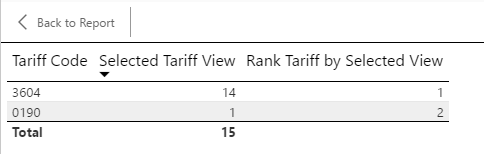
Here is the result:

Tariff Rank before.png


I now add the associated description to the Table visual. But when I do, I loose the rank. Here is what happens:


Tariff Rank after.png

What am I doing wrong?


Thanks..


1 ACCEPTED SOLUTION
Zubair_Muhammad
Community Champion
Community Champion

Hi @Anonymous


Add Tarriff Description as a parameter


Rank Tariff by Selected View =
IF (
    HASONEVALUE ( 'Tariff Dimension'[Tariff Code] ),
    RANKX (
        ALL ( 'Tariff Dimension'[Tariff Code], 'Tariff Dimension'[Tariff Description] ),
        [Selected Tariff View]
    )
)

View solution in original post

4 REPLIES 4
Ashish_Mathur
Super User
Super User

Hi,


Also, you may want to explore the LOOKUPVALUE() function to bring over the description field into your Table.


Regards,
Ashish Mathur
http://www.ashishmathur.com
https://www.linkedin.com/in/excelenthusiasts/
Zubair_Muhammad
Community Champion
Community Champion

Hi @Anonymous


Add Tarriff Description as a parameter


Rank Tariff by Selected View =
IF (
    HASONEVALUE ( 'Tariff Dimension'[Tariff Code] ),
    RANKX (
        ALL ( 'Tariff Dimension'[Tariff Code], 'Tariff Dimension'[Tariff Description] ),
        [Selected Tariff View]
    )
)
Anonymous
Not applicable

Hi @Zubair_Muhammad,


I see you have used 'ALL' which gives you the option of adding another parameter instead of 'ALLSELECTED', which is what I am using but doesnt give the option of additional parameters.


I am using 'ALLSELECTED' as I want to maintain the filter context of any filters already selected. Is there any way to do what you have suggested but with keeping the Filter context of any filters already selected?


Thanks

HI @Anonymous


Interesting...


Could you show how it impacts your results?.....The incorrect result and result you expect

Helpful resources

Announcements
Sticker Challenge 2026 Carousel

Join our Community Sticker Challenge 2026

If you love stickers, then you will definitely want to check out our Community Sticker Challenge!

January Power BI Update Carousel

Power BI Monthly Update - January 2026

Check out the January 2026 Power BI update to learn about new features.

FabCon Atlanta 2026 carousel

FabCon Atlanta 2026

Join us at FabCon Atlanta, March 16-20, for the ultimate Fabric, Power BI, AI and SQL community-led event. Save $200 with code FABCOMM.