cancel
Showing results for 
Search instead for 
Did you mean: 

The Power BI Data Visualization World Championships is back! Get ahead of the game and start preparing now! Learn more

Reply
kusanagi
Frequent Visitor

Ranking with matrix

Hi There,

I need help with the ranking. I tried to search similar issues, but still stuck at this formula.


This is my current formula and the output:

Rank = IF(HASONEVALUE(Sheet1[Item]),RANKX(ALLSELECTED(Sheet1[Item]),[Qty],,DESC,Skip))

kusanagi_1-1692767819812.png


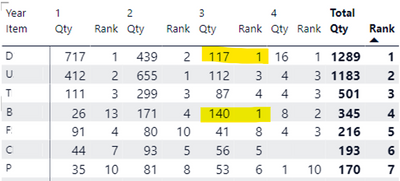
The rank for total Quantity is perfect, but I still need the rank of each year.

I don't know how can Qty 117 and Qty 140 in Year#3 both become rank#1.


Should the Column"Year" be in the formula? If so, where should it be?

1 ACCEPTED SOLUTION
v-yueyunzh-msft
Community Support
Community Support

Hi , @kusanagi 

According to your dax code, normally it can work in my understand .

I use your dax code in my side , it works good , and this is my test data:
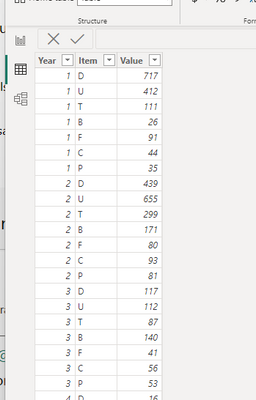
vyueyunzhmsft_0-1692932783399.png

When i use this dax code :

Measure 2 = RANKX(ALLSELECTED('Table'[Item]) , [Qty] , ,DESC,Dense)
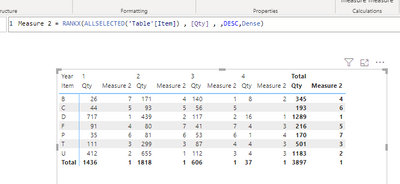
vyueyunzhmsft_1-1692932827986.png

So i think it may cause by the other reason in your side.


You can try to use this dax code :

Measure = IF( HASONEVALUE('Table'[Item]) , RANKX(SELECTCOLUMNS(CALCULATETABLE( 'Table'  , ALLSELECTED('Table'[Item])  ),"Item",[Item])  , [Qty] ,,DESC,Dense))


If you still can not solve this problem , can you share the sample .pbix file to me (without sensitive data in it) so that i can test it in my side.


Thank you for your time and sharing, and thank you for your support and understanding of PowerBI! 


Best Regards,

Aniya Zhang

If this post helps, then please consider Accept it as the solution to help the other members find it more quickly

View solution in original post

1 REPLY 1
v-yueyunzh-msft
Community Support
Community Support

Hi , @kusanagi 

According to your dax code, normally it can work in my understand .

I use your dax code in my side , it works good , and this is my test data:

vyueyunzhmsft_0-1692932783399.png

When i use this dax code :

Measure 2 = RANKX(ALLSELECTED('Table'[Item]) , [Qty] , ,DESC,Dense)

vyueyunzhmsft_1-1692932827986.png

So i think it may cause by the other reason in your side.


You can try to use this dax code :

Measure = IF( HASONEVALUE('Table'[Item]) , RANKX(SELECTCOLUMNS(CALCULATETABLE( 'Table'  , ALLSELECTED('Table'[Item])  ),"Item",[Item])  , [Qty] ,,DESC,Dense))


If you still can not solve this problem , can you share the sample .pbix file to me (without sensitive data in it) so that i can test it in my side.


Thank you for your time and sharing, and thank you for your support and understanding of PowerBI! 


Best Regards,

Aniya Zhang

If this post helps, then please consider Accept it as the solution to help the other members find it more quickly
Helpful resources

Announcements
Power BI DataViz World Championships

Power BI Dataviz World Championships

The Power BI Data Visualization World Championships is back! Get ahead of the game and start preparing now!

December 2025 Power BI Update Carousel

Power BI Monthly Update - December 2025

Check out the December 2025 Power BI Holiday Recap!

FabCon Atlanta 2026 carousel

FabCon Atlanta 2026

Join us at FabCon Atlanta, March 16-20, for the ultimate Fabric, Power BI, AI and SQL community-led event. Save $200 with code FABCOMM.