Get certified for free when you join Fabric Data Days 2026 and dive into Fabric, Power BI, SQL, AI, and other essential data skills.
Join nowJuly 7 - July 17 | Round 2 of the Power BI Dataviz World Championships. Don't miss your chance! Learn more
Hi All,
I need to have a rank of the values in my table as a new column. I have read few topics here but non of the solutions works for my case.
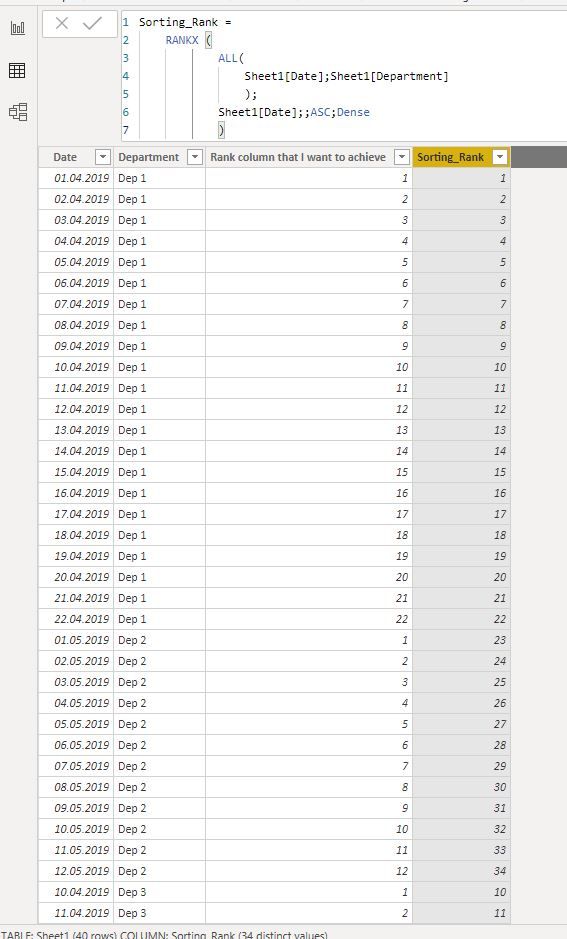
I have a column with Dates and the second clumn with Departments. What I need to get is the third columns with dates rank within departments as presented below on the screen:
The column 'Rank column that I want to achieve' is my goal. The 'Sorting_rank' is what I did but this is not exacly what I want,
Please help with fixing my DAX.
Attaching my pbix and data sourc files:
thanks in advance for help.
Solved! Go to Solution.
Just found a solution. DAX that does exacly what I wanted is:
Correct_Rank = RANKX (
FILTER (
'Sheet1';
Sheet1[Department] = EARLIER ( Sheet1[Department] )
);
Sheet1[Date];
; // leave value argument blank
ASC
)
Just found a solution. DAX that does exacly what I wanted is:
Correct_Rank = RANKX (
FILTER (
'Sheet1';
Sheet1[Department] = EARLIER ( Sheet1[Department] )
);
Sheet1[Date];
; // leave value argument blank
ASC
)
Join us in Barcelona for FabCon and SQLCon, the Fabric, Power BI, SQL, and AI community event. Save €200 with code FABCMTY200.
If you love stickers, then you will definitely want to check out our community sticker challenge, Barcelona edition!
Check out the July 2026 Power BI update to learn about new features.
| User | Count |
|---|---|
| 30 | |
| 28 | |
| 23 | |
| 23 | |
| 16 |
| User | Count |
|---|---|
| 45 | |
| 32 | |
| 17 | |
| 16 | |
| 16 |