Join us at FabCon Atlanta from March 16 - 20, 2026, for the ultimate Fabric, Power BI, AI and SQL community-led event. Save $200 with code FABCOMM.
Register now!Learn from the best! Meet the four finalists headed to the FINALS of the Power BI Dataviz World Championships! Register now
HI All,
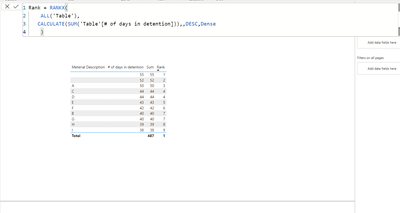
I'm trying to do a ranking based on the highest accumulated days for detention.
I have the formula below, but the ranking seems to be out of order:
Solved! Go to Solution.
@Shan_Drex12 , Make sure # of Days in Detention is COUNT(Sheet1[# of Days in Detention]). it should NOT be un/not summarized
Formula seems correct
Can you share sample data and sample output in table format? Or a sample pbix after removing sensitive data.
For Rank Refer these links
https://radacad.com/how-to-use-rankx-in-dax-part-2-of-3-calculated-measures
https://radacad.com/how-to-use-rankx-in-dax-part-1-of-3-calculated-columns
https://radacad.com/how-to-use-rankx-in-dax-part-3-of-3-the-finale
https://community.powerbi.com/t5/Community-Blog/Dynamic-TopN-made-easy-with-What-If-Parameter/ba-p/3...
HI @Shan_Drex12,
Can please share some dummy data with a similar data structure and expected results? It should help us clarify your scenario and test to coding formula.
How to Get Your Question Answered Quickly
Regards,
Xiaoxin Sheng
@Shan_Drex12 , Make sure # of Days in Detention is COUNT(Sheet1[# of Days in Detention]). it should NOT be un/not summarized
Formula seems correct
Can you share sample data and sample output in table format? Or a sample pbix after removing sensitive data.
For Rank Refer these links
https://radacad.com/how-to-use-rankx-in-dax-part-2-of-3-calculated-measures
https://radacad.com/how-to-use-rankx-in-dax-part-1-of-3-calculated-columns
https://radacad.com/how-to-use-rankx-in-dax-part-3-of-3-the-finale
https://community.powerbi.com/t5/Community-Blog/Dynamic-TopN-made-easy-with-What-If-Parameter/ba-p/3...
Hi @amitchandak, if I don't use the 'don't summarize' table it messes up with the number of detention days I have. Inside of the query editer I did the difference between two dates. Also, for some reason I keep getting an error every time I try to share sample data, sorry I couldn't upload!
I used this formula: inside of the power query to get the days detention by using this formula: Duration.Days(Duration.From([#"Today's Date"]-[Trailer Check In Time])) - 2
Share feedback directly with Fabric product managers, participate in targeted research studies and influence the Fabric roadmap.
Check out the February 2026 Power BI update to learn about new features.
| User | Count |
|---|---|
| 62 | |
| 55 | |
| 39 | |
| 16 | |
| 15 |
| User | Count |
|---|---|
| 93 | |
| 85 | |
| 33 | |
| 31 | |
| 25 |