cancel
Showing results for 
Search instead for 
Did you mean: 

The Power BI Data Visualization World Championships is back! Get ahead of the game and start preparing now! Learn more

Reply
Caldowd98
Helper I
Helper I

Ranking based on variable

Hi community,


I have a table like the below, with cutstomers and sales quantity. Im looking to rank these customers based on the postcode area they sit within.


Any ideas how i can do this within a Dax formula ? Many thanks !


CustomerPostcodeSales QuantityRank
ADY10002
BDY12001
CB15001
EB12502
FWR10001
GWR9502
1 ACCEPTED SOLUTION

Hi @Caldowd98 

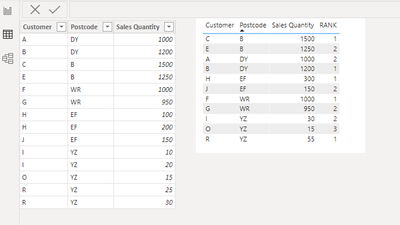
If you have multiple lines per customer, you can try this,

create the measure below,

RANK = 
RANKX (
    FILTER ( ALL ( 'Table' ), 'Table'[Postcode] = MIN ( 'Table'[Postcode] ) ),
    CALCULATE (
        SUM ( 'Table'[Sales Quantity] ),
        ALLEXCEPT ( 'Table', 'Table'[Customer], 'Table'[Postcode] )
    ),
    ,
    DESC,
    DENSE
)

result

vxiaotang_0-1651126919309.png


Best Regards,

Community Support Team _Tang

If this post helps, please consider Accept it as the solution to help the other members find it more quickly.

View solution in original post

3 REPLIES 3
johnt75
Super User
Super User

You could add a calculated column like

Ranking =
var currentPostcode = 'Table'[Postcode]
var currentAmount = 'Table'[Sales]
return RANKX( FILTER( 'Table', 'Table'[Postcode] = currentPostcode), 'Table'[Sales], currentAmount)

Hi great, thank you for help !


I have however multiple lines per customer, how would i group these and sum the QTY ?


Many thanks

Hi @Caldowd98 

If you have multiple lines per customer, you can try this,

create the measure below,

RANK = 
RANKX (
    FILTER ( ALL ( 'Table' ), 'Table'[Postcode] = MIN ( 'Table'[Postcode] ) ),
    CALCULATE (
        SUM ( 'Table'[Sales Quantity] ),
        ALLEXCEPT ( 'Table', 'Table'[Customer], 'Table'[Postcode] )
    ),
    ,
    DESC,
    DENSE
)

result

vxiaotang_0-1651126919309.png


Best Regards,

Community Support Team _Tang

If this post helps, please consider Accept it as the solution to help the other members find it more quickly.

Helpful resources

Announcements
Power BI DataViz World Championships

Power BI Dataviz World Championships

The Power BI Data Visualization World Championships is back! Get ahead of the game and start preparing now!

December 2025 Power BI Update Carousel

Power BI Monthly Update - December 2025

Check out the December 2025 Power BI Holiday Recap!

FabCon Atlanta 2026 carousel

FabCon Atlanta 2026

Join us at FabCon Atlanta, March 16-20, for the ultimate Fabric, Power BI, AI and SQL community-led event. Save $200 with code FABCOMM.