cancel
Showing results for 
Search instead for 
Did you mean: 

The Power BI Data Visualization World Championships is back! Get ahead of the game and start preparing now! Learn more

Reply
Anonymous
Not applicable

Ranking Not Working Properly

Hi guys

Need help before I pull all my hair out

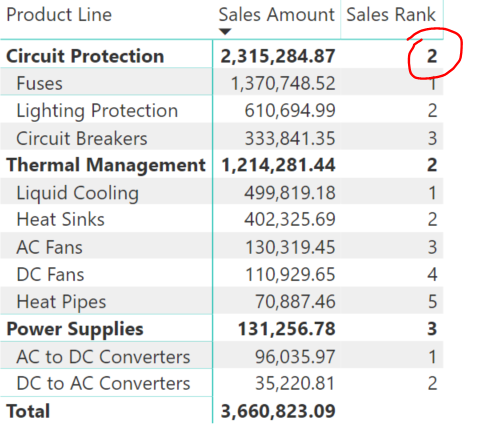
The ranking works fine for everything except for the red circled, it should be 1 instead of 2
Capture.PNG

Sales Rank =
IF (
ISINSCOPE ( 'Product'[Product Category] ),
RANKX ( ALL ( 'Product'[Product Category] ), [Sales Amount],, DESC ),
IF (
ISINSCOPE ( 'Product'[Product Line] ),
RANKX ( ALL ( 'Product'[Product Line] ), [Sales Amount],, DESC ),
BLANK ()
)
)


Here is the link of the pbix file on google drive

https://drive.google.com/open?id=1lBfXbT8ZFWSEcbKizBypfrGrJez4Ptp7


Thanks

1 ACCEPTED SOLUTION

That is very odd behavior, I can only think that it has something to do with [Product Category] "Fuses" have a sales amount larger than the #2 ranked [Product Line].  

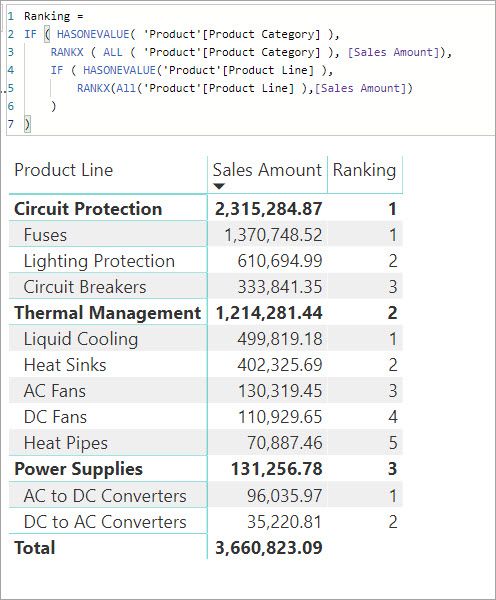
However, switching it to to using HASONEVALUE seems to fix it.

Ranking = 
IF ( HASONEVALUE ( 'Product'[Product Category] ),
    RANKX ( ALL ( 'Product'[Product Category] ), [Sales Amount] ),
    IF ( HASONEVALUE ( 'Product'[Product Line] ),
        RANKX ( All ( 'Product'[Product Line] ), [Sales Amount] )
    )
)

Ranking.jpg

View solution in original post

2 REPLIES 2
AlB
Community Champion
Community Champion

Hi @Anonymous 

That looks strange, yes. I don't see anything wrong with your code. In fact, to make it stranger, I was running some tests and realized by chance that by adding another measure to the matrix visual, your measure all of a sudden yields the correct result. If I take my mock measure [Sales rank V3] off the visual, your measure yields the wrong results again. Try it on "Page 2" that I've added to your original file (see attachment). Add and remove [Sales Rank V3] to the visual and see how the result for "Circuit protection" changes between 1 and 2


Maybe knowledgeable people like @Zubair_Muhammad, @MFelix@Greg_Deckler can have a look and help here


That is very odd behavior, I can only think that it has something to do with [Product Category] "Fuses" have a sales amount larger than the #2 ranked [Product Line].  

However, switching it to to using HASONEVALUE seems to fix it.

Ranking = 
IF ( HASONEVALUE ( 'Product'[Product Category] ),
    RANKX ( ALL ( 'Product'[Product Category] ), [Sales Amount] ),
    IF ( HASONEVALUE ( 'Product'[Product Line] ),
        RANKX ( All ( 'Product'[Product Line] ), [Sales Amount] )
    )
)

Ranking.jpg

Helpful resources

Announcements
Power BI DataViz World Championships

Power BI Dataviz World Championships

The Power BI Data Visualization World Championships is back! Get ahead of the game and start preparing now!

December 2025 Power BI Update Carousel

Power BI Monthly Update - December 2025

Check out the December 2025 Power BI Holiday Recap!

FabCon Atlanta 2026 carousel

FabCon Atlanta 2026

Join us at FabCon Atlanta, March 16-20, for the ultimate Fabric, Power BI, AI and SQL community-led event. Save $200 with code FABCOMM.