Join us at FabCon Atlanta from March 16 - 20, 2026, for the ultimate Fabric, Power BI, AI and SQL community-led event. Save $200 with code FABCOMM.
Register now!The Power BI Data Visualization World Championships is back! Get ahead of the game and start preparing now! Learn more
Hi All
I'm new to Power BI and i am needing some help on ranking
My source data has a list of all the individual sales that have been made throughout the year. I want to be able to rank the sales reps based on the total YTD revenue,
My report has a number of slicers to select the team name, sales rep name and product sold - i would like the ranking to update depending on whatever has been selected
My data looks something like this:
Team Sales Rep Product Revenue
A Rep 1 X $100
A Rep 1 Y $50
A Rep 2 X $100
A Rep 2 Y $100
B Rep 1 X $50
B Rep 1 Y $75
B Rep 2 X $100
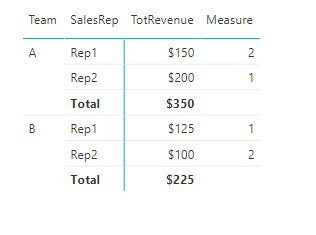
I need to be able to see the following when a team is selected by the user:
Team Sales Rep Revenue Rank
A Rep 1 $150 2
A Rep 2 $200 1
B Rep 1 $125 1
B Rep 2 $100 2
Thanks
Solved! Go to Solution.
You can achieve your results with the below measure. Depending on what you put on the matrix the measure may change
=
IF (
ISFILTERED ( Table1[SalesRep] ),
RANKX ( ALLSELECTED ( Table1[SalesRep] ), [TotRevenue] )
)
where TotRevenue is a Measure = SUM( Table1[Revenue] )
Did I answer your question correctly? Mark my answer as a solution!
Proud to be a Datanaut!
Hi @fisher_man,
It seems that the measure of LivioLanzo should solve your problem.
If you have solved your problem, please always accept the replies making sense as solution to your question so that people who may have the same question can get the solution directly.
If you still need help, please feel free to ask.
Best Regards,
Cherry
You can achieve your results with the below measure. Depending on what you put on the matrix the measure may change
=
IF (
ISFILTERED ( Table1[SalesRep] ),
RANKX ( ALLSELECTED ( Table1[SalesRep] ), [TotRevenue] )
)
where TotRevenue is a Measure = SUM( Table1[Revenue] )
Did I answer your question correctly? Mark my answer as a solution!
Proud to be a Datanaut!
The Power BI Data Visualization World Championships is back! Get ahead of the game and start preparing now!
| User | Count |
|---|---|
| 39 | |
| 38 | |
| 38 | |
| 28 | |
| 24 |
| User | Count |
|---|---|
| 122 | |
| 92 | |
| 70 | |
| 68 | |
| 66 |