Join us at FabCon Atlanta from March 16 - 20, 2026, for the ultimate Fabric, Power BI, AI and SQL community-led event. Save $200 with code FABCOMM.
Register now!The Power BI Data Visualization World Championships is back! Get ahead of the game and start preparing now! Learn more
Hi Everyone,
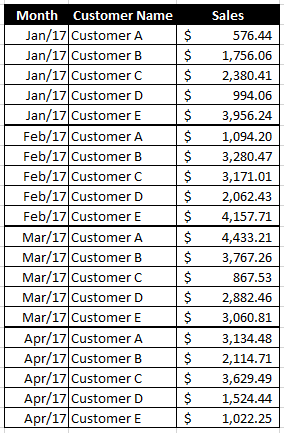
I need some assistance with getting ranks by month. Here is an example of my data:
I am trying to get a new column with the rank for each customer based on sales per month. So I can rank customers from 1 to 5 for each month.
Solved! Go to Solution.
@Jaime123,
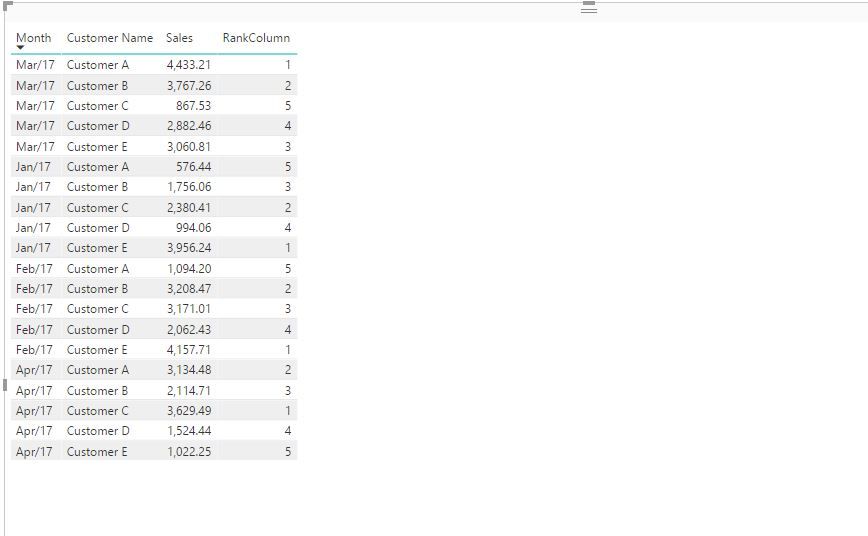
Create the following column in your table and check if you get expected result.
RankColumn = RANKX(FILTER(Table,Table[Month]=EARLIER(Table[Month])),Table[Sales],,DESC,Dense)
Regards,
Lydia
@Jaime123,
Create the following column in your table and check if you get expected result.
RankColumn = RANKX(FILTER(Table,Table[Month]=EARLIER(Table[Month])),Table[Sales],,DESC,Dense)
Regards,
Lydia
Thanks for your help Lydia!
Hi,
Try this calculated field formula
=RANKX(ALL(Data[Customer Name]),[Revenue])
I have assumed that Revenue is a field you have computed as the sum of the sales column in your Data Table.
The Power BI Data Visualization World Championships is back! Get ahead of the game and start preparing now!
| User | Count |
|---|---|
| 41 | |
| 38 | |
| 36 | |
| 30 | |
| 28 |
| User | Count |
|---|---|
| 129 | |
| 88 | |
| 79 | |
| 68 | |
| 63 |