cancel
Showing results for 
Search instead for 
Did you mean: 

The Power BI Data Visualization World Championships is back! Get ahead of the game and start preparing now! Learn more

Reply
Anonymous
Not applicable

RankX function help

Hi,

I am using RANKX function on table and getting the desired results when I have one dimension field in the table and a measure.

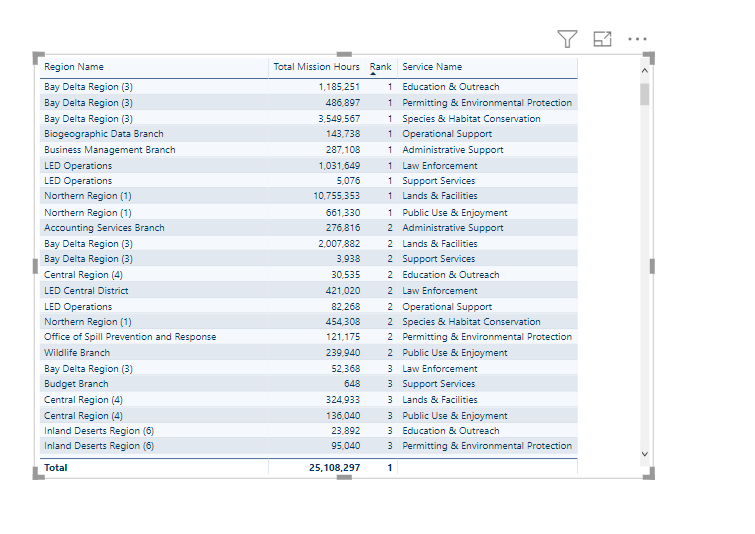
Attached screenshot1 shows that.

When I try to add another column in the table, the rank does not work properly. The second screenshot shows that.

I am using the formula - 

Rank = RANKX(ALLSELECTED('cdfwprod region'[Region Name]),'Calculated Measures'[Total Mission Hours]).
What needs to done so that even if I add new dimensions to the table, the ranking for the 'Region' field should not get afftected.
Thanks!rank1.PNGrank2.PNG
2 ACCEPTED SOLUTIONS
parry2k
Super User
Super User

@Anonymous do you want to keep the original rank when you add service in the visual?


Subscribe to the @PowerBIHowTo YT channel for an upcoming video on List and Record functions in Power Query!!

Learn Power BI and Fabric - subscribe to our YT channel - Click here: @PowerBIHowTo

If my solution proved useful, I'd be delighted to receive Kudos. When you put effort into asking a question, it's equally thoughtful to acknowledge and give Kudos to the individual who helped you solve the problem. It's a small gesture that shows appreciation and encouragement! ❤


Did I answer your question? Mark my post as a solution. Proud to be a Super User! Appreciate your Kudos 🙂
Feel free to email me with any of your BI needs.

View solution in original post

Hi @Anonymous ,

By my tests, you could modify your measure like below then you should get your desired output.

Rank =
RANKX (
    ALLSELECTED ( cdfwprodregion ),
    'Calculated Measures'[Total Mission Hours]
)

You could refer to my test pbix which has been attached below. I create the data model to reporduce your scenario.

Untitled.png

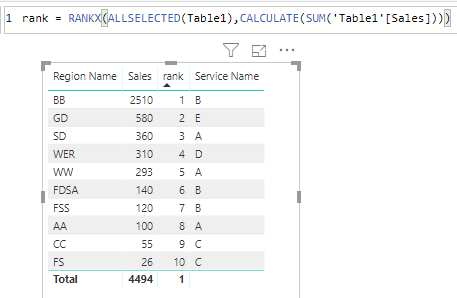
Here is the result.

Capture.PNG

Best  Regards,

Cherry


Community Support Team _ Cherry Gao
If this post helps, then please consider Accept it as the solution to help the other members find it more quickly.

View solution in original post

3 REPLIES 3
parry2k
Super User
Super User

@Anonymous do you want to keep the original rank when you add service in the visual?


Subscribe to the @PowerBIHowTo YT channel for an upcoming video on List and Record functions in Power Query!!

Learn Power BI and Fabric - subscribe to our YT channel - Click here: @PowerBIHowTo

If my solution proved useful, I'd be delighted to receive Kudos. When you put effort into asking a question, it's equally thoughtful to acknowledge and give Kudos to the individual who helped you solve the problem. It's a small gesture that shows appreciation and encouragement! ❤


Did I answer your question? Mark my post as a solution. Proud to be a Super User! Appreciate your Kudos 🙂
Feel free to email me with any of your BI needs.

Anonymous
Not applicable

Yes, I want to keep the original rank. How can I do that?

Hi @Anonymous ,

By my tests, you could modify your measure like below then you should get your desired output.

Rank =
RANKX (
    ALLSELECTED ( cdfwprodregion ),
    'Calculated Measures'[Total Mission Hours]
)

You could refer to my test pbix which has been attached below. I create the data model to reporduce your scenario.

Untitled.png

Here is the result.

Capture.PNG

Best  Regards,

Cherry


Community Support Team _ Cherry Gao
If this post helps, then please consider Accept it as the solution to help the other members find it more quickly.

Helpful resources

Announcements
Power BI DataViz World Championships

Power BI Dataviz World Championships

The Power BI Data Visualization World Championships is back! Get ahead of the game and start preparing now!

December 2025 Power BI Update Carousel

Power BI Monthly Update - December 2025

Check out the December 2025 Power BI Holiday Recap!

FabCon Atlanta 2026 carousel

FabCon Atlanta 2026

Join us at FabCon Atlanta, March 16-20, for the ultimate Fabric, Power BI, AI and SQL community-led event. Save $200 with code FABCOMM.