Join us at FabCon Atlanta from March 16 - 20, 2026, for the ultimate Fabric, Power BI, AI and SQL community-led event. Save $200 with code FABCOMM.
Register now!The Power BI Data Visualization World Championships is back! It's time to submit your entry. Live now!
Hi,
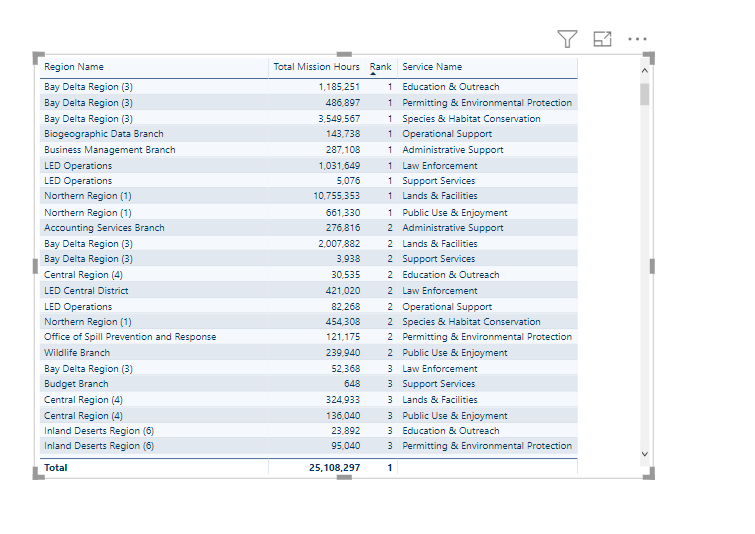
I am using RANKX function on table and getting the desired results when I have one dimension field in the table and a measure.
Attached screenshot1 shows that.
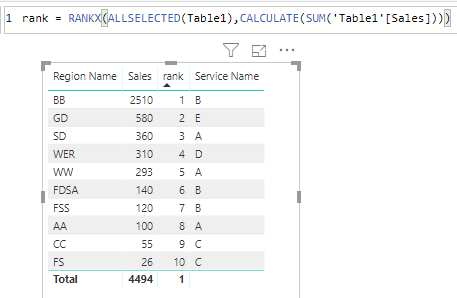
When I try to add another column in the table, the rank does not work properly. The second screenshot shows that.
I am using the formula -
Solved! Go to Solution.
@Anonymous do you want to keep the original rank when you add service in the visual?
Subscribe to the @PowerBIHowTo YT channel for an upcoming video on List and Record functions in Power Query!!
Learn Power BI and Fabric - subscribe to our YT channel - Click here: @PowerBIHowTo
If my solution proved useful, I'd be delighted to receive Kudos. When you put effort into asking a question, it's equally thoughtful to acknowledge and give Kudos to the individual who helped you solve the problem. It's a small gesture that shows appreciation and encouragement! ❤
Did I answer your question? Mark my post as a solution. Proud to be a Super User! Appreciate your Kudos 🙂
Feel free to email me with any of your BI needs.
Hi @Anonymous ,
By my tests, you could modify your measure like below then you should get your desired output.
Rank =
RANKX (
ALLSELECTED ( cdfwprodregion ),
'Calculated Measures'[Total Mission Hours]
)
You could refer to my test pbix which has been attached below. I create the data model to reporduce your scenario.
Here is the result.
Best Regards,
Cherry
@Anonymous do you want to keep the original rank when you add service in the visual?
Subscribe to the @PowerBIHowTo YT channel for an upcoming video on List and Record functions in Power Query!!
Learn Power BI and Fabric - subscribe to our YT channel - Click here: @PowerBIHowTo
If my solution proved useful, I'd be delighted to receive Kudos. When you put effort into asking a question, it's equally thoughtful to acknowledge and give Kudos to the individual who helped you solve the problem. It's a small gesture that shows appreciation and encouragement! ❤
Did I answer your question? Mark my post as a solution. Proud to be a Super User! Appreciate your Kudos 🙂
Feel free to email me with any of your BI needs.
Hi @Anonymous ,
By my tests, you could modify your measure like below then you should get your desired output.
Rank =
RANKX (
ALLSELECTED ( cdfwprodregion ),
'Calculated Measures'[Total Mission Hours]
)
You could refer to my test pbix which has been attached below. I create the data model to reporduce your scenario.
Here is the result.
Best Regards,
Cherry
The Power BI Data Visualization World Championships is back! It's time to submit your entry.
| User | Count |
|---|---|
| 47 | |
| 45 | |
| 33 | |
| 33 | |
| 30 |
| User | Count |
|---|---|
| 136 | |
| 116 | |
| 58 | |
| 58 | |
| 56 |