cancel
Showing results for 
Search instead for 
Did you mean: 

The Power BI Data Visualization World Championships is back! Get ahead of the game and start preparing now! Learn more

Reply
SupaJ68
New Member

Rank

Hi PBI Experts,

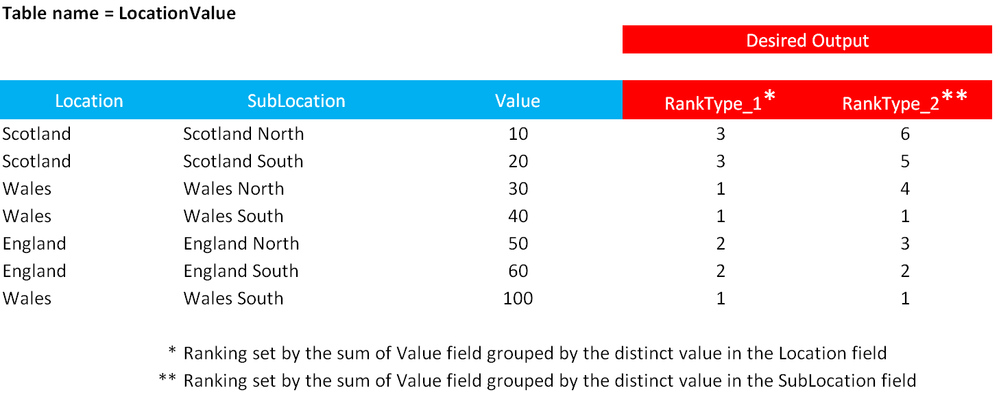
I am trying to rank the data within a table using two different groupings and I am struggling to get the DAX examples on the forum to work for me.  Below is an example of my data and what I am trying to Rank;


Any help would be greatly appreciated.

Thanks! JWPBI_Rank_problem.PNG


2 ACCEPTED SOLUTIONS
Zubair_Muhammad
Community Champion
Community Champion

@SupaJ68


You can use this calculated column for Type 1


RankType1 =
RANKX (
    SUMMARIZE (
        LocationValue,
        [Location],
        "Sum", CALCULATE ( SUM ( LocationValue[Value] ) )
    ),
    [Sum],
    CALCULATE (
        SUM ( LocationValue[Value] ),
        ALLEXCEPT ( LocationValue, LocationValue[Location] )
    ),
    DESC,
    DENSE
)

View solution in original post

@SupaJ68


And this one for RANK type 2

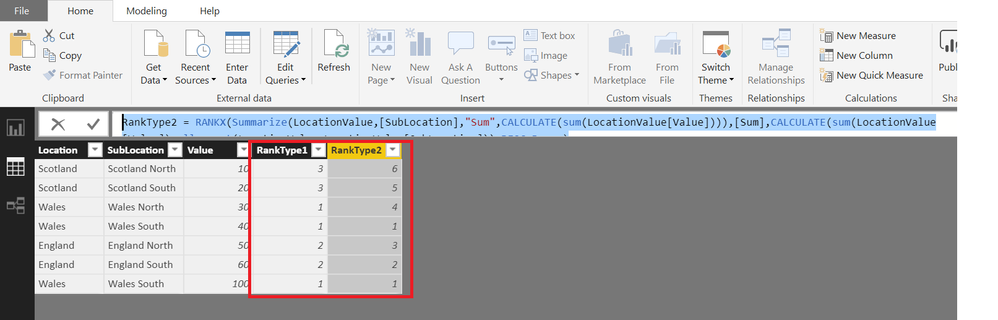
See attached file as well


RankType2 =
RANKX (
    SUMMARIZE (
        LocationValue,
        [SubLocation],
        "Sum", CALCULATE ( SUM ( LocationValue[Value] ) )
    ),
    [Sum],
    CALCULATE (
        SUM ( LocationValue[Value] ),
        ALLEXCEPT ( LocationValue, LocationValue[SubLocation] )
    ),
    DESC,
    DENSE
)

rannk.png

View solution in original post

3 REPLIES 3
Zubair_Muhammad
Community Champion
Community Champion

@SupaJ68


You can use this calculated column for Type 1


RankType1 =
RANKX (
    SUMMARIZE (
        LocationValue,
        [Location],
        "Sum", CALCULATE ( SUM ( LocationValue[Value] ) )
    ),
    [Sum],
    CALCULATE (
        SUM ( LocationValue[Value] ),
        ALLEXCEPT ( LocationValue, LocationValue[Location] )
    ),
    DESC,
    DENSE
)

@SupaJ68


And this one for RANK type 2

See attached file as well


RankType2 =
RANKX (
    SUMMARIZE (
        LocationValue,
        [SubLocation],
        "Sum", CALCULATE ( SUM ( LocationValue[Value] ) )
    ),
    [Sum],
    CALCULATE (
        SUM ( LocationValue[Value] ),
        ALLEXCEPT ( LocationValue, LocationValue[SubLocation] )
    ),
    DESC,
    DENSE
)

rannk.png

This works perfectly.  Thank you!!! Smiley Very Happy

Helpful resources

Announcements
Power BI DataViz World Championships

Power BI Dataviz World Championships

The Power BI Data Visualization World Championships is back! Get ahead of the game and start preparing now!

December 2025 Power BI Update Carousel

Power BI Monthly Update - December 2025

Check out the December 2025 Power BI Holiday Recap!

FabCon Atlanta 2026 carousel

FabCon Atlanta 2026

Join us at FabCon Atlanta, March 16-20, for the ultimate Fabric, Power BI, AI and SQL community-led event. Save $200 with code FABCOMM.