Join us at FabCon Atlanta from March 16 - 20, 2026, for the ultimate Fabric, Power BI, AI and SQL community-led event. Save $200 with code FABCOMM.
Register now!The Power BI Data Visualization World Championships is back! Get ahead of the game and start preparing now! Learn more
Hi PBI Experts,
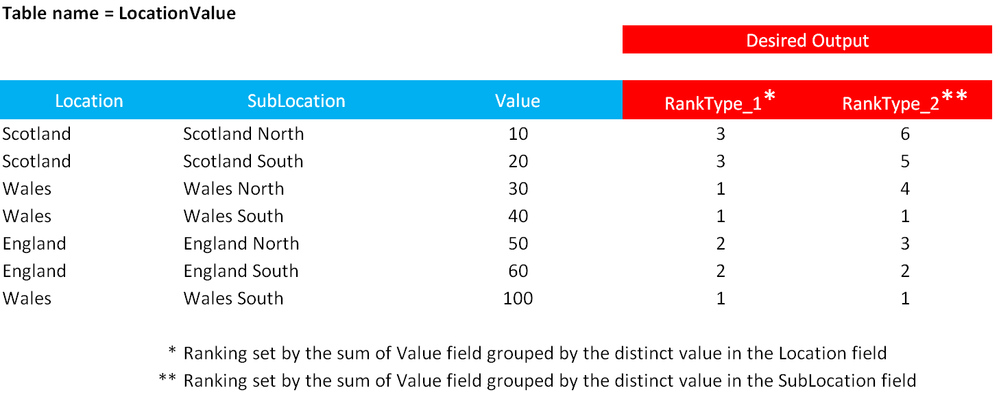
I am trying to rank the data within a table using two different groupings and I am struggling to get the DAX examples on the forum to work for me. Below is an example of my data and what I am trying to Rank;
Any help would be greatly appreciated.
Thanks! JW
Solved! Go to Solution.
You can use this calculated column for Type 1
RankType1 =
RANKX (
SUMMARIZE (
LocationValue,
[Location],
"Sum", CALCULATE ( SUM ( LocationValue[Value] ) )
),
[Sum],
CALCULATE (
SUM ( LocationValue[Value] ),
ALLEXCEPT ( LocationValue, LocationValue[Location] )
),
DESC,
DENSE
)
And this one for RANK type 2
See attached file as well
RankType2 =
RANKX (
SUMMARIZE (
LocationValue,
[SubLocation],
"Sum", CALCULATE ( SUM ( LocationValue[Value] ) )
),
[Sum],
CALCULATE (
SUM ( LocationValue[Value] ),
ALLEXCEPT ( LocationValue, LocationValue[SubLocation] )
),
DESC,
DENSE
)
You can use this calculated column for Type 1
RankType1 =
RANKX (
SUMMARIZE (
LocationValue,
[Location],
"Sum", CALCULATE ( SUM ( LocationValue[Value] ) )
),
[Sum],
CALCULATE (
SUM ( LocationValue[Value] ),
ALLEXCEPT ( LocationValue, LocationValue[Location] )
),
DESC,
DENSE
)
And this one for RANK type 2
See attached file as well
RankType2 =
RANKX (
SUMMARIZE (
LocationValue,
[SubLocation],
"Sum", CALCULATE ( SUM ( LocationValue[Value] ) )
),
[Sum],
CALCULATE (
SUM ( LocationValue[Value] ),
ALLEXCEPT ( LocationValue, LocationValue[SubLocation] )
),
DESC,
DENSE
)
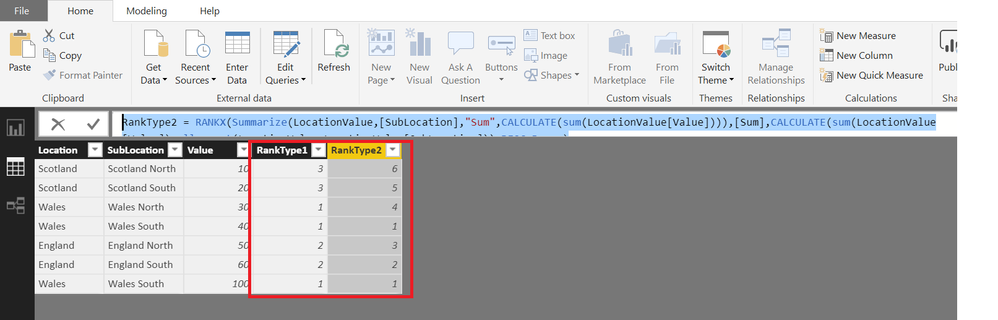
This works perfectly. Thank you!!! ![]()
The Power BI Data Visualization World Championships is back! Get ahead of the game and start preparing now!
| User | Count |
|---|---|
| 38 | |
| 36 | |
| 33 | |
| 33 | |
| 29 |
| User | Count |
|---|---|
| 134 | |
| 96 | |
| 78 | |
| 67 | |
| 65 |