cancel
Showing results for 
Search instead for 
Did you mean: 

The Power BI Data Visualization World Championships is back! Get ahead of the game and start preparing now! Learn more

Reply
reinholz
Frequent Visitor

Rank within double grouping - possible?

Hey,


I'm trying to add a rank column to a fact table that ranks based on two groupings.

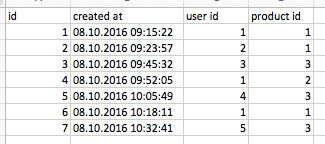
My table basically contains records for user activities with user id, created date and a column with the product id for which the activity happend.


It looks like this:

Screen Shot 2016-10-18 at 12.31.04.png  


What I now want to do is to create a column that ranks the activities by created date, based on user AND product.

How can I do this?


Thanks!


1 ACCEPTED SOLUTION
OwenAuger
Super User
Super User

Hi @reinholz


If I've understood you correctly, you want a calculated column that gives you the current row's [created at] rank, among all rows with the same [user id] and [product id].


With DAX, you can do that with an expression like this (you may want to change ASC to DESC):


Rank =
RANKX (
    CALCULATETABLE (
        FactTable,
        ALLEXCEPT ( FactTable, FactTable[user id], FactTable[product id] )
    ),
    FactTable[created at],
    ,
    ASC
)

Owen Auger
Did I answer your question? Mark my post as a solution!
Blog
LinkedIn

View solution in original post

3 REPLIES 3
OwenAuger
Super User
Super User

Hi @reinholz


If I've understood you correctly, you want a calculated column that gives you the current row's [created at] rank, among all rows with the same [user id] and [product id].


With DAX, you can do that with an expression like this (you may want to change ASC to DESC):


Rank =
RANKX (
    CALCULATETABLE (
        FactTable,
        ALLEXCEPT ( FactTable, FactTable[user id], FactTable[product id] )
    ),
    FactTable[created at],
    ,
    ASC
)

Owen Auger
Did I answer your question? Mark my post as a solution!
Blog
LinkedIn
Anonymous
Not applicable

Hi @aowen,


The solution works great  for static content.


However,  I cannot use Calculated Columns as there are 4 other fileds and a calendar field that are used for filtering data (dynamic filters) on the report.


Also, I need exactly 10 entries per group.


For example, in the above scenario

for PRODUCT 1, there shall be 10 customers ordered by Sales Amount,

for PRODUCT 2, there shall be 10 Customers ..etc


I tried with the below DAX expressions along with another field like country ..etc in a matrix and applied.


But as in snapshot, I m seeing incorrect values

The rank values are coming up from 2 instead of 1


What am I doing wrong?
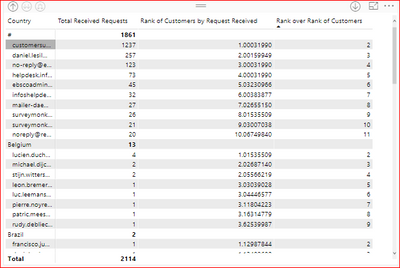
Table.PNG


//Rank decimal values

Rank over Rank of Customers = IF (HASONEVALUE( FACT_Mail[Sender]),
RANKX(ALL(FACT_Mail[Sender]), [Rank of Customers by Request Received], ,DESC,DENSE) , BLANK())


//Measure to generate decimal value by taking into account Primary and Secondary Measure to avoid ties

Rank of Customers by Request Received =

IF (HASONEVALUE(FACT_Mail[Sender]),

RANKX(ALL(FACT_Mail[Sender]), [Total Received Requests], ,DESC,DENSE)
+ DIVIDE (
RANKX ( ALL ( FACT_Mail ), [Total Mail Size]+0,, DESC, Dense ),
( COUNTROWS ( ALL ( FACT_Mail ) ) + 1 )),
BLANK())


//Primary Measure

Total Received Requests = CALCULATE(COUNT(FACT_Mail[RowId]), USERELATIONSHIP(DIM_DateTable[DateKey], FACT_Mail[DateKey_DateTimeReceived]) )


//Secondary Measure

Total Mail Size = DIVIDE(CALCULATE(SUM(FACT_Mail[Size]), USERELATIONSHIP(DIM_DateTable[DateKey], FACT_Mail[DateKey_DateTimeReceived]) ), 1024, 0)


Thanks,

Mannu


Thank you! Works exactly as expected!

Helpful resources

Announcements
Power BI DataViz World Championships

Power BI Dataviz World Championships

The Power BI Data Visualization World Championships is back! Get ahead of the game and start preparing now!

December 2025 Power BI Update Carousel

Power BI Monthly Update - December 2025

Check out the December 2025 Power BI Holiday Recap!

FabCon Atlanta 2026 carousel

FabCon Atlanta 2026

Join us at FabCon Atlanta, March 16-20, for the ultimate Fabric, Power BI, AI and SQL community-led event. Save $200 with code FABCOMM.