cancel
Showing results for 
Search instead for 
Did you mean: 

Learn from the best! Meet the four finalists headed to the FINALS of the Power BI Dataviz World Championships! Register now

Reply
FreedJustine
Helper I
Helper I

Rank using 2 measures

Hi! Need Help!


I want to create a rank measure, using 2 measures, not columns. Rankx seems to work  for columns in tables.


I want to rank the sales representative base on location sales size and total sales for the period.


Please see the sample pbix that i made. Thank you!


Download here 


1 ACCEPTED SOLUTION
v-easonf-msft
Community Support
Community Support

Hi , @FreedJustine 

Here is a demo.

Pbix attached 

If help ,please follow these  step.

1.Create measure 'Rank1'as below

Rank 1 = 
SWITCH(TRUE(),
[Average Sales per Month]<2000000,1,
[Average Sales per Month]>4000000,3,
[Average Sales per Month]>=2000000 && [Average Sales per Month] <=4000000,2)


2.Create measure "RankValue" as below:

rankvalue =
RANKX (
    GROUPBY ( ALLSELECTED ( 'Sales' ), Sales[Location], Sales[Sales Rep] ),
    CALCULATE ( [Rank 1] )
        + RANKX (
            GROUPBY ( ALLSELECTED ( 'Sales' ), Sales[Location], Sales[Sales Rep] ),
            CALCULATE ( SUM ( 'Sales'[Total Sales] ) ),
            ,
            ASC,
            DENSE
        )
            / CALCULATE ( COUNTROWS ( 'Sales' ), ALLSELECTED () ),
    ,
    DESC,
    DENSE
)

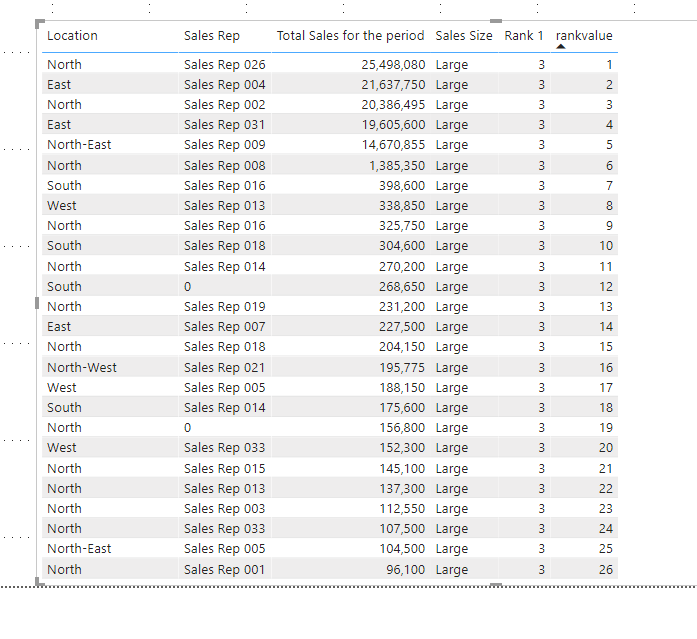
3. It will show as below

206.png

Best Regards,
Community Support Team _ Eason
If this post helps, then please consider Accept it as the solution to help the other members find it more quickly.

View solution in original post

4 REPLIES 4
v-easonf-msft
Community Support
Community Support

Hi , @FreedJustine 

Here is a demo.

Pbix attached 

If help ,please follow these  step.

1.Create measure 'Rank1'as below

Rank 1 = 
SWITCH(TRUE(),
[Average Sales per Month]<2000000,1,
[Average Sales per Month]>4000000,3,
[Average Sales per Month]>=2000000 && [Average Sales per Month] <=4000000,2)


2.Create measure "RankValue" as below:

rankvalue =
RANKX (
    GROUPBY ( ALLSELECTED ( 'Sales' ), Sales[Location], Sales[Sales Rep] ),
    CALCULATE ( [Rank 1] )
        + RANKX (
            GROUPBY ( ALLSELECTED ( 'Sales' ), Sales[Location], Sales[Sales Rep] ),
            CALCULATE ( SUM ( 'Sales'[Total Sales] ) ),
            ,
            ASC,
            DENSE
        )
            / CALCULATE ( COUNTROWS ( 'Sales' ), ALLSELECTED () ),
    ,
    DESC,
    DENSE
)

3. It will show as below

206.png

Best Regards,
Community Support Team _ Eason
If this post helps, then please consider Accept it as the solution to help the other members find it more quickly.

@v-easonf-msft  


Thank you very much! this the result im looking for. However i have additional problem, average monthly sales now is base on pre determine values per locations group.


Locations Group:

Group 1Group 2Group 3
BANorthSouth
WestNorth-EastSouth-East
EastNorth-WestSouth-West
HO  


Requirement to determine the locations sales size:

 Average Monthly Sales requirement
GroupSmall (1)Medium (2)Large (3)
Group 1<2000000>=2000000 <=4000000>4000000
Group 2<1000000>=1000000 <=5000000>5000000
Group 3<1000000>=1000000 <=3000000>3000000


I was thinking if i can apply in 

Rank 1 = 
SWITCH(TRUE(),
[Average Sales per Month]<2000000,1,
[Average Sales per Month]>4000000,3,
[Average Sales per Month]>=2000000 && [Average Sales per Month] <=4000000,2)

 When I try to add the group its not working. 

amitchandak
Super User
Super User

@FreedJustine 

Refer, these. Rank is best explained

https://radacad.com/how-to-use-rankx-in-dax-part-2-of-3-calculated-measures
https://radacad.com/how-to-use-rankx-in-dax-part-1-of-3-calculated-columns
https://radacad.com/how-to-use-rankx-in-dax-part-3-of-3-the-finale

Share with Power BI Enthusiasts: Full Power BI Video (20 Hours) YouTube
Microsoft Fabric Series 60+ Videos YouTube
Microsoft Fabric Hindi End to End YouTube
parry2k
Super User
Super User

@FreedJustine what you mean rank by location sales size and total sales for the period


you wan to rank each sales person in the location by the sales, or each location in the sale person by sales?


Subscribe to the @PowerBIHowTo YT channel for an upcoming video on List and Record functions in Power Query!!

Learn Power BI and Fabric - subscribe to our YT channel - Click here: @PowerBIHowTo

If my solution proved useful, I'd be delighted to receive Kudos. When you put effort into asking a question, it's equally thoughtful to acknowledge and give Kudos to the individual who helped you solve the problem. It's a small gesture that shows appreciation and encouragement! ❤


Did I answer your question? Mark my post as a solution. Proud to be a Super User! Appreciate your Kudos 🙂
Feel free to email me with any of your BI needs.

Helpful resources

Announcements
Join our Fabric User Panel

Join our Fabric User Panel

Share feedback directly with Fabric product managers, participate in targeted research studies and influence the Fabric roadmap.

March Power BI Update Carousel

Power BI Community Update - March 2026

Check out the March 2026 Power BI update to learn about new features.