
Join us at FabCon Atlanta from March 16 - 20, 2026, for the ultimate Fabric, Power BI, AI and SQL community-led event. Save $200 with code FABCOMM.
Register now!The Power BI Data Visualization World Championships is back! Get ahead of the game and start preparing now! Learn more
Hi All,
I want to know how to use DAX to rank like this?
| Country | Customer | Sales Amount | Ranking |
| CN | ABC | 200 | 4 |
| CN | DEF | 100 | 5 |
| CN | GHI | 300 | 3 |
| CN | JLK | 400 | 2 |
| CN | MNO | 500 | 1 |
| US | ABC | 500 | 1 |
| US | DEF | 400 | 2 |
| US | GHI | 300 | 3 |
| US | JLK | 200 | 4 |
| US | MNO | 100 | 5 |
| JP | ABC | 200 | 4 |
| JP | DEF | 100 | 5 |
| JP | GHI | 300 | 3 |
| JP | JLK | 400 | 2 |
| JP | MNO | 500 | 1 |
Also, is it possible to only show top 10 Country by their total "Sales Amount" and their Top 1 Customer by their "Sales Amount" in a single table?
Thanks
Solved! Go to Solution.
Hi, @KH_Mike
Thank you for your feedback.
Do you want to create a column or a measure?
My formula above is, as I already mentioned above, for creating a new column.
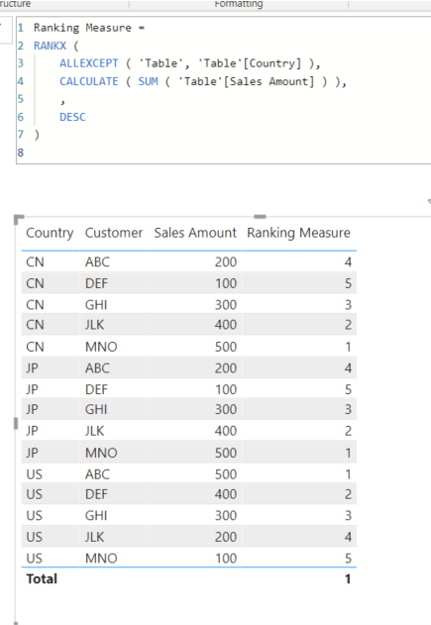
Please check the below for creating a new measure.
Hi, My name is Jihwan Kim.
If this post helps, then please consider accept it as the solution to help other members find it faster, and give a big thumbs up.
Linkedin: linkedin.com/in/jihwankim1975/
Twitter: twitter.com/Jihwan_JHKIM
Hi, @KH_Mike
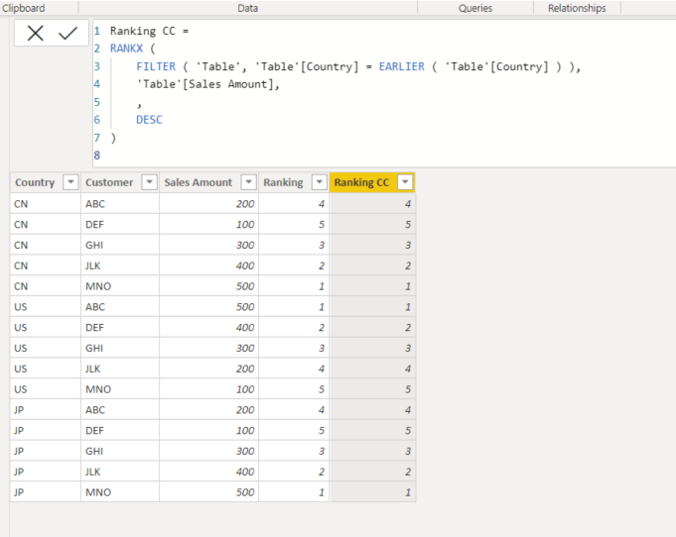
Please check the below picture and the formula for creating a new column.
Ranking CC =
RANKX (
FILTER ( 'Table', 'Table'[Country] = EARLIER ( 'Table'[Country] ) ),
'Table'[Sales Amount],
,
DESC
)
Hi, My name is Jihwan Kim.
If this post helps, then please consider accept it as the solution to help other members find it faster, and give a big thumbs up.
Linkedin: linkedin.com/in/jihwankim1975/
Twitter: twitter.com/Jihwan_JHKIM
Hi @Jihwan_Kim ,
Thank you for your support. However, when I apply it into my PBI, it show error and can't run correctly.
Hi, @KH_Mike
Thank you for your feedback.
Do you want to create a column or a measure?
My formula above is, as I already mentioned above, for creating a new column.
Please check the below for creating a new measure.
Hi, My name is Jihwan Kim.
If this post helps, then please consider accept it as the solution to help other members find it faster, and give a big thumbs up.
Linkedin: linkedin.com/in/jihwankim1975/
Twitter: twitter.com/Jihwan_JHKIM
The Power BI Data Visualization World Championships is back! Get ahead of the game and start preparing now!
| User | Count |
|---|---|
| 39 | |
| 37 | |
| 33 | |
| 32 | |
| 29 |
| User | Count |
|---|---|
| 133 | |
| 88 | |
| 85 | |
| 68 | |
| 64 |