
cancel
Showing results for 
Search instead for 
Did you mean: 

Get Fabric Certified for FREE during Fabric Data Days. Don't miss your chance! Request now

Reply
KH_Mike
Helper III
Helper III

Rank Two Column

Hi All,


I want to know how to use DAX to rank like this?


CountryCustomerSales AmountRanking
CNABC2004
CNDEF1005
CNGHI3003
CNJLK4002
CNMNO5001
USABC5001
USDEF4002
USGHI3003
USJLK2004
USMNO1005
JPABC2004
JPDEF1005
JPGHI3003
JPJLK4002
JPMNO5001


Also, is it possible to only show top 10 Country by their total "Sales Amount" and their Top 1 Customer by their "Sales Amount" in a single table?


Thanks


1 ACCEPTED SOLUTION

Hi, @KH_Mike 

Thank you for your feedback.

Do you want to create a column or a measure? 

My formula above is, as I already mentioned above, for creating a new column.

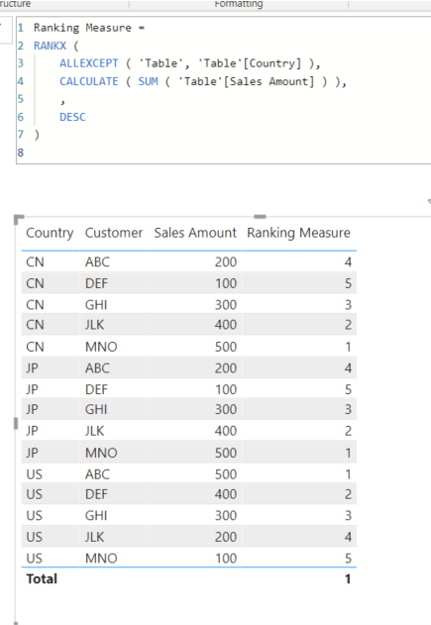
Please check the below for creating a new measure.


Picture3.png


Ranking Measure =
RANKX (
ALLEXCEPT ( 'Table', 'Table'[Country] ),
CALCULATE ( SUM ( 'Table'[Sales Amount] ) ),
,
DESC
)


Hi, My name is Jihwan Kim.


If this post helps, then please consider accept it as the solution to help other members find it faster, and give a big thumbs up.


Linkedin: linkedin.com/in/jihwankim1975/

Twitter: twitter.com/Jihwan_JHKIM


If this post helps, then please consider accepting it as the solution to help other members find it faster, and give a big thumbs up.


Click here to visit my LinkedIn page

Click here to schedule a short Teams meeting to discuss your question.

View solution in original post

3 REPLIES 3
Jihwan_Kim
Super User
Super User

Hi, @KH_Mike 

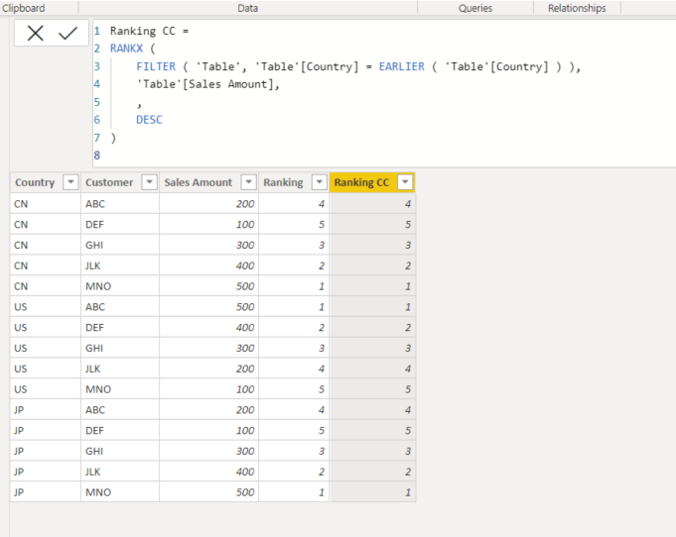
Please check the below picture and the formula for creating a new column.


Picture2.png


Ranking CC =
RANKX (
FILTER ( 'Table', 'Table'[Country] = EARLIER ( 'Table'[Country] ) ),
'Table'[Sales Amount],
,
DESC
)


Hi, My name is Jihwan Kim.


If this post helps, then please consider accept it as the solution to help other members find it faster, and give a big thumbs up.


Linkedin: linkedin.com/in/jihwankim1975/

Twitter: twitter.com/Jihwan_JHKIM


If this post helps, then please consider accepting it as the solution to help other members find it faster, and give a big thumbs up.


Click here to visit my LinkedIn page

Click here to schedule a short Teams meeting to discuss your question.

Hi @Jihwan_Kim ,


Thank you for your support. However, when I apply it into my PBI, it show error and can't run correctly.


Untitled.png

Hi, @KH_Mike 

Thank you for your feedback.

Do you want to create a column or a measure? 

My formula above is, as I already mentioned above, for creating a new column.

Please check the below for creating a new measure.


Picture3.png


Ranking Measure =
RANKX (
ALLEXCEPT ( 'Table', 'Table'[Country] ),
CALCULATE ( SUM ( 'Table'[Sales Amount] ) ),
,
DESC
)


Hi, My name is Jihwan Kim.


If this post helps, then please consider accept it as the solution to help other members find it faster, and give a big thumbs up.


Linkedin: linkedin.com/in/jihwankim1975/

Twitter: twitter.com/Jihwan_JHKIM


If this post helps, then please consider accepting it as the solution to help other members find it faster, and give a big thumbs up.


Click here to visit my LinkedIn page

Click here to schedule a short Teams meeting to discuss your question.

Helpful resources

Announcements
November Power BI Update Carousel

Power BI Monthly Update - November 2025

Check out the November 2025 Power BI update to learn about new features.

Fabric Data Days Carousel

Fabric Data Days

Advance your Data & AI career with 50 days of live learning, contests, hands-on challenges, study groups & certifications and more!

FabCon Atlanta 2026 carousel

FabCon Atlanta 2026

Join us at FabCon Atlanta, March 16-20, for the ultimate Fabric, Power BI, AI and SQL community-led event. Save $200 with code FABCOMM.

Top Solution Authors
Top Kudoed Authors