This time we’re going bigger than ever. Fabric, Power BI, SQL, AI and more. We're covering it all. You won't want to miss it.
Learn moreLevel up your Power BI skills this month - build one visual each week and tell better stories with data! Get started
Hi all,
I'm trying to find a way to rank order a network. I have two columns with "start" and "end" destinations of each segment of the network. In the case of this problem, there will always be a last destination, though their may be multiple paths into the network. I've included a simple example.
To do this in C++ or Matlab I would use a For Loop and something like an insertion sort algorithm to build the list where the prior row's "end" is equal to current rows "start" then apply the rank order to the sorted list by group. I know in principle that I would perform this in M by wrapping it in a Group function, but beyond that I'm uncertain how to compare different columns in different row in this way.
In the event of ties (where two nodes feed into one) which is given each rank is not important.
Simple Data Example
Group | Start | End |
1 | A | C |
1 | C | D |
1 | B | C |
1 | E | F |
1 | D | E |
2 | K | L |
2 | M | O |
2 | L | M |
2 | N | O |
2 | O | P |
Network diagram
Desired Results
Order Number | Group | Start | End |
1 | 1 | A | C |
3 | 1 | C | D |
2 | 1 | B | C |
5 | 1 | E | F |
4 | 1 | D | E |
1 | 2 | K | L |
3 | 2 | M | O |
2 | 2 | L | M |
4 | 2 | N | O |
5 | 2 | O | P |
Any ideas?
Solved! Go to Solution.
Hi @Anonymous ,
You can use the following iterate function to add a custom column to get the detail relationship mapping(notice: you need to enter to query editor to do these operations), then you can use PATHLENGTH to ranking records.
Iterate function:
let
findPath=(tb as table,para as text, optional path as text)=>
let
source= Table.SelectRows(tb,each [Start]=para),
result=
if Table.RowCount(source)>0
then @findPath(tb, source[End]{0},if Text.Length(path) <>0 then path&"|"&source[End]{0} else para&"|"&source[End]{0} )
else path
in
result
in
findPath
Full query:
let
Source = Table.FromRows(Json.Document(Binary.Decompress(Binary.FromText("i45WMlTSUXIEYmelWB0IzxmIXeA8JxQ5VyB2g/NcwCIgnhGQ5Q3EPnCeLxD7w3k+YBEYzw9Fzh+IA5RiYwE=", BinaryEncoding.Base64), Compression.Deflate)), let _t = ((type text) meta [Serialized.Text = true]) in type table [Group = _t, Start = _t, End = _t]),
#"Changed Type" = Table.TransformColumnTypes(Source,{{"Group", Int64.Type}, {"Start", type text}, {"End", type text}}),
#"Added Custom" = Table.AddColumn(#"Changed Type", "Path", each @findPath(Table.SelectRows(#"Changed Type", each [Group]=_[Group]),[Start],""))
in
#"Added Custom"
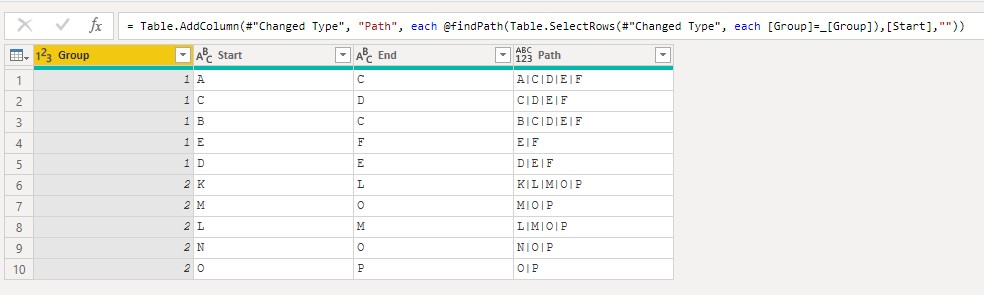
Regards,
Xiaoxin Sheng
Hi @Anonymous ,
You can use the following iterate function to add a custom column to get the detail relationship mapping(notice: you need to enter to query editor to do these operations), then you can use PATHLENGTH to ranking records.
Iterate function:
let
findPath=(tb as table,para as text, optional path as text)=>
let
source= Table.SelectRows(tb,each [Start]=para),
result=
if Table.RowCount(source)>0
then @findPath(tb, source[End]{0},if Text.Length(path) <>0 then path&"|"&source[End]{0} else para&"|"&source[End]{0} )
else path
in
result
in
findPath
Full query:
let
Source = Table.FromRows(Json.Document(Binary.Decompress(Binary.FromText("i45WMlTSUXIEYmelWB0IzxmIXeA8JxQ5VyB2g/NcwCIgnhGQ5Q3EPnCeLxD7w3k+YBEYzw9Fzh+IA5RiYwE=", BinaryEncoding.Base64), Compression.Deflate)), let _t = ((type text) meta [Serialized.Text = true]) in type table [Group = _t, Start = _t, End = _t]),
#"Changed Type" = Table.TransformColumnTypes(Source,{{"Group", Int64.Type}, {"Start", type text}, {"End", type text}}),
#"Added Custom" = Table.AddColumn(#"Changed Type", "Path", each @findPath(Table.SelectRows(#"Changed Type", each [Group]=_[Group]),[Start],""))
in
#"Added Custom"
Regards,
Xiaoxin Sheng
Thanks! I made some minor adjustments to convert the concatenation of stations to a counter (adding 1 for each step). This saves the need to count the length of the path. The concatenation of the stations is a great approach to check that it is working correctly though!
I had a similar idea to @amitchandak , but I think the networks are becoming more complex than a parent child path.
Probably the goal can only be achieved with an R or Python transformation in Power Query.
If I answered your question, please mark my post as solution, this will also help others.
Please give Kudos for support.
Marcus Wegener works as Full Stack Power BI Engineer at BI or DIE.
His mission is clear: "Get the most out of data, with Power BI."
twitter - LinkedIn - YouTube - website - podcast - Power BI Tutorials
Refer -https://docs.microsoft.com/en-us/dax/parent-and-child-functions-dax
check if pathlength can help
Appreciate your Kudos. In case, this is the solution you are looking for, mark it as the Solution. In case it does not help, please provide additional information and mark me with @
Thanks.
My Recent Blog - https://community.powerbi.com/t5/Community-Blog/Comparing-Data-Across-Date-Ranges/ba-p/823601
Check out the April 2026 Power BI update to learn about new features.
Sign up to receive a private message when registration opens and key events begin.
If you have recently started exploring Fabric, we'd love to hear how it's going. Your feedback can help with product improvements.
| User | Count |
|---|---|
| 37 | |
| 29 | |
| 28 | |
| 22 | |
| 18 |
| User | Count |
|---|---|
| 66 | |
| 36 | |
| 29 | |
| 25 | |
| 24 |