cancel
Showing results for 
Search instead for 
Did you mean: 

The Power BI Data Visualization World Championships is back! Get ahead of the game and start preparing now! Learn more

Reply
adnanarain
Helper V
Helper V

Rank Measure with ID and Date

Hi All,

Below is the sample data:

IDDateQuantity
101/01/20      2
101/02/20      3
101/03/20      1
201/01/20      3
201/02/20      7
201/03/20      9
301/04/20      3
301/05/20      1
301/06/20      2


below is the output I need: Date Slicer dates selected from 1/2/2020 to 1/6/2020


IDDateQuantity  Rank
101/02/20      3   1
101/03/20      1   2
201/02/20      7   1
201/03/20      9   2
301/04/20      3   1
301/05/20      1   2
301/06/20      2   3


I want to create a measure to display rank within ID category and rank start from the oldest date selected through a slicer.

1 ACCEPTED SOLUTION
Anonymous
Not applicable


@adnanarain 

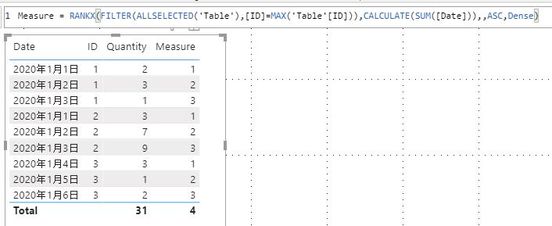
Try this one:

Measure = RANKX(FILTER(ALLSELECTED('Table'),[ID]=MAX('Table'[ID])),CALCULATE(SUM([Date])),,ASC,Dense)

 rank id and date.JPG

Paul Zheng _ Community Support Team
If this post helps, then please consider Accept it as the solution to help the other members find it more quickly.

View solution in original post

4 REPLIES 4
amitchandak
Super User
Super User

@adnanarain , try like


rankx(allselected(Table[Date]), calculate(sum(Table[Quantity])),,desc,dense)


Please find the attached file after the signature.


For Rank Refer these links
https://radacad.com/how-to-use-rankx-in-dax-part-2-of-3-calculated-measures

Share with Power BI Enthusiasts: Full Power BI Video (20 Hours) YouTube
Microsoft Fabric Series 60+ Videos YouTube
Microsoft Fabric Hindi End to End YouTube

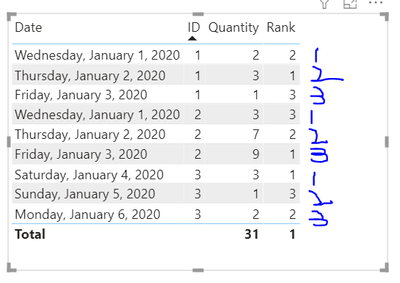
adnanarain_0-1600842270235.png

@amitchandak This is what I want.

Anonymous
Not applicable


@adnanarain 

Try this one:

Measure = RANKX(FILTER(ALLSELECTED('Table'),[ID]=MAX('Table'[ID])),CALCULATE(SUM([Date])),,ASC,Dense)

 rank id and date.JPG

Paul Zheng _ Community Support Team
If this post helps, then please consider Accept it as the solution to help the other members find it more quickly.

Thanks, Amit for your reply. This ranking is based on date and quantity so basically I need rank based on ID and date no matter what is the quantity, so for example, if we have ID 1, the date is 1st January and the quantity is 5 and in 2nd row, we have ID 1, date 2nd January and quantity is 8 then the rank will be 1 for 1st January and 2 for 2nd January. No matter what is the quantity.

I have tried to clear my point here I hope is clear now.

Helpful resources

Announcements
Power BI DataViz World Championships

Power BI Dataviz World Championships

The Power BI Data Visualization World Championships is back! Get ahead of the game and start preparing now!

December 2025 Power BI Update Carousel

Power BI Monthly Update - December 2025

Check out the December 2025 Power BI Holiday Recap!

FabCon Atlanta 2026 carousel

FabCon Atlanta 2026

Join us at FabCon Atlanta, March 16-20, for the ultimate Fabric, Power BI, AI and SQL community-led event. Save $200 with code FABCOMM.