Don't miss your chance to take the Fabric Data Engineer (DP-600) exam for FREE! Find out how by watching the DP-600 session on-demand now through April 28th.
Learn moreJoin the FabCon + SQLCon recap series. Up next: Power BI, Real-Time Intelligence, IQ and AI, and Data Factory take center stage. All sessions are available on-demand after the live show. Register now
Hi All,
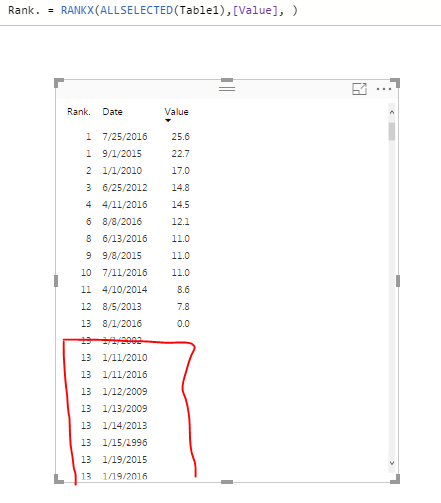
I am trying to rank a value field, but I am getting the rank as below.
Can Someone explain me what I am doing wrong here, how can I resolve this.
Thanks in advance!
Regards,
Solved! Go to Solution.
Hey,
this is because empty values (NULL) are treated as 0 (zero), for this reason there are a lot of rows ranked with the value 13.
This behavior is explained here:
https://msdn.microsoft.com/en-us/library/gg492185.aspx
If you want to avoid this, you have to make sure that rows with an empty value have to be filtered out.
Hope this helps
Hey,
this is because empty values (NULL) are treated as 0 (zero), for this reason there are a lot of rows ranked with the value 13.
This behavior is explained here:
https://msdn.microsoft.com/en-us/library/gg492185.aspx
If you want to avoid this, you have to make sure that rows with an empty value have to be filtered out.
Hope this helps
Hi TomMartens,
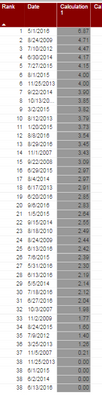
Thanks for your input,I am able to get the expected data except that my Rank is duplicated due to ties. Is there any
workaround to break the ties and get the rank in sequential order(38,39,40...)
@Anonymous
You can break ties using something similar to my post in this thread:
I think your measure will look something like this.
Rank with ties broken =
RANKX (
TableForRanking,
RANKX ( TableForRanking, [Primary Measure],, ASC )
+ DIVIDE (
RANKX (
TableForRanking,
PhysicalTable[Date],
CALCULATE ( MAX ( PhysicalTable[Date] ) ),
ASC
),
( COUNTROWS ( TableForRanking ) + 1 )
)
)It might be easier for you to post more details on the table/measure names or a sample pbix file to get the code exactly right.
Regards,
Owen
Check out the April 2026 Power BI update to learn about new features.
If you have recently started exploring Fabric, we'd love to hear how it's going. Your feedback can help with product improvements.
A new Power BI DataViz World Championship is coming this June! Don't miss out on submitting your entry.
| User | Count |
|---|---|
| 41 | |
| 37 | |
| 34 | |
| 21 | |
| 16 |
| User | Count |
|---|---|
| 65 | |
| 59 | |
| 31 | |
| 25 | |
| 25 |