cancel
Showing results for 
Search instead for 
Did you mean: 

The Power BI Data Visualization World Championships is back! Get ahead of the game and start preparing now! Learn more

Reply
Anonymous
Not applicable

Random dots in line chart

Dear all,

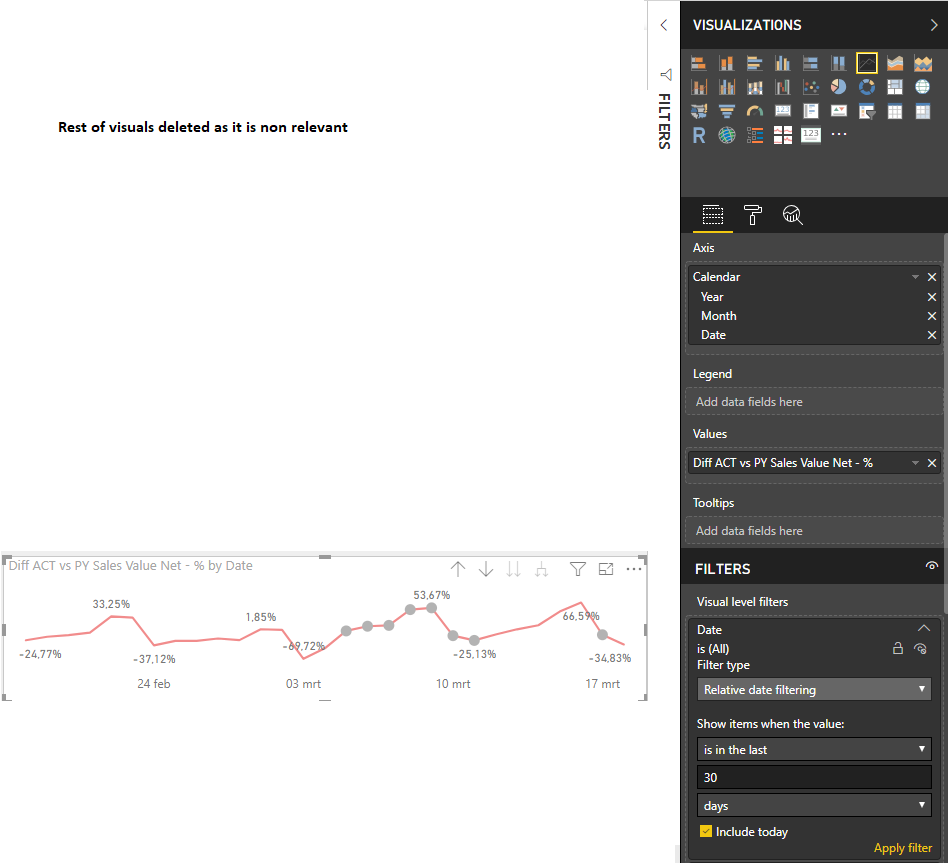
I might have a very (stupid) question but I am clueless. I have a simple line chart with date on the axis and a measure on Values.


Somehow, I get dots on my line for (it appears to me) randoms days. I have no idea why these dots are present and what they would indicate. Attached I provide a screenshot of my line chart and of my fields window for this specific line chart. 


All (visual specific) filters are set to "All", except date (but this is visible in the screenshot).


Thanks in advance!

screenshot forum.png

2 REPLIES 2
v-yuta-msft
Community Support
Community Support

@Anonymous ,


In format pane, check if in Y axis-> style is dotted. Change to solid.

Capture.PNG 


Community Support Team _ Jimmy Tao

If this post helps, then please consider Accept it as the solution to help the other members find it more quickly.

Anonymous
Not applicable

Y-axis formatting was switched off. Even when I switch it on, the line style is solid. Changing this (f.e. to dotted) has no impact on my line even. I'm more thinking of a bug now...

Helpful resources

Announcements
Power BI DataViz World Championships

Power BI Dataviz World Championships

The Power BI Data Visualization World Championships is back! Get ahead of the game and start preparing now!

December 2025 Power BI Update Carousel

Power BI Monthly Update - December 2025

Check out the December 2025 Power BI Holiday Recap!

FabCon Atlanta 2026 carousel

FabCon Atlanta 2026

Join us at FabCon Atlanta, March 16-20, for the ultimate Fabric, Power BI, AI and SQL community-led event. Save $200 with code FABCOMM.