
cancel
Showing results for 
Search instead for 
Did you mean: 

The FabCon + SQLCon recap series starts April 14th at 8am Pacific. If you’re tracking where AI is going inside Fabric, this first session is a can't miss. Register now

Reply
Anonymous
Not applicable

RLS with Roleplaying

Greetings!

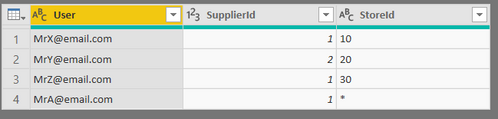
I´m struggling with setting up RLS for two different scenarios. First of I have two tables, UserTable and FactTable:

UserTable.PNGFactTable.PNG


The tables can be connected by SupplierId or StoreId. I need it to be dynamic depending on who logs in. Which is normally achived by roleplaying dimensions (USERELATIONSHIP). Per my understanding it is not supported with RLS. Im looking for other alternatives.

Relation.PNG


Scenario 1 - MrX@email.com logs in 
The report needs to be filtered on his associated StoreId,10.


Scenario 2 - MrA@email.com logs in

The report needs to be filtered on his associated SupplierId, 1. He should see all Stores with the same SupplierId. In this case, 10 and 20. (The "*" can be changed)


The benefit of a solution would be that we will not need to create up to 500 rows for each User, as some Suppliers are located in up to 500 Stores.

Any suggestions are welcome!

3 REPLIES 3
Anonymous
Not applicable

You could potentially do the following:


1. Create 2 different User security tables.

    1.a. For users that have no filter on one of the tables, include a row with "All" for that user.

2. Create a bridge table between each security table and the fact table.

    2.a. In the bridge table, "All" can be associated with all of the Stores / Suppliers.

3. Apply RLS to both User security tables.


Hope this helps,

Nathan

Anonymous
Not applicable

Thank you for your fast reply @Anonymous !


Are you suggesting splitting the Users into two Security Groups?


Security Group1
MrA@email.com


Security Group 2

MrX@email.com

MrY@email.com

MrZ@email.com


Noone is suppose to see everything. Security Group 1(SG1) should see all stores under a certain Supplier.

SG2 should only see specifik Stores.

Anonymous
Not applicable

@Anonymous  - I was thinking of a single security group, with every user in both tables, but I like your idea better. Then you can eliminate the suggested bridge tables and only apply the RLS on the relevant User Security table for each security group.

Cheers!

Nathan

Helpful resources

Announcements
New to Fabric survey Carousel

New to Fabric Survey

If you have recently started exploring Fabric, we'd love to hear how it's going. Your feedback can help with product improvements.

Power BI DataViz World Championships carousel

Power BI DataViz World Championships - June 2026

A new Power BI DataViz World Championship is coming this June! Don't miss out on submitting your entry.

Join our Fabric User Panel

Join our Fabric User Panel

Share feedback directly with Fabric product managers, participate in targeted research studies and influence the Fabric roadmap.

March Power BI Update Carousel

Power BI Community Update - March 2026

Check out the March 2026 Power BI update to learn about new features.