Get Fabric or SQL Certified for Free.
Get certified for free when you join Fabric Data Days 2026 and dive into Fabric, Power BI, SQL, AI, and other essential data skills.
Join now- Power BI forums
- Get Help with Power BI
- Desktop
- Service
- Report Server
- Power Query
- Mobile Apps
- Developer
- DAX Commands and Tips
- Custom Visuals Development Discussion
- Health and Life Sciences
- Power BI Spanish forums
- Translated Spanish Desktop
- Training and Consulting
- Instructor Led Training
- Dashboard in a Day for Women, by Women
- Galleries
- Data Stories Gallery
- Themes Gallery
- Contests Gallery
- QuickViz Gallery
- Quick Measures Gallery
- Visual Calculations Gallery
- Notebook Gallery
- Translytical Task Flow Gallery
- TMDL Gallery
- R Script Showcase
- Webinars and Video Gallery
- Ideas
- Custom Visuals Ideas (read-only)
- Issues
- Issues
- Events
- Upcoming Events
Try your skills in the Power BI Dataviz World Championship! Round one ends June 26. Join now
- Power BI forums
- Forums
- Get Help with Power BI
- Desktop
- RLS help!
- Subscribe to RSS Feed
- Mark Topic as New
- Mark Topic as Read
- Float this Topic for Current User
- Bookmark
- Subscribe
- Printer Friendly Page

- Mark as New
- Bookmark
- Subscribe
- Mute
- Subscribe to RSS Feed
- Permalink
- Report Inappropriate Content
RLS help!
I have a table "RLS" with two columns Department and User ID. I have a requirement where when a user logs in Power BI service they should only see data related to their department .
Eg [email protected] sees only 1234. this is easy setup a role user ID = Userprincipalname()
My question - when users [email protected] and [email protected] login, they should see all the data in department. i.e rls shouldnt be applied.
| Department | User ID |
| 1234 | [email protected] |
| 1235 | [email protected] |
| All | [email protected] |
| 1236 | [email protected] |
| All | [email protected] |
Solved! Go to Solution.


- Mark as New
- Bookmark
- Subscribe
- Mute
- Subscribe to RSS Feed
- Permalink
- Report Inappropriate Content
Hi,
You can create multiple roles in Power BI desktop. So in your example you might want to create the following roles:
- Department: This is where you set up your RLS as specified below. Filter user ID = Userprincipalname()
- All: Create a role that does not contain any filters.
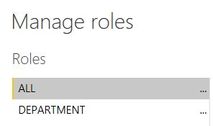
When you publish your report to Power BI service, you can add users [email protected] and [email protected] to the "All" role, and no filters will be applied when they access this Power BI report.


- Mark as New
- Bookmark
- Subscribe
- Mute
- Subscribe to RSS Feed
- Permalink
- Report Inappropriate Content
@Anonymous , refer if these can help for RLS - Row Level security
https://community.powerbi.com/t5/MBAS-Gallery/Microsoft-Power-BI-Unleash-row-level-security-patterns...
https://radacad.com/dynamic-row-level-security-with-organizational-hierarchy-power-bi
https://www.blue-granite.com/blog/using-dynamic-row-level-security-with-organizational-hierarchies
https://docs.microsoft.com/en-us/power-bi/service-admin-rls
https://blog.tallan.com/2018/04/10/row-level-security-in-power-bi-part-1-roles-and-users/
https://radacad.com/what-do-you-need-to-implement-dynamic-row-level-security-in-power-bi
- Mark as New
- Bookmark
- Subscribe
- Mute
- Subscribe to RSS Feed
- Permalink
- Report Inappropriate Content
Hi,
You can create multiple roles in Power BI desktop. So in your example you might want to create the following roles:
- Department: This is where you set up your RLS as specified below. Filter user ID = Userprincipalname()
- All: Create a role that does not contain any filters.
When you publish your report to Power BI service, you can add users [email protected] and [email protected] to the "All" role, and no filters will be applied when they access this Power BI report.
- Mark as New
- Bookmark
- Subscribe
- Mute
- Subscribe to RSS Feed
- Permalink
- Report Inappropriate Content
Thanks for the response , is there a way to use if else condtion in the same role ? instead of creating two roles ?
- Mark as New
- Bookmark
- Subscribe
- Mute
- Subscribe to RSS Feed
- Permalink
- Report Inappropriate Content
Not that I'm aware of. Creating a new, blank role for any users who should see unfiltered data would be the simpler option.
- Mark as New
- Bookmark
- Subscribe
- Mute
- Subscribe to RSS Feed
- Permalink
- Report Inappropriate Content
Thanks for the solutions!
- Mark as New
- Bookmark
- Subscribe
- Mute
- Subscribe to RSS Feed
- Permalink
- Report Inappropriate Content
Hi @Anonymous ,
I don't think so. Why you don't want to create multiple role?
Best Regards,
Jay
Helpful resources

Data Days 2026
Don't miss out on Data Days, June 15 through August 7. Learn Fabric, Power BI, SQL, AI and more.

Power BI DataViz World Championships - June 2026
A new Power BI DataViz World Championship is coming this June! Don't miss out on submitting your entry.

| User | Count |
|---|---|
| 24 | |
| 22 | |
| 22 | |
| 21 | |
| 13 |


| User | Count |
|---|---|
| 66 | |
| 56 | |
| 45 | |
| 45 | |
| 30 |


