Don't miss your chance to take the Fabric Data Engineer (DP-600) exam for FREE! Find out how by watching the DP-600 session on-demand now through April 28th.
Learn moreJoin the FabCon + SQLCon recap series. Up next: Power BI, Real-Time Intelligence, IQ and AI, and Data Factory take center stage. All sessions are available on-demand after the live show. Register now
Hello everyone! I have an issue with defining roles for directors of business units in my company and at the same time illustrating in visualizations average values throughout the company for comparison. Power BI applies the role also for the average value so it becomes an equal for the value of the current business unit. Does the Power BI provides any opportunities to realize both role and average meaning? I will be very greatful for help!
5 years later but did you find a way im stuck with the same problem
Your requirement is not very clear. Show us a complete example, please.
Is it clear now?
Thank you for your interest
That's what RLS does. It restricts data access for given users.
We know that but we try to find the way to realize our idea to use restriction only for BU values not average meanings.
It restricts data at the row level. The total number of rows is reduced.
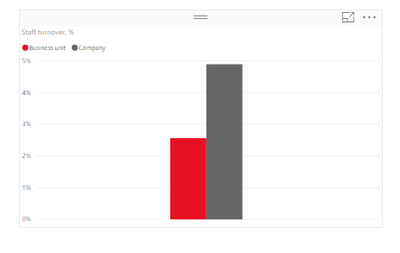
This is the chart like we need it to be. But here we use filter not RLS.
When we use RLS like [Business unit] = “711" to restrict access for directors of business unit we get average value equal to business unit measure.
Check out the April 2026 Power BI update to learn about new features.
If you have recently started exploring Fabric, we'd love to hear how it's going. Your feedback can help with product improvements.
A new Power BI DataViz World Championship is coming this June! Don't miss out on submitting your entry.
| User | Count |
|---|---|
| 43 | |
| 38 | |
| 35 | |
| 21 | |
| 15 |
| User | Count |
|---|---|
| 63 | |
| 58 | |
| 28 | |
| 27 | |
| 25 |