
Don't miss your chance to take the Fabric Data Engineer (DP-600) exam for FREE! Find out how by watching the DP-600 session on-demand now through April 28th.
Learn moreJoin the FabCon + SQLCon recap series. Up next: Power BI, Real-Time Intelligence, IQ and AI, and Data Factory take center stage. All sessions are available on-demand after the live show. Register now
Hi guys,
I am setting up a Dynamic Row Level Security on the Employee table and having a simple model . The table Employees contains userprincipalname and is linked 1->M with the table History via ID.
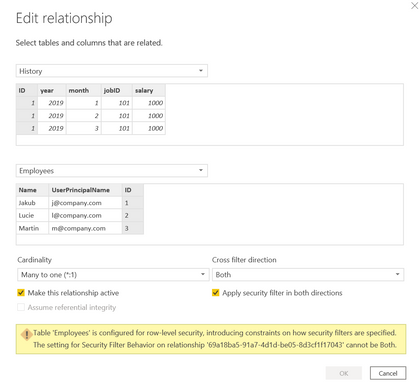
Unfortunately I am retrieving the following error: once i check the "Apply Security Filter in both Direction".
The error is: "Table Employees is configured for row level security, introducing constraint on how security filters are applied". Attached image.
Do you know why? I though that checkbox was a minimal reuqirement for this to work.
Thanks
Luca
Solved! Go to Solution.
@zanottiluca Pretty sure you do not want Both. You want the relationship direction to be defined as:
Employees 1 -> * History
Thus, security enforced on Employees limits the rows and this then flows to the History table via the relationship.
@zanottiluca Pretty sure you do not want Both. You want the relationship direction to be defined as:
Employees 1 -> * History
Thus, security enforced on Employees limits the rows and this then flows to the History table via the relationship.
Thanks a lot @Greg_Deckler for this, this is now working, hence my error was mainly on assuming the "Apply security filter on both direction" was ticked. I mistakenly thought was a minimum requirement for DRLS to work!
Back to basis this tick and the Both direction, are needed only in case I have a bridge table inbetween employees and history which otherwise will not propagate the filter acordingly, correct?
Many thanks for this.
Luca
@zanottiluca - Right, the Both direction is if you would want History to filter Employees as well as Employees to filter History. To understand this, think of this scenario.
Place the "Employee" column from the Employees table in a table visual. Place a column from History in the same visual. Make the aggregation "count". You will get a count of the rows in the History table for each Employee.
Now, create a table visual with the "Employee" column from the History table in a table visual. Place a column from Employees table in the same visual. Make the aggregation "count". You will get a count of ALL the rows in the Employee table for each Employee.
This happens because Employees table filters History but not vice versa.
Check out the April 2026 Power BI update to learn about new features.
If you have recently started exploring Fabric, we'd love to hear how it's going. Your feedback can help with product improvements.
A new Power BI DataViz World Championship is coming this June! Don't miss out on submitting your entry.
| User | Count |
|---|---|
| 44 | |
| 38 | |
| 34 | |
| 20 | |
| 16 |
| User | Count |
|---|---|
| 68 | |
| 65 | |
| 30 | |
| 26 | |
| 25 |