Join us at FabCon Atlanta from March 16 - 20, 2026, for the ultimate Fabric, Power BI, AI and SQL community-led event. Save $200 with code FABCOMM.
Register now!The Power BI Data Visualization World Championships is back! Get ahead of the game and start preparing now! Learn more
Hello everyone,
i am trying to connect the Power BI Client to a REST API by a Dataset.
The Dataset i am tryin to run, looks like this:
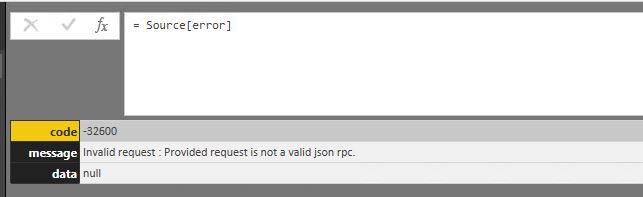
I alway get the error, that says, this is an invalid request.
I dont get what there is been missing or where the error is? I didnt find anything through researches.
Am I Missing the Authentification (X-RPC-Auth-Username / X-RPC-Auth-Password / X-RPC-Auth-Session)?
If yes, where do i have to insert it?
I am very thankful for your help,
Regards
Solved! Go to Solution.
In the body step of your query, it looks like you're passing a JSON object in the body of the request. A JSON parser would recognize the values for jsonrpc and id as numbers instead of strings. It would also have trouble parsing the value you have for method; it wouldn't recognize it as a string.
I'm not sure what the structure of the request should look like, but it's very likely these values should all be strings.
Try this instead:
let
url = "...",
bodyContent = [ jsonrpc = "2.0", method = "cmdb.objects.read", params = [apikey = APIKEY], id = "1" ],
body = Json.FromValue(bodyContent),
Source = Json.Document(Web.Contents(url, [Headers = [#"Content-Type" = "application/json"], Content = body] ))
in
SourceNote: I assume you have the value for APIKEY defined properly elsewhere.
If that doesn't work, try making the same request with Postman. Also, what does the API documentation say about that -32600 status code?
In the body step of your query, it looks like you're passing a JSON object in the body of the request. A JSON parser would recognize the values for jsonrpc and id as numbers instead of strings. It would also have trouble parsing the value you have for method; it wouldn't recognize it as a string.
I'm not sure what the structure of the request should look like, but it's very likely these values should all be strings.
Try this instead:
let
url = "...",
bodyContent = [ jsonrpc = "2.0", method = "cmdb.objects.read", params = [apikey = APIKEY], id = "1" ],
body = Json.FromValue(bodyContent),
Source = Json.Document(Web.Contents(url, [Headers = [#"Content-Type" = "application/json"], Content = body] ))
in
SourceNote: I assume you have the value for APIKEY defined properly elsewhere.
If that doesn't work, try making the same request with Postman. Also, what does the API documentation say about that -32600 status code?
Sorry for the delay and a big thank you tonmcg !!! It works with the square brackets
The Power BI Data Visualization World Championships is back! Get ahead of the game and start preparing now!
Check out the November 2025 Power BI update to learn about new features.
| User | Count |
|---|---|
| 59 | |
| 46 | |
| 42 | |
| 23 | |
| 18 |
| User | Count |
|---|---|
| 192 | |
| 125 | |
| 99 | |
| 67 | |
| 48 |