
This time we’re going bigger than ever. Fabric, Power BI, SQL, AI and more. We're covering it all. You won't want to miss it.
Learn moreLevel up your Power BI skills this month - build one visual each week and tell better stories with data! Get started
Hi everyone,
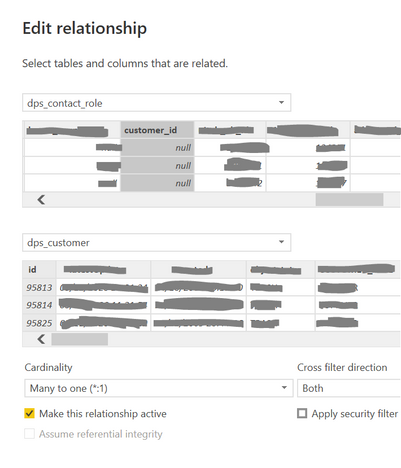
I have 2 tables (dps_contact_role and dps_customer) related to each other like this:
I am trying to calculate how many customers are missing customer contact ID (which is called contactidentity_id in dps_contact_role_ table). To be more precise I need to visualise using Pie chart, how many customers HAVE customer contact ID in the system and how many are MISSING it.
I am creating calculated columns in the table dps_customer:
Because relationship are Many to One and I am creating the column in lookup table, RELATED function doesn't work. But I have created similar columns for other pie charts where relationship is reverse (where customer table is the fact table) and it worked perfectly.
I am a bit confused now. How else can I create a column in customer table for my purpose if I cannot change relationships and I cannot create a column in another table?
Thanks in advance!!
Solved! Go to Solution.
Hi @Anonymous ,
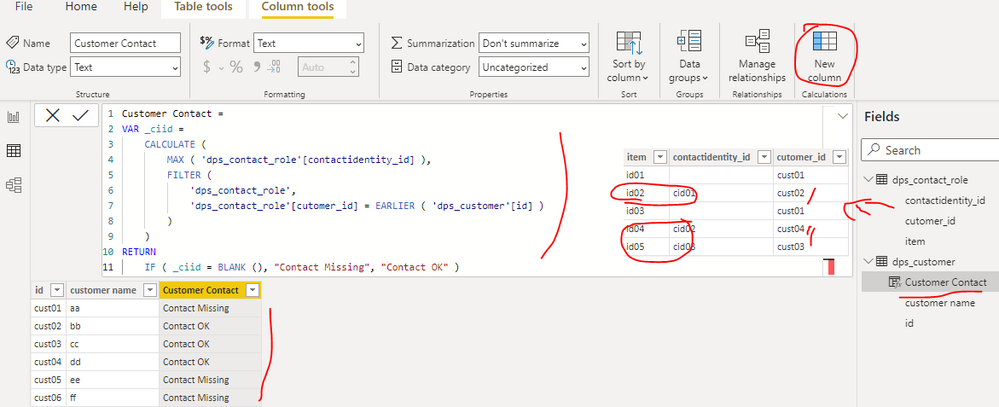
You can created a calculated column as below in the table 'dps_customer' to get it, please find the details in the attachment.
Customer Contact =
VAR _ciid =
CALCULATE (
MAX ( 'dps_contact_role'[contactidentity_id] ),
FILTER (
'dps_contact_role',
'dps_contact_role'[cutomer_id] = EARLIER ( 'dps_customer'[id] )
)
)
RETURN
IF ( _ciid = BLANK (), "Contact Missing", "Contact OK" )
In addition, you can review the blogs below to know the applied scenario of RELATED function...
Best Regards
Hi @Anonymous ,
You can created a calculated column as below in the table 'dps_customer' to get it, please find the details in the attachment.
Customer Contact =
VAR _ciid =
CALCULATE (
MAX ( 'dps_contact_role'[contactidentity_id] ),
FILTER (
'dps_contact_role',
'dps_contact_role'[cutomer_id] = EARLIER ( 'dps_customer'[id] )
)
)
RETURN
IF ( _ciid = BLANK (), "Contact Missing", "Contact OK" )
In addition, you can review the blogs below to know the applied scenario of RELATED function...
Best Regards
@Anonymous HUGE thanks!! That solution worked perfectly 🙂
If you sit at the M side of a M:1 relationship you can use RELATED as it will always return one or zero results. For all other scenarios you need to use RELATEDTABLE and then boil the result down to a scalar value.
thanks @lbendlin
I sit on 1 side, not M (that's the problem). But how could I use RELATEDTABLE in this case? if you could help with that
Thanks
Check out the April 2026 Power BI update to learn about new features.
Sign up to receive a private message when registration opens and key events begin.
If you have recently started exploring Fabric, we'd love to hear how it's going. Your feedback can help with product improvements.
| User | Count |
|---|---|
| 36 | |
| 29 | |
| 29 | |
| 21 | |
| 18 |
| User | Count |
|---|---|
| 71 | |
| 43 | |
| 33 | |
| 24 | |
| 23 |