Join us at FabCon Atlanta from March 16 - 20, 2026, for the ultimate Fabric, Power BI, AI and SQL community-led event. Save $200 with code FABCOMM.
Register now!The Power BI Data Visualization World Championships is back! Get ahead of the game and start preparing now! Learn more
Hi Experts
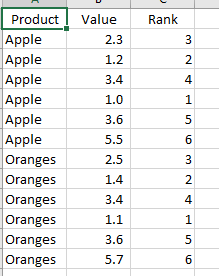
How would you rank products based on the values in the data set. See images below i have ranked each product based on the values for that products so each product group has its own ranking. (if that makes any sense).
Solved! Go to Solution.
Refer
https://radacad.com/how-to-use-rankx-in-dax-part-2-of-3-calculated-measures
Ranking by Sub Category =
RANKX (
FILTER(
ALL(
'Table'[Category],
'Table'[Sub Category]
),
'Table'[Category] = MAX('Table'[Category])
),
CALCULATE(SUM('Table'[My Value]))
)
Hi @Anonymous
Create columns
rank = RANKX(FILTER('Table','Table'[product]=EARLIER('Table'[product])),[value],,ASC,Dense)
THanks you maggie and god bless...
Refer
https://radacad.com/how-to-use-rankx-in-dax-part-2-of-3-calculated-measures
Ranking by Sub Category =
RANKX (
FILTER(
ALL(
'Table'[Category],
'Table'[Sub Category]
),
'Table'[Category] = MAX('Table'[Category])
),
CALCULATE(SUM('Table'[My Value]))
)
Hi Amit
i need to add this as calculated column....into a table..
silly question whats Category and sub Category from my example...
The Power BI Data Visualization World Championships is back! Get ahead of the game and start preparing now!
Check out the November 2025 Power BI update to learn about new features.
| User | Count |
|---|---|
| 59 | |
| 43 | |
| 42 | |
| 23 | |
| 17 |
| User | Count |
|---|---|
| 190 | |
| 122 | |
| 96 | |
| 66 | |
| 47 |