- Power BI forums
- Updates
- News & Announcements
- Get Help with Power BI
- Desktop
- Service
- Report Server
- Power Query
- Mobile Apps
- Developer
- DAX Commands and Tips
- Custom Visuals Development Discussion
- Health and Life Sciences
- Power BI Spanish forums
- Translated Spanish Desktop
- Power Platform Integration - Better Together!
- Power Platform Integrations (Read-only)
- Power Platform and Dynamics 365 Integrations (Read-only)
- Training and Consulting
- Instructor Led Training
- Dashboard in a Day for Women, by Women
- Galleries
- Community Connections & How-To Videos
- COVID-19 Data Stories Gallery
- Themes Gallery
- Data Stories Gallery
- R Script Showcase
- Webinars and Video Gallery
- Quick Measures Gallery
- 2021 MSBizAppsSummit Gallery
- 2020 MSBizAppsSummit Gallery
- 2019 MSBizAppsSummit Gallery
- Events
- Ideas
- Custom Visuals Ideas
- Issues
- Issues
- Events
- Upcoming Events
- Community Blog
- Power BI Community Blog
- Custom Visuals Community Blog
- Community Support
- Community Accounts & Registration
- Using the Community
- Community Feedback
Register now to learn Fabric in free live sessions led by the best Microsoft experts. From Apr 16 to May 9, in English and Spanish.
- Power BI forums
- Forums
- Get Help with Power BI
- Desktop
- Re: RANKX Totals by category
- Subscribe to RSS Feed
- Mark Topic as New
- Mark Topic as Read
- Float this Topic for Current User
- Bookmark
- Subscribe
- Printer Friendly Page

- Mark as New
- Bookmark
- Subscribe
- Mute
- Subscribe to RSS Feed
- Permalink
- Report Inappropriate Content
RANKX Totals by category
Hello!, this is my first question for the PBI Community, I have tried many solutions posted in here but for some reason, none of them seems to work in my case, thanks in advance.
I need to have a calculated column that ranks de "Shipping_Line" by "Container_Volume" in order to add this as a filter so the DONUT CHART and table only shows the top 10 Shipping Lines for each Business_Unit.
Table name: Vol_TEUS
Data:
| Bussines_Unit | Shipping_Line | Movement_Type | Container_Volume |
| Company1 | MSK | Load | 21,337 |
| Company1 | MSK | Load | 19,601 |
| Company1 | MSK | Unload | 19,505 |
| Company1 | MSK | Unload | 18,998 |
| Company1 | MSK | Load | 17,978 |
| Company1 | MSK | Unload | 16,909 |
| Company1 | MSK | Unload | 16,871 |
| Company1 | MSK | Unload | 16,829 |
| Company1 | MSK | Load | 16,532 |
| Company1 | MSK | Unload | 16,471 |
| Company1 | MSK | Transhipment | 16,331 |
| Company1 | MSK | Unload | 16,302 |
| Company2 | APL | Unload | 16,255 |
| Company2 | APL | Load | 15,952 |
| Company2 | MSC | Load | 15,767 |
| Company3 | APL | Load | 14,268 |
| Company3 | APL | Unload | 14,253 |
| Company3 | HLC | Load | 14,068 |
These are the formulas I have tried with no success:
RANKX(ALLEXCEPT(Vol_TEUS,Vol_TEUS[Shipping_Line]),CALCULATE(SUM(Vol_TEUS[Container_Volume])),,DESC,Dense)RANKX(FILTER(Vol_TEUS,Vol_TEUS[Shipping_Line] = EARLIER(Vol_TEUS[Shipping_Line])),Vol_TEUS[Container_Volume],,ASC,Dense)
Solved! Go to Solution.


- Mark as New
- Bookmark
- Subscribe
- Mute
- Subscribe to RSS Feed
- Permalink
- Report Inappropriate Content
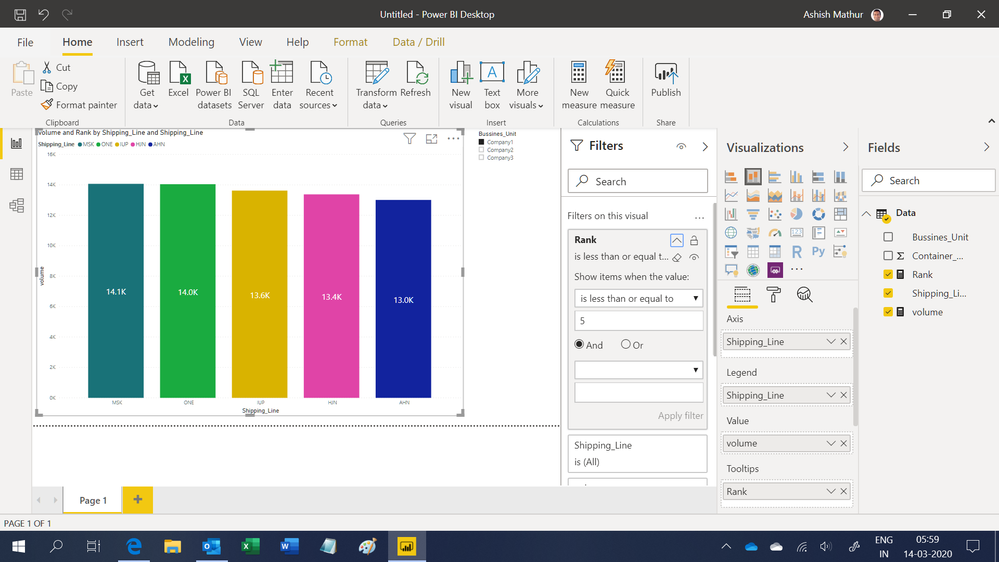
Hi,
You may download my PBI file from here.
Hope this helps.
Regards,
Ashish Mathur
http://www.ashishmathur.com
https://www.linkedin.com/in/excelenthusiasts/
- Mark as New
- Bookmark
- Subscribe
- Mute
- Subscribe to RSS Feed
- Permalink
- Report Inappropriate Content
Hi,
For the data that you have shared, show the expected result in a simple Table. From there, we can always build a pie chart.
Regards,
Ashish Mathur
http://www.ashishmathur.com
https://www.linkedin.com/in/excelenthusiasts/
- Mark as New
- Bookmark
- Subscribe
- Mute
- Subscribe to RSS Feed
- Permalink
- Report Inappropriate Content
@amitchandak Thank you, i have actually solved the "making a rank" issue.
@Ashish_Mathur Thank you!, find the example data below:
Actual Result Using = (RANKX(FILTER(Vol_TEUS,Vol_TEUS[Shipping_Line]=EARLIER(Vol_TEUS[Shipping_Line])),[Container_Volume],,ASC,Dense))
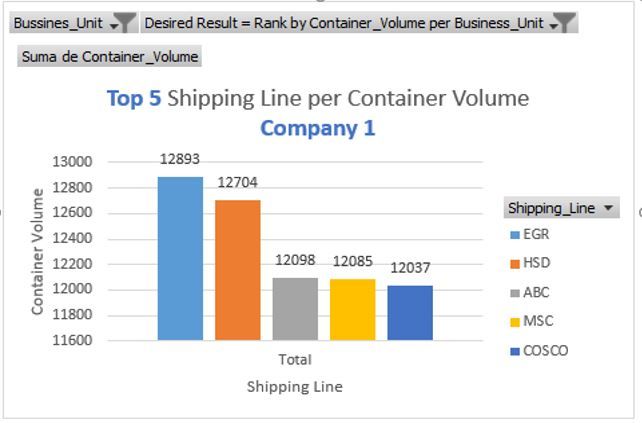
Desired Result = Rank by Container_Volume per Business_Unit
| Bussines_Unit | Shipping_Line | Container_Volume | Actual Result | Desired Result |
| Company2 | MSC | 5,874 | 1 | 1 |
| Company2 | COSCO | 5,904 | 2 | 2 |
| Company2 | ABC | 5,912 | 3 | 3 |
| Company2 | HSD | 5,920 | 4 | 4 |
| Company2 | EGR | 5,925 | 5 | 5 |
| Company2 | AHN | 6,022 | 6 | 6 |
| Company2 | HJN | 6,072 | 7 | 7 |
| Company2 | IUP | 6,156 | 8 | 8 |
| Company2 | ONE | 6,168 | 9 | 9 |
| Company2 | MSK | 6,261 | 10 | 10 |
| Company3 | ONE | 7,663 | 11 | 1 |
| Company3 | HSD | 7,786 | 12 | 2 |
| Company3 | MSC | 7,881 | 13 | 3 |
| Company3 | ABC | 7,914 | 14 | 4 |
| Company3 | EGR | 8,215 | 15 | 5 |
| Company3 | AHN | 8,225 | 16 | 6 |
| Company3 | HJN | 8,313 | 17 | 7 |
| Company3 | IUP | 8,370 | 18 | 8 |
| Company3 | MSK | 8,410 | 19 | 9 |
| Company3 | COSCO | 8,459 | 20 | 10 |
| Company1 | COSCO | 12,037 | 21 | 1 |
| Company1 | MSC | 12,085 | 22 | 2 |
| Company1 | ABC | 12,098 | 23 | 3 |
| Company1 | HSD | 12,704 | 24 | 4 |
| Company1 | EGR | 12,893 | 25 | 5 |
| Company1 | AHN | 13,010 | 26 | 6 |
| Company1 | HJN | 13,376 | 27 | 7 |
| Company1 | IUP | 13,624 | 28 | 8 |
| Company1 | ONE | 14,045 | 29 | 9 |
| Company1 | MSK | 14,068 | 30 | 10 |
I'd like to add that calculated column to the "page filters" in order to selec only the TOP 10 or TOP 5, which are different for each Business Unit.
- Mark as New
- Bookmark
- Subscribe
- Mute
- Subscribe to RSS Feed
- Permalink
- Report Inappropriate Content
Hi,
You may download my PBI file from here.
Hope this helps.
Regards,
Ashish Mathur
http://www.ashishmathur.com
https://www.linkedin.com/in/excelenthusiasts/
- Mark as New
- Bookmark
- Subscribe
- Mute
- Subscribe to RSS Feed
- Permalink
- Report Inappropriate Content
- Mark as New
- Bookmark
- Subscribe
- Mute
- Subscribe to RSS Feed
- Permalink
- Report Inappropriate Content
You are welcome.
Regards,
Ashish Mathur
http://www.ashishmathur.com
https://www.linkedin.com/in/excelenthusiasts/

- Mark as New
- Bookmark
- Subscribe
- Mute
- Subscribe to RSS Feed
- Permalink
- Report Inappropriate Content
@Anonymous
Try like
RANKX(ALL(Vol_TEUS,Vol_TEUS[Shipping_Line]),CALCULATE(SUM(Vol_TEUS[Container_Volume])),,DESC,Dense)
The best you refer to the first link. It has been explained in details
For Rank Refer these links
https://radacad.com/how-to-use-rankx-in-dax-part-2-of-3-calculated-measures
https://radacad.com/how-to-use-rankx-in-dax-part-1-of-3-calculated-columns
https://radacad.com/how-to-use-rankx-in-dax-part-3-of-3-the-finale
Microsoft Power BI Learning Resources, 2023 !!
Learn Power BI - Full Course with Dec-2022, with Window, Index, Offset, 100+ Topics !!
Did I answer your question? Mark my post as a solution! Appreciate your Kudos !! Proud to be a Super User! !!


- Mark as New
- Bookmark
- Subscribe
- Mute
- Subscribe to RSS Feed
- Permalink
- Report Inappropriate Content
Do you want the total container volume for each shipping line ? and then the top 10 totals ?
Did this post answer your question? Mark it as a solution so others can find it!
Help when you know. Ask when you don't!
Join the conversation at We Talk BI find out more about me at Slow BI
- Mark as New
- Bookmark
- Subscribe
- Mute
- Subscribe to RSS Feed
- Permalink
- Report Inappropriate Content
Yes!
But the top 10 is different for each Business Unit.
Example: I have a "Chiclet slicer" visualization with the name of the companies, and I would like that to sync and show the top 10 per each company.
I already have this measure:
Container_Volume total for Shpping Line =
CALCULATE(
	SUM('Vol_TEUS'[Container_Volume]),
	ALLSELECTED('Vol_TEUS'[Shipping Line])
)Helpful resources

Microsoft Fabric Learn Together
Covering the world! 9:00-10:30 AM Sydney, 4:00-5:30 PM CET (Paris/Berlin), 7:00-8:30 PM Mexico City

Power BI Monthly Update - April 2024
Check out the April 2024 Power BI update to learn about new features.

Fabric Community Update - April 2024
Find out what's new and trending in the Fabric Community.

| User | Count |
|---|---|
| 106 | |
| 104 | |
| 78 | |
| 68 | |
| 61 |


| User | Count |
|---|---|
| 144 | |
| 106 | |
| 106 | |
| 82 | |
| 70 |


