Don't miss your chance to take the Fabric Data Engineer (DP-600) exam for FREE! Find out how by attending the DP-600 session on April 23rd (pacific time), live or on-demand.
Learn moreJoin the FabCon + SQLCon recap series. Up next: Power BI, Real-Time Intelligence, IQ and AI, and Data Factory take center stage. All sessions are available on-demand after the live show. Register now
Hi All,
I have been reading a bit on DAX and trying to work out how the RANKX formula works.
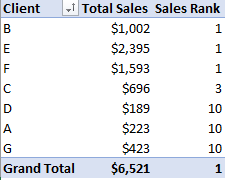
I have the below list of data and trying to rank it by sales. My formula is Sales Rank = RANKX(ALL(Sales),[Total Sales])
The below is the result I get (have used Excel in this example)
I have tried to use Sales Rank = RANKX(ALL(Sales[Client]),[Total Sales]) which works properly but it doesn't work when I change the pivottable rows to Sector. Is there a reason why I can't use ALL on the entire table?
| Client | Sector | Sales |
| A | F&B | 125 |
| B | Tech | 456 |
| A | F&B | 98 |
| B | Tech | 546 |
| C | Tech | 564 |
| C | Tech | 132 |
| D | Auto | 189 |
| E | Financial | 456 |
| E | Financial | 542 |
| E | Financial | 652 |
| E | Financial | 745 |
| F | Energy | 897 |
| F | Energy | 564 |
| F | Energy | 132 |
| G | F&B | 52 |
| G | F&B | 54 |
| G | F&B | 87 |
| G | F&B | 98 |
| G | F&B | 132 |
Thanks All!
Solved! Go to Solution.
Hi @Anonymous ,
Please update your formula as below.
Measure = RANKX(ALL(Sales[Client]),[Total sales],,DESC,Dense)
Thanks for your help. If I want to rank total sales by sector, I need to write another DAX formula as below?
Measure = RANKX(ALL(Sales[Sector]),[Total sales],,DESC,Dense)
In case you take all
Rank = RANKX(all(Sheet1[Client]),CALCULATE(SUM(Sheet1[Sales])),,DESC,Dense)
Rank will change with another field you add and give a ranking of the client inside that group.
What is expected outcome
Hi
I am just trying to understand why Sales Rank = RANKX(ALL(Sales),[Total Sales]) doesn't work
Can I not just take the entire sales table?
If I wanted to group by sector, I need to write another DAX formula like: Sales Rank = RANKX(ALL(Sales[Sector]),[Total Sales])
Hi @Anonymous
how do you get [Total Sales] measure?
do not hesitate to give a kudo to useful posts and mark solutions as solution
Total Sales = Sum(SalesTable[Sales])
Check out the April 2026 Power BI update to learn about new features.
If you have recently started exploring Fabric, we'd love to hear how it's going. Your feedback can help with product improvements.
A new Power BI DataViz World Championship is coming this June! Don't miss out on submitting your entry.
| User | Count |
|---|---|
| 48 | |
| 46 | |
| 41 | |
| 20 | |
| 17 |
| User | Count |
|---|---|
| 69 | |
| 67 | |
| 32 | |
| 27 | |
| 26 |