cancel
Showing results for 
Search instead for 
Did you mean: 

The Power BI Data Visualization World Championships is back! Get ahead of the game and start preparing now! Learn more

Reply
Anonymous
Not applicable

RANKX Help

I'm trying to us the RANKX formula to rank store numbers based on their Potential ACV. 


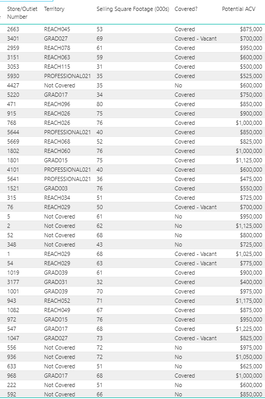
I have the Store/Outlet Number, and Potential ACV columns in the table. 


This is the formula I'm trying to use:

ACVRank = CALCULATE(RANKX(ALL('Walmart Data'[Store/Outlet Number],'Walmart Data'[Potential ACV],
 
But when I try to use the comma to go to the "value" or "order" part of the formula, it never lets me get to that point. It just keeps giving me the option to add more columns into the formula. I'm sure it's something I'm doing wrong, but I can't figure it out. 
 
Photo attached shows the columns in the data.
 Capture.PNG


1 ACCEPTED SOLUTION
amitchandak
Super User
Super User

Please close all. I think parenthesis is missing 

In case you need more than one column

Column =
RANKX (
    'Table',
    RIGHT ( 'Table'[Period], 4 ) & LEFT ( 'Table'[Period], 2 ),
    ,
    DESC,
    DENSE
)


Share with Power BI Enthusiasts: Full Power BI Video (20 Hours) YouTube
Microsoft Fabric Series 60+ Videos YouTube
Microsoft Fabric Hindi End to End YouTube

View solution in original post

1 REPLY 1
amitchandak
Super User
Super User

Please close all. I think parenthesis is missing 

In case you need more than one column

Column =
RANKX (
    'Table',
    RIGHT ( 'Table'[Period], 4 ) & LEFT ( 'Table'[Period], 2 ),
    ,
    DESC,
    DENSE
)


Share with Power BI Enthusiasts: Full Power BI Video (20 Hours) YouTube
Microsoft Fabric Series 60+ Videos YouTube
Microsoft Fabric Hindi End to End YouTube

Helpful resources

Announcements
Power BI DataViz World Championships

Power BI Dataviz World Championships

The Power BI Data Visualization World Championships is back! Get ahead of the game and start preparing now!

December 2025 Power BI Update Carousel

Power BI Monthly Update - December 2025

Check out the December 2025 Power BI Holiday Recap!

FabCon Atlanta 2026 carousel

FabCon Atlanta 2026

Join us at FabCon Atlanta, March 16-20, for the ultimate Fabric, Power BI, AI and SQL community-led event. Save $200 with code FABCOMM.

Top Solution Authors