cancel
Showing results for 
Search instead for 
Did you mean: 

The Power BI Data Visualization World Championships is back! It's time to submit your entry. Live now!

Reply
Ankitapahuja
Regular Visitor

R code not working

Hi,


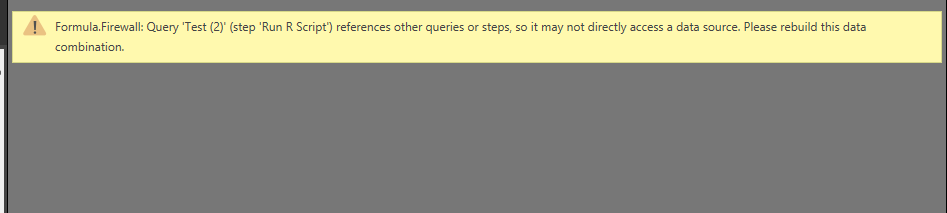
I am unable to run any R code in the data set. Below is the error received. Please help. Thanks


R script issue.PNG

6 REPLIES 6
Anonymous
Not applicable

Hi Ankitpahuja
Could you please provide the R Code, so we may check it?

Hi,


Below is the R code,


R code.PNG

Anonymous
Not applicable

Hi

Although I can't see the whole code, my best guess is that something is missing before the r code..

would you mind the post the query code?


The R code is as below:


write.table(dataset, file = "C:/Users/v-akrag/Documents/MSFT Office Apps/Test/PowerBI_SD_new2.csv",  row.names = FALSE)


and Power BI query code is


#"Inserted Week of Year" = Table.AddColumn(#"Inserted Year", "WeekOfYear", each Date.WeekOfYear([Start Date]), type number),

    #"Inserted Merged Column" = Table.AddColumn(#"Inserted Week of Year", "Merged", each Text.Combine({Text.From([Year], "en-US"), Text.From([WeekOfYear], "en-US")}, ":"), type text),

#"Grouped Rows" = Table.Group(#"Changed Type2", {"Category", "App Name", "Merged"}, {{"Downloads", each List.Sum([Downloads]), type text}}),

#"Merged Queries" = Table.NestedJoin(#"Inserted Merged Column1",{"Merged.1"},PowerBI_SD1,{"NewMerged"},"NewColumn",JoinKind.Inner),

    #"Expanded NewColumn" = Table.ExpandTableColumn(#"Merged Queries", "NewColumn", {"D.Date", "Index", "D.Date.lag", "D.Downloads.lag", "WoW Growth"}, {"NewColumn.D.Date", "NewColumn.Index", "NewColumn.D.Date.lag", "NewColumn.D.Downloads.lag", "NewColumn.WoW Growth"}),

    #"Run R Script" = R.Execute("# 'dataset' holds the input data for this script#(lf)write.table(dataset, file = ""C:/Users/v-akrag/Documents/MSFT Office Apps/Test/PowerBI_SD_new2.csv"",  row.names = FALSE)",[dataset=#"Expanded NewColumn"])

in

    #"Run R Script"


Anonymous
Not applicable

I tested your R Script, it works fine.

So I think the issue happens in one of the steps before, even though the message tells something different.

This is the entire Power Bi query code. Could you please help us identifying where the error might lie:


let

    Source = Folder.Files("C:\Users\v-akrag\Documents\MSFT Office Apps\Test\Downloads_csv"),

    #"Invoked Custom Function" = Table.AddColumn(Source, "Transform Binary from Downloads_csv", each #"Transform Binary from Downloads_csv"([Content])),

    #"Renamed Columns1" = Table.RenameColumns(#"Invoked Custom Function",{{"Name", "Source.Name"}}),

#"Expanded Table Column1" = Table.ExpandTableColumn(#"Removed Other Columns1", "Transform Binary from Test (4)", Table.ColumnNames(#"Removed Other Columns1"[#"Transform Binary from Test (4)"]{0})),


#"Inserted Week of Year" = Table.AddColumn(#"Inserted Year", "WeekOfYear", each Date.WeekOfYear([Start Date]), type number),

    #"Inserted Merged Column" = Table.AddColumn(#"Inserted Week of Year", "Merged", each Text.Combine({Text.From([Year], "en-US"), Text.From([WeekOfYear], "en-US")}, ":"), type text),

#"Grouped Rows" = Table.Group(#"Changed Type2", {"Category", "App Name", "Merged"}, {{"Downloads", each List.Sum([Downloads]), type text}}),

#"Merged Queries" = Table.NestedJoin(#"Inserted Merged Column1",{"Merged.1"},PowerBI_SD1,{"NewMerged"},"NewColumn",JoinKind.Inner),

    #"Expanded NewColumn" = Table.ExpandTableColumn(#"Merged Queries", "NewColumn", {"D.Date", "Index", "D.Date.lag", "D.Downloads.lag", "WoW Growth"}, {"NewColumn.D.Date", "NewColumn.Index", "NewColumn.D.Date.lag", "NewColumn.D.Downloads.lag", "NewColumn.WoW Growth"}),

    #"Run R Script" = R.Execute("# 'dataset' holds the input data for this script#(lf)write.table(dataset, file = ""C:/Users/v-akrag/Documents/MSFT Office Apps/Test/PowerBI_SD_new2.csv"",  row.names = FALSE)",[dataset=#"Expanded NewColumn"])

in

    #"Run R Script"


Helpful resources

Announcements
Power BI DataViz World Championships

Power BI Dataviz World Championships

The Power BI Data Visualization World Championships is back! It's time to submit your entry.

January Power BI Update Carousel

Power BI Monthly Update - January 2026

Check out the January 2026 Power BI update to learn about new features.

FabCon Atlanta 2026 carousel

FabCon Atlanta 2026

Join us at FabCon Atlanta, March 16-20, for the ultimate Fabric, Power BI, AI and SQL community-led event. Save $200 with code FABCOMM.