cancel
Showing results for 
Search instead for 
Did you mean: 

A new Data Days event is coming soon! This time we’re going bigger than ever. Fabric, Power BI, SQL, AI and more. Don't miss out.

Reply
Anonymous
Not applicable

Quintile a Measure

Good Evening 


Thank you for your time. 

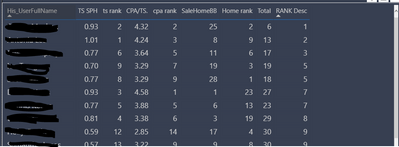
I currenty have a table built in power BI and i have ranked 3 areas of sales performance. At the end of the table i have created a total score then ranked the total (If that nakes sense)


Now i am struggling to create a quintile measure, please help 🙂


The Rank and Rank Desc are all measures

ianboothman84_0-1617052914538.png


1 ACCEPTED SOLUTION
v-luwang-msft
Community Support
Community Support

Hi @Anonymous ,

You could use the following measure:

Measure = 
VAR _table =
    SUMMARIZE ( ALL (table1), Table1[His_UserfullName], "_Rank",  MAX(table1[rank desc]))

VAR Percentile25 =
    PERCENTILEX.EXC ( _table, [_Rank], 0.25 )
VAR Percentile50 =
    PERCENTILEX.EXC ( _table, [_Rank], 0.5 )
VAR Percentile75 =
    PERCENTILEX.EXC ( _table, [_Rank], 0.75 )
RETURN
     IF (
        MAX(table1[rank desc])< Percentile25,
        "Q1",
        IF ( MAX(table1[rank desc])< Percentile50, "Q2", IF ( MAX(table1[rank desc])< Percentile75, "Q3", "Q4" ) )
    )


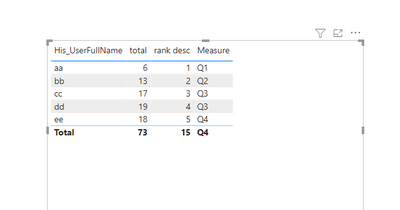
Then you will get the below:

v-luwang-msft_0-1617261281565.png


Wish it is helpful for you!


Best Regards

Lucien

View solution in original post

3 REPLIES 3
v-luwang-msft
Community Support
Community Support

Hi @Anonymous ,

You could use the following measure:

Measure = 
VAR _table =
    SUMMARIZE ( ALL (table1), Table1[His_UserfullName], "_Rank",  MAX(table1[rank desc]))

VAR Percentile25 =
    PERCENTILEX.EXC ( _table, [_Rank], 0.25 )
VAR Percentile50 =
    PERCENTILEX.EXC ( _table, [_Rank], 0.5 )
VAR Percentile75 =
    PERCENTILEX.EXC ( _table, [_Rank], 0.75 )
RETURN
     IF (
        MAX(table1[rank desc])< Percentile25,
        "Q1",
        IF ( MAX(table1[rank desc])< Percentile50, "Q2", IF ( MAX(table1[rank desc])< Percentile75, "Q3", "Q4" ) )
    )


Then you will get the below:

v-luwang-msft_0-1617261281565.png


Wish it is helpful for you!


Best Regards

Lucien

Anonymous
Not applicable

@v-luwang-msft thnak you, works great 🙂

amitchandak
Super User
Super User

@Anonymous , Check if this can help

https://sqldusty.com/2018/08/31/calculating-quartiles-with-dax-and-power-bi/

Share with Power BI Enthusiasts: Full Power BI Video (20 Hours) YouTube
Microsoft Fabric Series 60+ Videos YouTube
Microsoft Fabric Hindi End to End YouTube

Helpful resources

Announcements
May Power BI Update Carousel

Power BI Monthly Update - May 2026

Check out the May 2026 Power BI update to learn about new features.

Fabric SQL PBI Data Days

Data Days 2026 coming soon!

Sign up to receive a private message when registration opens and key events begin.

New to Fabric survey Carousel

New to Fabric Survey

If you have recently started exploring Fabric, we'd love to hear how it's going. Your feedback can help with product improvements.

Power BI DataViz World Championships carousel

Power BI DataViz World Championships - June 2026

A new Power BI DataViz World Championship is coming this June! Don't miss out on submitting your entry.