Get certified for free when you join Fabric Data Days 2026 and dive into Fabric, Power BI, SQL, AI, and other essential data skills.
Join nowTry your skills in the Power BI Dataviz World Championship! Round one ends June 26. Join now
Good Evening
Thank you for your time.
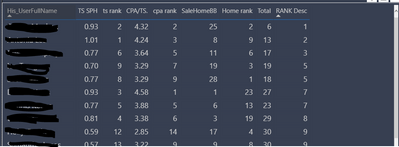
I currenty have a table built in power BI and i have ranked 3 areas of sales performance. At the end of the table i have created a total score then ranked the total (If that nakes sense)
Now i am struggling to create a quintile measure, please help 🙂
The Rank and Rank Desc are all measures
Solved! Go to Solution.
Hi @Anonymous ,
You could use the following measure:
Measure =
VAR _table =
SUMMARIZE ( ALL (table1), Table1[His_UserfullName], "_Rank", MAX(table1[rank desc]))
VAR Percentile25 =
PERCENTILEX.EXC ( _table, [_Rank], 0.25 )
VAR Percentile50 =
PERCENTILEX.EXC ( _table, [_Rank], 0.5 )
VAR Percentile75 =
PERCENTILEX.EXC ( _table, [_Rank], 0.75 )
RETURN
IF (
MAX(table1[rank desc])< Percentile25,
"Q1",
IF ( MAX(table1[rank desc])< Percentile50, "Q2", IF ( MAX(table1[rank desc])< Percentile75, "Q3", "Q4" ) )
)
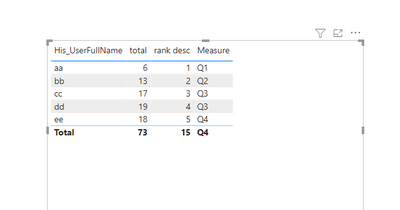
Then you will get the below:
Wish it is helpful for you!
Best Regards
Lucien
Hi @Anonymous ,
You could use the following measure:
Measure =
VAR _table =
SUMMARIZE ( ALL (table1), Table1[His_UserfullName], "_Rank", MAX(table1[rank desc]))
VAR Percentile25 =
PERCENTILEX.EXC ( _table, [_Rank], 0.25 )
VAR Percentile50 =
PERCENTILEX.EXC ( _table, [_Rank], 0.5 )
VAR Percentile75 =
PERCENTILEX.EXC ( _table, [_Rank], 0.75 )
RETURN
IF (
MAX(table1[rank desc])< Percentile25,
"Q1",
IF ( MAX(table1[rank desc])< Percentile50, "Q2", IF ( MAX(table1[rank desc])< Percentile75, "Q3", "Q4" ) )
)
Then you will get the below:
Wish it is helpful for you!
Best Regards
Lucien
@Anonymous , Check if this can help
https://sqldusty.com/2018/08/31/calculating-quartiles-with-dax-and-power-bi/
| User | Count |
|---|---|
| 23 | |
| 21 | |
| 20 | |
| 17 | |
| 11 |
| User | Count |
|---|---|
| 55 | |
| 53 | |
| 41 | |
| 36 | |
| 32 |