cancel
Showing results for 
Search instead for 
Did you mean: 

Get Fabric Certified for FREE during Fabric Data Days. Don't miss your chance! Request now

Reply
Anonymous
Not applicable

Quickmeasure Percentage show 0% instead of blank

Hello all


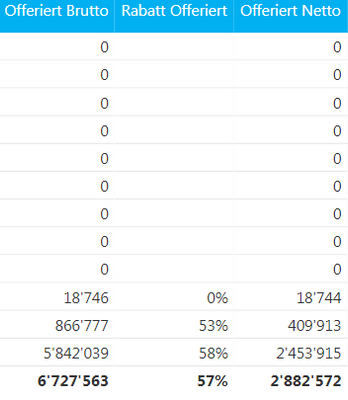
I have two columns and a quickmeasure that calculates the percentage difference of them. When Both columns are 0 it returns blank. I tried to edit the quickmeasure but cannot find out why its not working...


1.png

It should show 0% like it is in the first row with values (its rounded)


The Quickmeasure looks like:

2.PNG

IMO it should return the else (0).

I also tried to display other values(maybe 0's are not shown anyways) but that wont work either


Thank you for your time

Best regards

1 ACCEPTED SOLUTION
Anonymous
Not applicable

I found the solution by myself.

The Divide function has an optional parameter [AlternateValue] if there was a divide by 0 error.

i added 0 as value for this parameter now it works

View solution in original post

1 REPLY 1
Anonymous
Not applicable

I found the solution by myself.

The Divide function has an optional parameter [AlternateValue] if there was a divide by 0 error.

i added 0 as value for this parameter now it works

Helpful resources

Announcements
November Power BI Update Carousel

Power BI Monthly Update - November 2025

Check out the November 2025 Power BI update to learn about new features.

Fabric Data Days Carousel

Fabric Data Days

Advance your Data & AI career with 50 days of live learning, contests, hands-on challenges, study groups & certifications and more!

FabCon Atlanta 2026 carousel

FabCon Atlanta 2026

Join us at FabCon Atlanta, March 16-20, for the ultimate Fabric, Power BI, AI and SQL community-led event. Save $200 with code FABCOMM.

Top Solution Authors
Top Kudoed Authors