Join us at FabCon Atlanta from March 16 - 20, 2026, for the ultimate Fabric, Power BI, AI and SQL community-led event. Save $200 with code FABCOMM.
Register now!The Power BI Data Visualization World Championships is back! Get ahead of the game and start preparing now! Learn more
Hi,
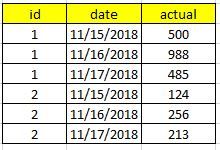
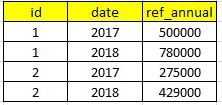
I have a problem in the creation of measures from different tables and mixer them in the visual. As an example i have 2 tables (actuals and references) that both only can have a relation many to many (id).
So, as you can see the table of actuals is in daly values and the ref in yearly values and related to the sames id
I want to create a measure in the table Actuals (because is where i have the majority of the measures and apart of that i want to create another measures using this new measure of ref annual value)
I know that I can use calculate to create a column in my actual table that takes the values from ref taking into account the id and year from both tables and then another measure from that new column in actuals. But i'm asking for a direct measure in actuals takt take values from the ref table.
Can someone help me on this?
Thanks in advance, regards!!!!
Solved! Go to Solution.
Sorry @v-lili6-msft,
It seems i created 2 topics under the same thing. I have solved the problem in this link
https://community.powerbi.com/t5/Desktop/Measure-of-sum-values-from-another-table-with-relation-of-i...
But thanks a lot to take time to help me!
Regards!
HI, @dobregon
After my research, you try to this way as below:
Step1:
Add a year column for table actuals
Step2:
Use this formula to create a measure
Measure = CALCULATE(SUM(ref[ref_annual]),FILTER(ref,ref[date] in VALUES(actuals[Year])))Result:
Best Regards,
Lin
Sorry @v-lili6-msft,
It seems i created 2 topics under the same thing. I have solved the problem in this link
https://community.powerbi.com/t5/Desktop/Measure-of-sum-values-from-another-table-with-relation-of-i...
But thanks a lot to take time to help me!
Regards!
The Power BI Data Visualization World Championships is back! Get ahead of the game and start preparing now!
Check out the November 2025 Power BI update to learn about new features.
| User | Count |
|---|---|
| 68 | |
| 46 | |
| 44 | |
| 29 | |
| 20 |
| User | Count |
|---|---|
| 202 | |
| 130 | |
| 102 | |
| 71 | |
| 55 |