Join us at FabCon Atlanta from March 16 - 20, 2026, for the ultimate Fabric, Power BI, AI and SQL community-led event. Save $200 with code FABCOMM.
Register now!Get Fabric Certified for FREE during Fabric Data Days. Don't miss your chance! Request now
Hi
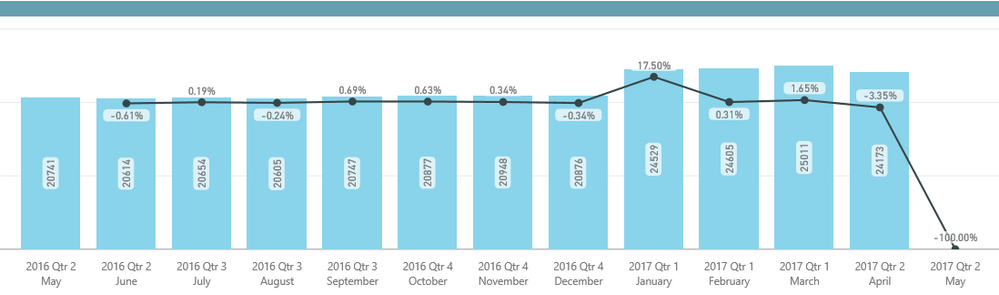
When using the MoM% quick measure Power BI is also returning values for the last month PLUS 1. I.e. If my last period is May 2017, then the quick measure calculates the MoM% for June 2017 which creates a distortion when looking at the chart/data.
Have anybody come across this issue?
Thanks,
Solved! Go to Solution.
@Anonymous
Hi, made a adjustment to the quick measure. Add before a condition to evaluate the Date.
Value MoM%-Modified =
If (VALUES(Table1[Date])<>BLANK(),
IF(
ISFILTERED('Table1'[Date]),
ERROR("Time intelligence quick measures can only be grouped or filtered by the Power BI-provided date hierarchy."),
VAR __PREV_MONTH =
CALCULATE(SUM('Table1'[Value]), DATEADD('Table1'[Date].[Date], -1, MONTH))
RETURN
DIVIDE(SUM('Table1'[Value]) - __PREV_MONTH, __PREV_MONTH)
))Regards
Victor
Lima - Peru
You can also use below DAX in a measure instead of quick measure to solve the distortion in the beginning as well as at the end of the visuals. Here you just have to create one more measure for prior month instaed of defining a variable within the measure itself.
Current_Month_Value = SUM('Table1"[Value])
Prior_Month_Value = CALCULATE('Table1'[Value], PREVIOUSMONTH('Table1'[Date]))
%_MoM_Modified_Value =
IF(
AND(
'Table1'[Value]<>Blank(),
'Table1'[Prior_Month_Value]<>Blank()
),
DIVIDE([Value],[Prior_Month_Value],Blank())-1,
Blank()
)
@Anonymous
Hi, made a adjustment to the quick measure. Add before a condition to evaluate the Date.
Value MoM%-Modified =
If (VALUES(Table1[Date])<>BLANK(),
IF(
ISFILTERED('Table1'[Date]),
ERROR("Time intelligence quick measures can only be grouped or filtered by the Power BI-provided date hierarchy."),
VAR __PREV_MONTH =
CALCULATE(SUM('Table1'[Value]), DATEADD('Table1'[Date].[Date], -1, MONTH))
RETURN
DIVIDE(SUM('Table1'[Value]) - __PREV_MONTH, __PREV_MONTH)
))Regards
Victor
Lima - Peru
Why
VALUES(Table1[Date])<>BLANK() not works for me? it show error message, you expeted return a sing value. So I changed values to Max or Min
Thanks so much Victor!
This worked just prefect !
Check out the November 2025 Power BI update to learn about new features.
Advance your Data & AI career with 50 days of live learning, contests, hands-on challenges, study groups & certifications and more!