Learn from the best! Meet the four finalists headed to the FINALS of the Power BI Dataviz World Championships! Register now
Hi
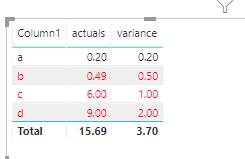
I manage to use conditional formatting one of my matrix table. I use a rule that really simple
If 1column value (variance) is higher than 0.1 and lower 99999 show its red.
I would like to modify for the following
If the column value (variance) is higher than 0.1 and lower 99999 show its red BUT if the variance = the actuals (other column) it should be blank.
Any ide how can I manage this? Where should I look at it?
Solved! Go to Solution.
Hi @Anonymous ,
We can set conditional formatting based on a measure like this.
Measure = var va = MAX('Table'[variance])
var ac = MAX('Table'[actuals])
return
IF(va >=0.1 && va<=99999 && va <>ac,"#FF0027",BLANK())
Hi @Anonymous ,
We can set conditional formatting based on a measure like this.
Measure = var va = MAX('Table'[variance])
var ac = MAX('Table'[actuals])
return
IF(va >=0.1 && va<=99999 && va <>ac,"#FF0027",BLANK())
Hi there,
If you cannot set your rules applying to your needs, you can always use a calculated measure to do so.
I cannot explain it better than on this page :
https://docs.microsoft.com/en-us/power-bi/desktop-conditional-table-formatting
Have a look at the SWITCH Method.
Robbe
| User | Count |
|---|---|
| 50 | |
| 35 | |
| 29 | |
| 17 | |
| 17 |
| User | Count |
|---|---|
| 66 | |
| 57 | |
| 39 | |
| 22 | |
| 21 |