HI @Anonymous ,
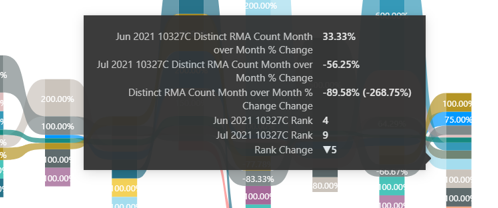
As you haven't provided complete information around what metrics you have moved to this chart, I tried the ribbon chart at my end with a simple metric overtime:
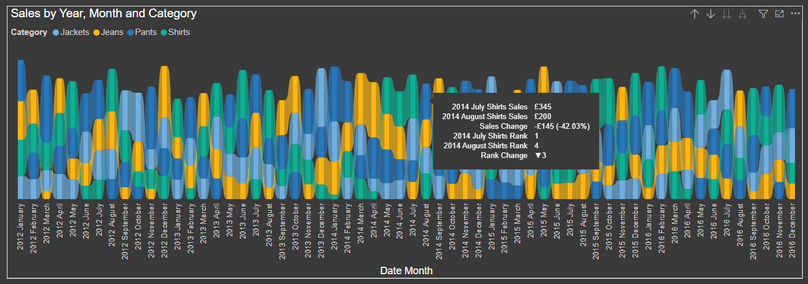
In the above chart I have shown Sales overtime split by different clothing categories.
When I hover over the ribbon portion of August 2014, I see a tooltip which ives me following information:
- Sales for Shirts for July 2014
- Sales for Shirts August 2014
- Difference in sales for above 2 months (negative as it is gone down in August as compared to July)
- In the month of July, a ranking is created for sales against all the different clothing categories; out of which Shirts generated the most sales and is ranked 1 as compared to other categories on the chart.
- Similarly a ranking for the Shirts category for the month of August.
- Last but not tht least, a chnage in the ranks for the Shirts category on sales.
I suspect in your case you are moving a proportion metric or a distinct count metric as a percentage. (not clear to me with your screenshot).
You can relate the description from my chart to your's and hopefully the tooltip information is clear to you.
Thanks,
Pragati
Best Regards,
Pragati Jain
LinkedIn | Twitter | Blog | YouTube
Did I answer your question? Mark my post as a solution! This will help others on the forum!
Appreciate your Kudos!!
Proud to be a Super User!!