cancel
Showing results for 
Search instead for 
Did you mean: 

The Power BI Data Visualization World Championships is back! Get ahead of the game and start preparing now! Learn more

Reply
Anonymous
Not applicable

Question about how to make matrix date drill down column by column

Hi Everyone,


My matrix hierarchy is:

Group

    Project_Grouping

           Product

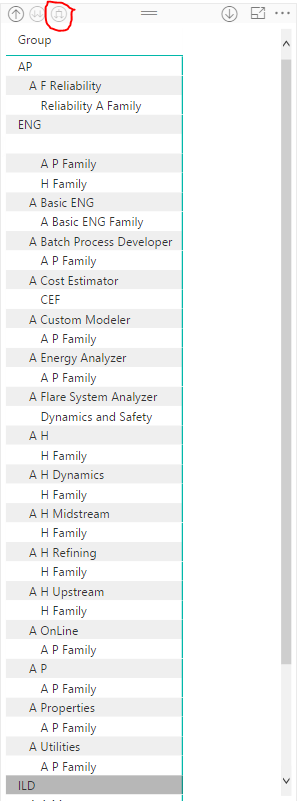
After I dragged them to column and clicked the rightmost double arrow twice, they displayed progressively as below image. However,this will make the metrix so long and it's inconvenient to read. So I want them to be displayed column by column.

Drill Down.PNG


Could you assist me to alter the way of display or give some advices about metrix? Thank you in advance.


Regards,

Kelly

1 ACCEPTED SOLUTION
Anonymous
Not applicable

Hi Ketan @ketan10,


I have found the way to solve this. I referenced this: https://powerbi.microsoft.com/en-us/documentation/powerbi-desktop-matrix-visual/ . After turning off the button "Stepped Layout", they will be shown column by column.


Regards,

Kelly

View solution in original post

6 REPLIES 6
ketan10
Advocate III
Advocate III

Hi @Anonymous,

you could probably use one or two of levels in the hierarchy as filters and then show the third level in a table.
Ex: In your situation Group & Project_Grouping could be used as filters. This would give the end user more flexibility to control the data at his/her end. 
Else, if you could provide me a sample file of your dataset I could check it at my end.

Regards,
Ketan!

Anonymous
Not applicable

Hi Ketan,


Thanks for your help! That's a good way to solve this question now.

However, sometimes customers need us to sent table which format is similar as before. The former table is a povit table made by Excel. They can drill down column by column, but they can't be refreshed automatically. So we still need to learn how to drill down column by column.

I am sorry that I don't know how to import the file to community. Could you provide me your email address or the way to import file to community? Thank you very much!


Regards,

Kelly

Hi @Anonymous

Here is my email address: ketan.deshpande@rudderanalytics.com
You can mail me the issue in detail. Will try my best to solve it. 

Cheers,
Ketan!

Anonymous
Not applicable

Hi Ketan @ketan10,


I have found the way to solve this. I referenced this: https://powerbi.microsoft.com/en-us/documentation/powerbi-desktop-matrix-visual/ . After turning off the button "Stepped Layout", they will be shown column by column.


Regards,

Kelly

Hi @Anonymous,


Great to hear the problem got resolved! Could you accept your reply above as solution to close this thread? Smiley Happy


Regards

Anonymous
Not applicable

Of course! Thanks!

Helpful resources

Announcements
Power BI DataViz World Championships

Power BI Dataviz World Championships

The Power BI Data Visualization World Championships is back! Get ahead of the game and start preparing now!

December 2025 Power BI Update Carousel

Power BI Monthly Update - December 2025

Check out the December 2025 Power BI Holiday Recap!

FabCon Atlanta 2026 carousel

FabCon Atlanta 2026

Join us at FabCon Atlanta, March 16-20, for the ultimate Fabric, Power BI, AI and SQL community-led event. Save $200 with code FABCOMM.