This time we’re going bigger than ever. Fabric, Power BI, SQL, AI and more. We're covering it all. You won't want to miss it.
Learn moreDid you hear? There's a new SQL AI Developer certification (DP-800). Start preparing now and be one of the first to get certified. Register now
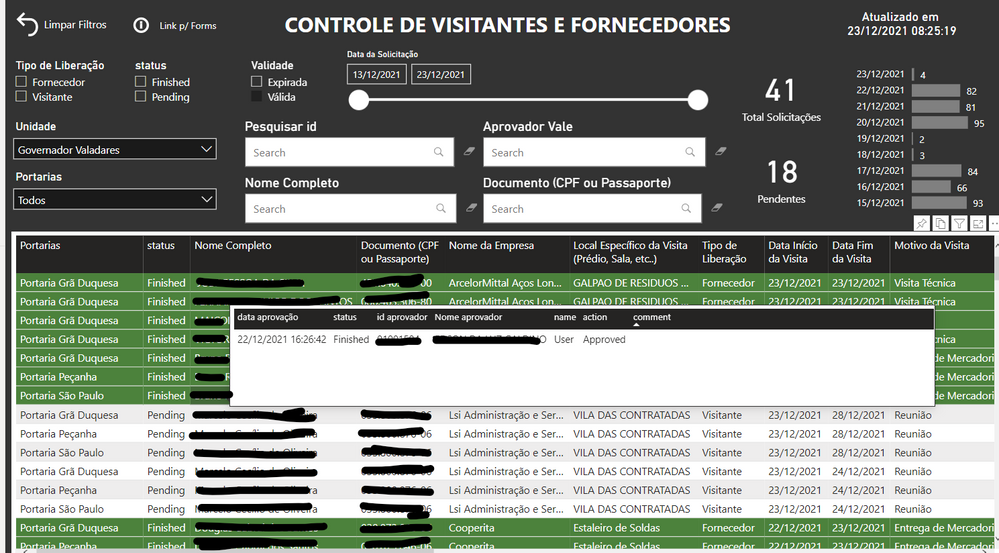
So here is my question. I have a table and i want to show other secondary important informations from another table with tooltip. Its working great, but sometimes the information from the tooltip shows up in front of the main table and this is not working for me. I want to know if there is something to use instead of tooptip or if there is some way to trigger the tooltip manually. Thanks.
Solved! Go to Solution.
Hi @Anonymous
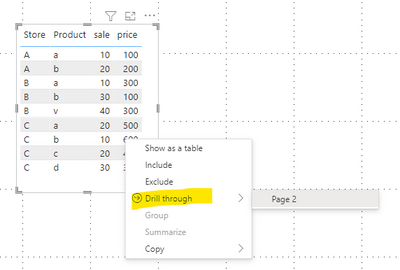
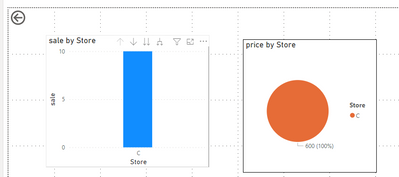
You can use the Drill through function , when you need to show other secondary important information from another table , you can right click and choose the Drill through to another page .
You can have a detail understanding about the function through the link below .
https://docs.microsoft.com/en-us/power-bi/create-reports/desktop-drillthrough
I also attached my pbix file , you can refer to it .
Best Regard
Community Support Team _ Ailsa Tao
Hi @Anonymous
You can use the Drill through function , when you need to show other secondary important information from another table , you can right click and choose the Drill through to another page .
You can have a detail understanding about the function through the link below .
https://docs.microsoft.com/en-us/power-bi/create-reports/desktop-drillthrough
I also attached my pbix file , you can refer to it .
Best Regard
Community Support Team _ Ailsa Tao
@Anonymous Perhaps you could disable the tooltips and instead go with a buttons and bookmarks approach?
yeah this could be the way, but how exacly i can do it? can you give me an example?
Check out the April 2026 Power BI update to learn about new features.
Sign up to receive a private message when registration opens and key events begin.
If you have recently started exploring Fabric, we'd love to hear how it's going. Your feedback can help with product improvements.
| User | Count |
|---|---|
| 34 | |
| 31 | |
| 25 | |
| 20 | |
| 16 |
| User | Count |
|---|---|
| 60 | |
| 48 | |
| 29 | |
| 23 | |
| 23 |