Join us at FabCon Atlanta from March 16 - 20, 2026, for the ultimate Fabric, Power BI, AI and SQL community-led event. Save $200 with code FABCOMM.
Register now!The Power BI Data Visualization World Championships is back! Get ahead of the game and start preparing now! Learn more
Hi all,
I have a dataset of 100 rows, each row is a unique case which can have Drug A through Drug H marked as either 1 (present) or 0 (not present). Multiple drug types can be found in a single case.
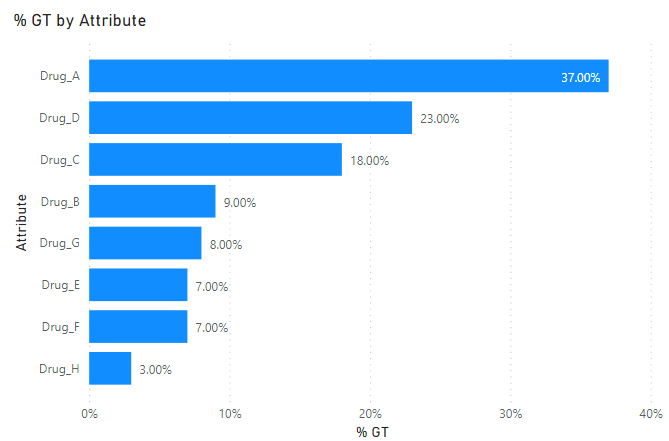
On the chart, I want to display the percentage of each drug type present as a percentage of the total 100 cases. For this, I'm using a clustered bar chart.
In order to make the clustered bar chart, I select the columns Drug A through Drug H, and 'unpivot' the selected columns. Then I put "attribute" on the Axis, and 'value' on the Values.
I'm able to display the raw counts of each drug, but when I try to "show value as" percent of grand total, it gives the percentage based on the unpivoted data, which is now many more rows than the original 100. I want them to be % of the total 100 cases. In this sense, the percentages would not add up to 100%, but rather, Drug A would be be 37% (found in 37 of the 100 cases), Drug B would be 9 % (found in 9 of the 100 cases), etc. etc.
Workbook is here (this forum won't let me attach .pbix file here?)
https://app.box.com/s/wvkk4fzrxqg1tr25p3k7dlfmpqvuaeg8
so you can see my thought process. Hope my question makes sense. Any help much appreciated!
Solved! Go to Solution.
Hey @mossshvlw ,
I'm not sure if I totally understood the result.
With the following measure you can count the rows with Value 1:
Count Drug =
CALCULATE(
DISTINCTCOUNT( 'Pivoted Data'[Case ] ),
'Pivoted Data'[Value] = 1
)
Then you need the total amount of rows what seems to be identical to the distinct cases:
Total Amount = DISTINCTCOUNT( 'Original Data'[Case ] )
And then you can calculate the percentage:
% GT =
DIVIDE(
[Count Drug],
[Total Amount]
)
If you want everything in one measure you can also do that:
% GT =
VAR vCountDrug =
CALCULATE(
DISTINCTCOUNT( 'Pivoted Data'[Case ] ),
'Pivoted Data'[Value] = 1
)
VAR vTotalAmount = DISTINCTCOUNT( 'Original Data'[Case ] )
VAR vResult =
DIVIDE(
[Count Drug],
[Total Amount]
)
RETURN
vResult
Ahh, of course ! I should've known I could just do a new measure to get %. this works perfectly, thanks a lot !
Hey @mossshvlw ,
I'm not sure if I totally understood the result.
With the following measure you can count the rows with Value 1:
Count Drug =
CALCULATE(
DISTINCTCOUNT( 'Pivoted Data'[Case ] ),
'Pivoted Data'[Value] = 1
)
Then you need the total amount of rows what seems to be identical to the distinct cases:
Total Amount = DISTINCTCOUNT( 'Original Data'[Case ] )
And then you can calculate the percentage:
% GT =
DIVIDE(
[Count Drug],
[Total Amount]
)
If you want everything in one measure you can also do that:
% GT =
VAR vCountDrug =
CALCULATE(
DISTINCTCOUNT( 'Pivoted Data'[Case ] ),
'Pivoted Data'[Value] = 1
)
VAR vTotalAmount = DISTINCTCOUNT( 'Original Data'[Case ] )
VAR vResult =
DIVIDE(
[Count Drug],
[Total Amount]
)
RETURN
vResult
The Power BI Data Visualization World Championships is back! Get ahead of the game and start preparing now!
| User | Count |
|---|---|
| 40 | |
| 38 | |
| 36 | |
| 29 | |
| 28 |
| User | Count |
|---|---|
| 127 | |
| 88 | |
| 78 | |
| 66 | |
| 65 |