Don't miss your chance to take the Fabric Data Engineer (DP-600) exam for FREE! Find out how by watching the DP-600 session on-demand now through April 28th.
Learn moreJoin the FabCon + SQLCon recap series. Up next: Power BI, Real-Time Intelligence, IQ and AI, and Data Factory take center stage. All sessions are available on-demand after the live show. Register now
Hi community,
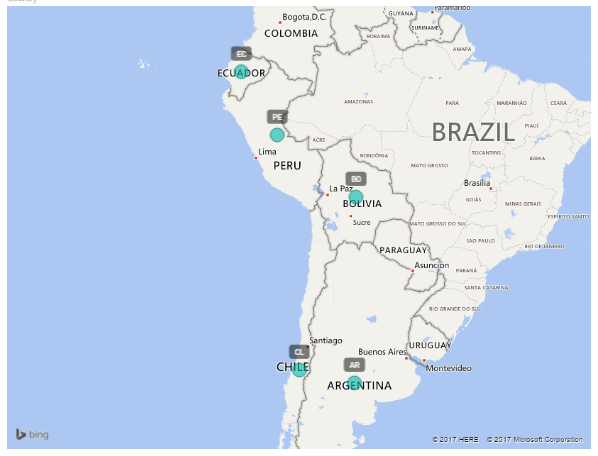
I have a report of Vacancy Fulfillment, my raw data is in excel, and one of the fields is Country. The problem is, that the countrys are in acronym. For example AR for Argentina, BO for Bolivia, CL for Chile, EC for Ecuador, PE for Peru, PY for Paraguay and UY for Uruguay some examples.
I want to show the Vacancy Fulfillment KPI that i already calculated with a measure for each country in the map.
The raw data report brings the information with the acronym, and it would be awesome not to change them manually, is there a way to create a command for PowerBI to recognize the acronyms for each country in the map? Never used the map visualization before.
Thanks & Regards!
When using Map visual, try to use three-letter abbreviation instead of two-letter abbreviation to make sure the country or region can be recogized properly. I suggest you associate your two-letter country/region abbreviations with three-letter country/region abbreviations. For more details, please see:
Tips and Tricks for Power BI Map visualizations
How-To: Display 2-letter country data on a Power BI map
Regards,
Check out the April 2026 Power BI update to learn about new features.
If you have recently started exploring Fabric, we'd love to hear how it's going. Your feedback can help with product improvements.
A new Power BI DataViz World Championship is coming this June! Don't miss out on submitting your entry.
| User | Count |
|---|---|
| 45 | |
| 38 | |
| 34 | |
| 21 | |
| 17 |
| User | Count |
|---|---|
| 66 | |
| 64 | |
| 31 | |
| 26 | |
| 26 |