Join us at FabCon Atlanta from March 16 - 20, 2026, for the ultimate Fabric, Power BI, AI and SQL community-led event. Save $200 with code FABCOMM.
Register now!The Power BI Data Visualization World Championships is back! Get ahead of the game and start preparing now! Learn more
No. | Measure | Thoughts |
1 | % of previous quarter | For each quarter, what percentage the total quantity sold constitutes of the same figure for the previous quarter. |
2 | YTD % of all previous year | For each time period, the cumulative year-to-date figure divided by total quantity sold for the whole of the previous year. |
3 | 3-month moving average | The average of the total quantity sold for the previous 3 months. |
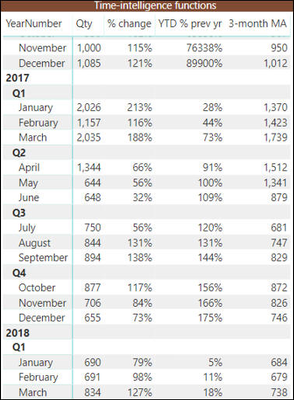
In the first figure, this is the table I need to work on in Power BI. I am already given this table.
In the above table, I need to create three measures whose names are given as mentioned. I did the second measure perfectly but I am facing problem in creating first and third measure. Anyone plz help with this and kindly tell me what DAX formula I should use so that I can create these measures. Your help will be highly appreciated.
Thank u in advance.
@SushainKoul , with help from the date table and time intelligence
QTD Sales = CALCULATE(SUM(Sales[Sales Amount]),DATESQTD(('Date'[Date])))
Last QTD Sales = CALCULATE(SUM(Sales[Sales Amount]),DATESQTD(dateadd('Date'[Date],-1,QUARTER)))
Last Year same QTD Sales = CALCULATE(SUM(Sales[Sales Amount]),DATESQTD(dateadd('Date'[Date],-4,QUARTER)))
YTD Sales = CALCULATE(SUM(Sales[Sales Amount]),DATESYTD('Date'[Date],"12/31"))
Last YTD Sales = CALCULATE(SUM(Sales[Sales Amount]),DATESYTD(dateadd('Date'[Date],-1,Year),"12/31"))
Rolling 3 = CALCULATE(sum(Sales[Sales Amount]),DATESINPERIOD('Date'[Date ],MAX('Date'[Date]),-3,MONTH))
Rolling 3 before 3 = CALCULATE(sum(Sales[Sales Amount]),DATESINPERIOD('Date'[Date ],MAXX('Date',dateadd('Date'[Date],-3,month)),-3,MONTH))
You can take diff
Can you share sample data and sample output in table format? Or a sample pbix after removing sensitive data.
Sir, In all the expressions where u have mentioned DATESADD function its showing some sort of error as I had also tried using DATESADD but didn't get the desired result.
Here is the output sir.
The Power BI Data Visualization World Championships is back! Get ahead of the game and start preparing now!
| User | Count |
|---|---|
| 161 | |
| 132 | |
| 117 | |
| 79 | |
| 53 |