Join us at FabCon Atlanta from March 16 - 20, 2026, for the ultimate Fabric, Power BI, AI and SQL community-led event. Save $200 with code FABCOMM.
Register now!The Power BI Data Visualization World Championships is back! Get ahead of the game and start preparing now! Learn more
I am attempting to organize data from a SQL server by removing rows which contain duplicates in a certain column. When using the normal remove duplicates function after a simply database connection in Power Query I received the "not supported in DirectQuery" error. I thought that I could write a SQL statement and use the advanced connection to the database to get around this error:
Select * from database as db,
(select min(dateandtime) as dateandtime, num, seq, type from database
where seq = 1
and type = 'A'
group by seq, num, type) Min_Date
where db.dateandtime = min_date.dateandtime
But this also throws the not supported error. I know one solution is to change to an import connection rather than DirectQuery, but that path is highly undesirable. Any help you can give on a work around for this method removing duplicates would be greatly appreciated.
Thank you
Solved! Go to Solution.
Any M step after a custom SQL step will prevent query folding. Here's a way to do it in M (no custom SQL).
1. Connect to the table (DirectQuery). Query name: lab_stl_all
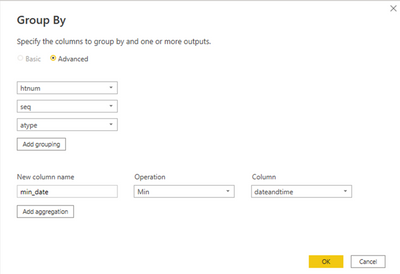
2. Create a Group By query based on lab_stl_all (by Reference). Query name: lab_stl_group_by
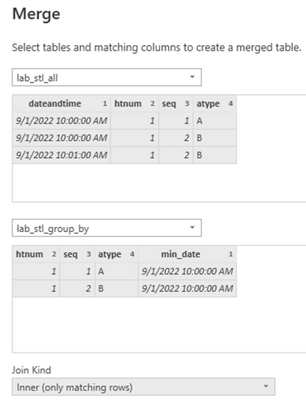
3. Create query lab_stl using "Merge Queries as New". This will be an inner join between lab_stl_all and lab_stl_group_by. Use Ctrl-click to select multiple join columns.
4. Result:
Note that the resulting table uses Import mode.
Proud to be a Super User!
I changed the SELECT clause in your custom SQL to "Select db.*" to avoid returning the columns twice, and it ran successfully. Would you confirm? If this doesn't work, please provide sample data and a screenshot of the error.
Proud to be a Super User!
I made the change and the query ran but once I tried to do any basic change, such as sorting or filtering a column the error gets thrown again. Here is some sample data I am using:
This is the exact SQL I ran:
Select stl.dateandtime, stl.htnum, stl.seq, stl.atype, stl.ccode from lab_stl stl,
(select min(dateandtime) as dateandtime, htnum, seq, atype from lab_stl
where atype = 'L'
and seq = 2
and htnum < '100'
group by seq, htnum, atype) Min_Date
where stl.dateandtime = min_date.dateandtime;
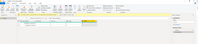
The query ran fine, but when I sorted by the ccode column in descending order in (you can see the step taken on the far right) the error gets thrown (yellow bar above the data). I know that I can make adjustments like this in the SQL but I need to be able to make adjustments within Power BI because I wish to merge data from two different sources into a master table and I can't do that in SQL and use it in Power BI (I think).
Thank you for your help!
Any M step after a custom SQL step will prevent query folding. Here's a way to do it in M (no custom SQL).
1. Connect to the table (DirectQuery). Query name: lab_stl_all
2. Create a Group By query based on lab_stl_all (by Reference). Query name: lab_stl_group_by
3. Create query lab_stl using "Merge Queries as New". This will be an inner join between lab_stl_all and lab_stl_group_by. Use Ctrl-click to select multiple join columns.
4. Result:
Note that the resulting table uses Import mode.
Proud to be a Super User!
The Power BI Data Visualization World Championships is back! Get ahead of the game and start preparing now!
| User | Count |
|---|---|
| 68 | |
| 45 | |
| 43 | |
| 36 | |
| 23 |
| User | Count |
|---|---|
| 196 | |
| 126 | |
| 106 | |
| 78 | |
| 55 |