


Join us at FabCon Atlanta from March 16 - 20, 2026, for the ultimate Fabric, Power BI, AI and SQL community-led event. Save $200 with code FABCOMM.
Register now!Vote for your favorite vizzies from the Power BI Dataviz World Championship submissions. Vote now!
I am attempting to organize data from a SQL server by removing rows which contain duplicates in a certain column. When using the normal remove duplicates function after a simply database connection in Power Query I received the "not supported in DirectQuery" error. I thought that I could write a SQL statement and use the advanced connection to the database to get around this error:
Select * from database as db,
(select min(dateandtime) as dateandtime, num, seq, type from database
where seq = 1
and type = 'A'
group by seq, num, type) Min_Date
where db.dateandtime = min_date.dateandtime
But this also throws the not supported error. I know one solution is to change to an import connection rather than DirectQuery, but that path is highly undesirable. Any help you can give on a work around for this method removing duplicates would be greatly appreciated.
Thank you
Solved! Go to Solution.
Any M step after a custom SQL step will prevent query folding. Here's a way to do it in M (no custom SQL).
1. Connect to the table (DirectQuery). Query name: lab_stl_all
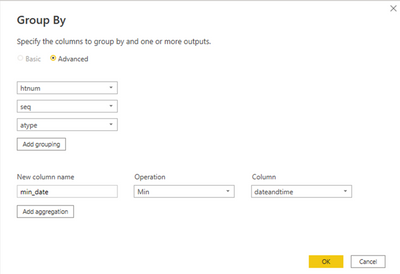
2. Create a Group By query based on lab_stl_all (by Reference). Query name: lab_stl_group_by
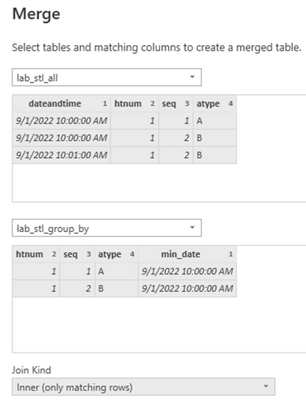
3. Create query lab_stl using "Merge Queries as New". This will be an inner join between lab_stl_all and lab_stl_group_by. Use Ctrl-click to select multiple join columns.
4. Result:
Note that the resulting table uses Import mode.
Proud to be a Super User!
I changed the SELECT clause in your custom SQL to "Select db.*" to avoid returning the columns twice, and it ran successfully. Would you confirm? If this doesn't work, please provide sample data and a screenshot of the error.
Proud to be a Super User!
I made the change and the query ran but once I tried to do any basic change, such as sorting or filtering a column the error gets thrown again. Here is some sample data I am using:
This is the exact SQL I ran:
Select stl.dateandtime, stl.htnum, stl.seq, stl.atype, stl.ccode from lab_stl stl,
(select min(dateandtime) as dateandtime, htnum, seq, atype from lab_stl
where atype = 'L'
and seq = 2
and htnum < '100'
group by seq, htnum, atype) Min_Date
where stl.dateandtime = min_date.dateandtime;
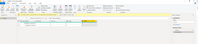
The query ran fine, but when I sorted by the ccode column in descending order in (you can see the step taken on the far right) the error gets thrown (yellow bar above the data). I know that I can make adjustments like this in the SQL but I need to be able to make adjustments within Power BI because I wish to merge data from two different sources into a master table and I can't do that in SQL and use it in Power BI (I think).
Thank you for your help!
Any M step after a custom SQL step will prevent query folding. Here's a way to do it in M (no custom SQL).
1. Connect to the table (DirectQuery). Query name: lab_stl_all
2. Create a Group By query based on lab_stl_all (by Reference). Query name: lab_stl_group_by
3. Create query lab_stl using "Merge Queries as New". This will be an inner join between lab_stl_all and lab_stl_group_by. Use Ctrl-click to select multiple join columns.
4. Result:
Note that the resulting table uses Import mode.
Proud to be a Super User!
Vote for your favorite vizzies from the Power BI World Championship submissions!
If you love stickers, then you will definitely want to check out our Community Sticker Challenge!
Check out the January 2026 Power BI update to learn about new features.
| User | Count |
|---|---|
| 63 | |
| 51 | |
| 41 | |
| 23 | |
| 18 |
| User | Count |
|---|---|
| 135 | |
| 110 | |
| 50 | |
| 31 | |
| 29 |