Get Fabric or SQL Certified for Free.
Get certified for free when you join Fabric Data Days 2026 and dive into Fabric, Power BI, SQL, AI, and other essential data skills.
Join now- Power BI forums
- Get Help with Power BI
- Desktop
- Service
- Report Server
- Power Query
- Mobile Apps
- Developer
- DAX Commands and Tips
- Custom Visuals Development Discussion
- Health and Life Sciences
- Power BI Spanish forums
- Translated Spanish Desktop
- Training and Consulting
- Instructor Led Training
- Dashboard in a Day for Women, by Women
- Galleries
- Data Stories Gallery
- Themes Gallery
- Contests Gallery
- QuickViz Gallery
- Quick Measures Gallery
- Visual Calculations Gallery
- Notebook Gallery
- Translytical Task Flow Gallery
- TMDL Gallery
- R Script Showcase
- Webinars and Video Gallery
- Ideas
- Custom Visuals Ideas (read-only)
- Issues
- Issues
- Events
- Upcoming Events
July 7 - July 17 | Round 2 of the Power BI Dataviz World Championships. Don't miss your chance! Learn more
- Power BI forums
- Forums
- Get Help with Power BI
- Desktop
- Re: Query in Table relationship and Visual
- Subscribe to RSS Feed
- Mark Topic as New
- Mark Topic as Read
- Float this Topic for Current User
- Bookmark
- Subscribe
- Printer Friendly Page

- Mark as New
- Bookmark
- Subscribe
- Mute
- Subscribe to RSS Feed
- Permalink
- Report Inappropriate Content
Query in Table relationship and Visual
Hello Guys, hope you are well.
I have face one difficulties that would like to request for your kind assitance.
Based on the screenshot below, the both supplier performance table have a dependency towards the calender table.
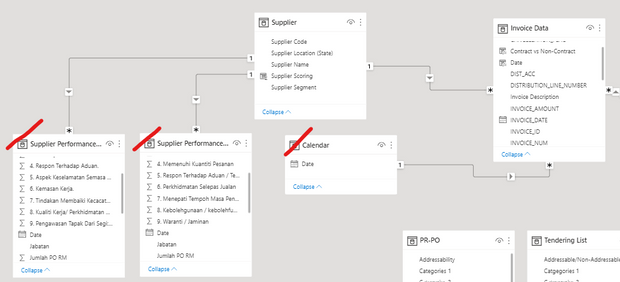
However, when i created a visual. (X axis= "Date" from calendar, Y axis = column from supplier performance table, secondary y axis = from another supplier performance table).
if appear something as below. does not show a relationship beweetn both supplier performance and calender table

Solved! Go to Solution.


- Mark as New
- Bookmark
- Subscribe
- Mute
- Subscribe to RSS Feed
- Permalink
- Report Inappropriate Content
@Anonymous
Filters flow in the direction of the arrow along the relationship so the fitler on the calendar table can flow down to the invoice data but it cannot flow back "up" (against the arrow) to the supplier so it does not get sent down to the Supplier Performance tables.
You can make this relationship bi-directional so that the invoice data table can filter the supplier table.
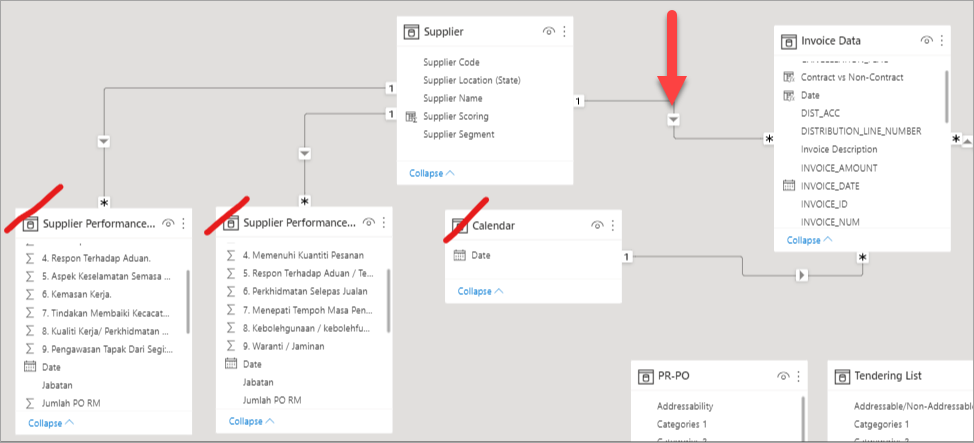
If you right click on the line you can set the fitler direction to "Both"

- Mark as New
- Bookmark
- Subscribe
- Mute
- Subscribe to RSS Feed
- Permalink
- Report Inappropriate Content
@Anonymous
This should be bi-directional
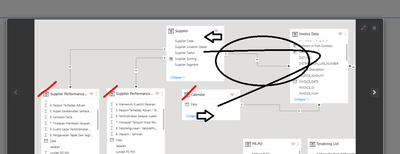
Learn more >> https://docs.microsoft.com/en-us/power-bi/guidance/relationships-bidirectional-filtering
Thanks,
Ritesh
- Mark as New
- Bookmark
- Subscribe
- Mute
- Subscribe to RSS Feed
- Permalink
- Report Inappropriate Content
@Anonymous
Put a year slicer on your report so you can see if it is data from a different year. If you are showing just month name, January - 2021 and January - 2022 are both just January so you might be getting multiple years together.
- Mark as New
- Bookmark
- Subscribe
- Mute
- Subscribe to RSS Feed
- Permalink
- Report Inappropriate Content
@Anonymous
This should be bi-directional
Learn more >> https://docs.microsoft.com/en-us/power-bi/guidance/relationships-bidirectional-filtering
Thanks,
Ritesh
- Mark as New
- Bookmark
- Subscribe
- Mute
- Subscribe to RSS Feed
- Permalink
- Report Inappropriate Content
hi @ribisht17
Thanks for replying but i found out there is one issues i have encounter.
I have change the relationship to bi-directional,
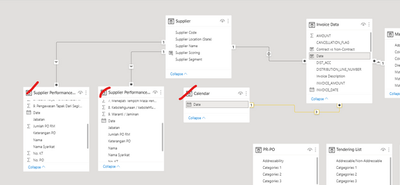
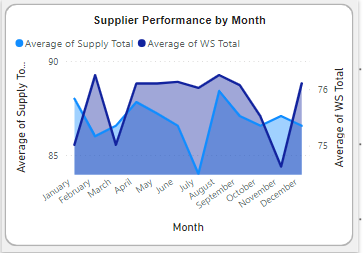
I have created a chart as below using (X axis= "Date" from calendar, Y axis = column from supplier performance table, secondary y axis = from another supplier performance table).
But this issue is that, i dont have data from January to May in both supplier performance dataset. however, the chart is showing there is data from Jan to May
- Mark as New
- Bookmark
- Subscribe
- Mute
- Subscribe to RSS Feed
- Permalink
- Report Inappropriate Content
thank you so much for your help!!
- Mark as New
- Bookmark
- Subscribe
- Mute
- Subscribe to RSS Feed
- Permalink
- Report Inappropriate Content
@Anonymous
Filters flow in the direction of the arrow along the relationship so the fitler on the calendar table can flow down to the invoice data but it cannot flow back "up" (against the arrow) to the supplier so it does not get sent down to the Supplier Performance tables.
You can make this relationship bi-directional so that the invoice data table can filter the supplier table.
If you right click on the line you can set the fitler direction to "Both"
- Mark as New
- Bookmark
- Subscribe
- Mute
- Subscribe to RSS Feed
- Permalink
- Report Inappropriate Content
waooo, it works !! this is something new to me !. thank you!!
Helpful resources

FabCon & SQLCon – Barcelona 2026
Join us in Barcelona for FabCon and SQLCon, the Fabric, Power BI, SQL, and AI community event. Save €200 with code FABCMTY200.

Data Days 2026
Join Data Days 2026: 60 days of free live/on-demand sessions, challenges, study groups, and certification opportunities.

Power BI DataViz World Championships - June 2026
A new Power BI DataViz World Championship is coming this June! Don't miss out on submitting your entry.

| User | Count |
|---|---|
| 29 | |
| 27 | |
| 25 | |
| 25 | |
| 18 |


| User | Count |
|---|---|
| 54 | |
| 50 | |
| 43 | |
| 35 | |
| 32 |


