cancel
Showing results for 
Search instead for 
Did you mean: 

The Power BI Data Visualization World Championships is back! Get ahead of the game and start preparing now! Learn more

Reply
stevoboy
New Member

Query for Pie Chart

Dear all,


I am quite new to Power BI. Currently, I am facing beginners issue. The following I'd like to do in Power BI which I have done previously in Excel.


Data:

Reported Event    Order               Status

1                           VEA123            Reported

2                           VEA123           

3                           VEA124            Reported

4                           VEA124            Reported

5                           VEA125          


Result in a pie chart

3 orders   = 100%

Reported = 66% (Reported for 2 out of 3 orders)

Not reported = 33% (only 1 order without any report)


How do I set up such a case in Power BI


Steffen

1 ACCEPTED SOLUTION
Anonymous
Not applicable

@stevoboy  - 

A couple notes:

1. The script is for a DAX calculated column. You are in Power Query.

     a. It is also possible to perform this task in Power Query:

           -Make a copy of your query

           -In the new query, Group By Order to get Max of Status per order.

           -In the original query, Merge with the new query.

           -Expand the table to retrieve the Max Status.

2. The script assumes your table is called Order Reported. You can substitute that text with the name of your table. 

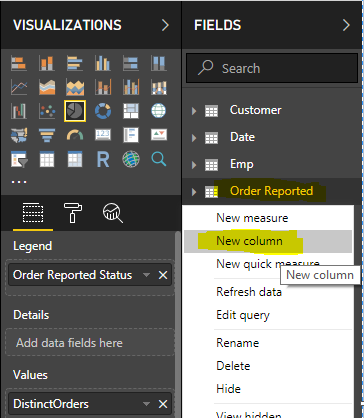
3. How to add a DAX calculated column: 

Create Calculated Column - 1.PNGCreate Calculated Column - 2.PNG

View solution in original post

3 REPLIES 3
stevoboy
New Member

Thanks for your help. I put in your script, I get an error though. What am I doing wrong?


2019-03-29_09h01_43.png

Anonymous
Not applicable

@stevoboy  - 

A couple notes:

1. The script is for a DAX calculated column. You are in Power Query.

     a. It is also possible to perform this task in Power Query:

           -Make a copy of your query

           -In the new query, Group By Order to get Max of Status per order.

           -In the original query, Merge with the new query.

           -Expand the table to retrieve the Max Status.

2. The script assumes your table is called Order Reported. You can substitute that text with the name of your table. 

3. How to add a DAX calculated column: 

Create Calculated Column - 1.PNGCreate Calculated Column - 2.PNG

Anonymous
Not applicable

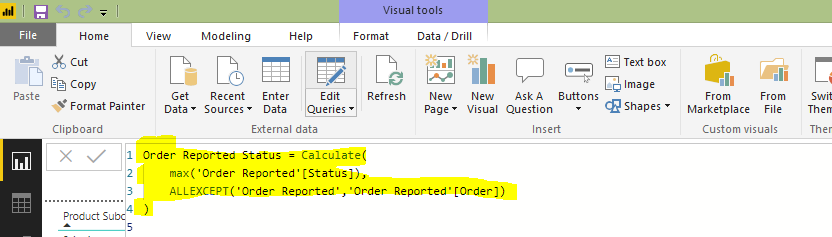
Hi @stevoboy -

Add this calculated column to your table, and then use it as the Legend in the Pie chart.


Order Reported Status =
Calculate(
        max('Order Reported'[Status]),
        ALLEXCEPT('Order Reported','Order Reported'[Order])
)
 
Hope this helps,
Nathan

Helpful resources

Announcements
November Power BI Update Carousel

Power BI Monthly Update - November 2025

Check out the November 2025 Power BI update to learn about new features.

Fabric Data Days Carousel

Fabric Data Days

Advance your Data & AI career with 50 days of live learning, contests, hands-on challenges, study groups & certifications and more!

FabCon Atlanta 2026 carousel

FabCon Atlanta 2026

Join us at FabCon Atlanta, March 16-20, for the ultimate Fabric, Power BI, AI and SQL community-led event. Save $200 with code FABCOMM.