Don't miss your chance to take the Fabric Data Engineer (DP-700) exam on us!
Learn moreNext up in the FabCon + SQLCon recap series: The roadmap for Microsoft SQL and Maximizing Developer experiences in Fabric. All sessions are available on-demand after the live show. Register now
Dear all,
I am quite new to Power BI. Currently, I am facing beginners issue. The following I'd like to do in Power BI which I have done previously in Excel.
Data:
Reported Event Order Status
1 VEA123 Reported
2 VEA123
3 VEA124 Reported
4 VEA124 Reported
5 VEA125
Result in a pie chart
3 orders = 100%
Reported = 66% (Reported for 2 out of 3 orders)
Not reported = 33% (only 1 order without any report)
How do I set up such a case in Power BI
Steffen
Solved! Go to Solution.
A couple notes:
1. The script is for a DAX calculated column. You are in Power Query.
a. It is also possible to perform this task in Power Query:
-Make a copy of your query
-In the new query, Group By Order to get Max of Status per order.
-In the original query, Merge with the new query.
-Expand the table to retrieve the Max Status.
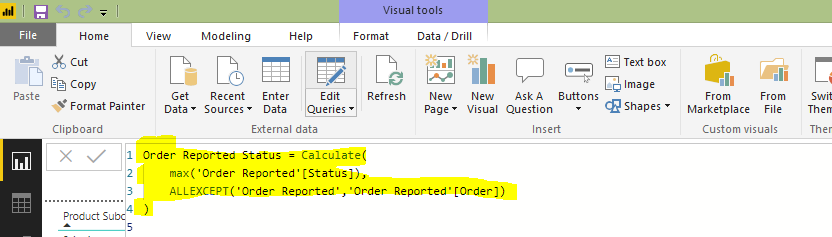
2. The script assumes your table is called Order Reported. You can substitute that text with the name of your table.
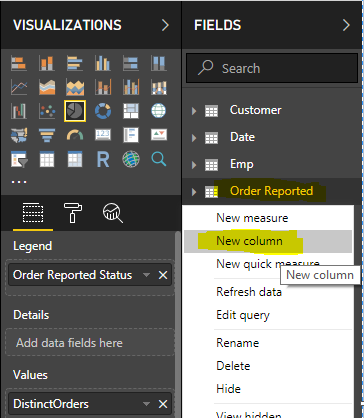
3. How to add a DAX calculated column:
Thanks for your help. I put in your script, I get an error though. What am I doing wrong?
A couple notes:
1. The script is for a DAX calculated column. You are in Power Query.
a. It is also possible to perform this task in Power Query:
-Make a copy of your query
-In the new query, Group By Order to get Max of Status per order.
-In the original query, Merge with the new query.
-Expand the table to retrieve the Max Status.
2. The script assumes your table is called Order Reported. You can substitute that text with the name of your table.
3. How to add a DAX calculated column:
Hi @stevoboy -
Add this calculated column to your table, and then use it as the Legend in the Pie chart.
If you have recently started exploring Fabric, we'd love to hear how it's going. Your feedback can help with product improvements.
A new Power BI DataViz World Championship is coming this June! Don't miss out on submitting your entry.
Share feedback directly with Fabric product managers, participate in targeted research studies and influence the Fabric roadmap.
| User | Count |
|---|---|
| 48 | |
| 44 | |
| 42 | |
| 18 | |
| 18 |
| User | Count |
|---|---|
| 71 | |
| 66 | |
| 33 | |
| 32 | |
| 32 |