Get Fabric certified for FREE!
Don't miss your chance to take exam DP-600 or DP-700 on us!
Request now- Power BI forums
- Get Help with Power BI
- Desktop
- Service
- Report Server
- Power Query
- Mobile Apps
- Developer
- DAX Commands and Tips
- Custom Visuals Development Discussion
- Health and Life Sciences
- Power BI Spanish forums
- Translated Spanish Desktop
- Training and Consulting
- Instructor Led Training
- Dashboard in a Day for Women, by Women
- Galleries
- Data Stories Gallery
- Themes Gallery
- Contests Gallery
- QuickViz Gallery
- Quick Measures Gallery
- Visual Calculations Gallery
- Notebook Gallery
- Translytical Task Flow Gallery
- TMDL Gallery
- R Script Showcase
- Webinars and Video Gallery
- Ideas
- Custom Visuals Ideas (read-only)
- Issues
- Issues
- Events
- Upcoming Events
Learn from the best! Meet the four finalists headed to the FINALS of the Power BI Dataviz World Championships! Register now
- Power BI forums
- Forums
- Get Help with Power BI
- Desktop
- Query editor filter the latest date
- Subscribe to RSS Feed
- Mark Topic as New
- Mark Topic as Read
- Float this Topic for Current User
- Bookmark
- Subscribe
- Printer Friendly Page


- Mark as New
- Bookmark
- Subscribe
- Mute
- Subscribe to RSS Feed
- Permalink
- Report Inappropriate Content
Query editor filter the latest date
Hi All,
In my query editor, i have several of files.
The files are naming based on <plant_filename_date>
In the query editor, there are files from the same plant but different date.
Can i have filter in query editor, just for 1 file for the same plant with the lastest date?
Solved! Go to Solution.


- Mark as New
- Bookmark
- Subscribe
- Mute
- Subscribe to RSS Feed
- Permalink
- Report Inappropriate Content
You can Group By plant with operation "All Rows" and then adjust the generated code to have the maximum date selected.
let
    Source = Table1,
    #"Grouped Rows" = Table.Group(Source, {"Plant"}, {{"AllData", each Table.Max(_,"Date"), type record}}),
    #"Expanded AllData" = Table.ExpandRecordColumn(#"Grouped Rows", "AllData", {"FileName", "Date"}, {"FileName", "Date"})
in
    #"Expanded AllData"
- Mark as New
- Bookmark
- Subscribe
- Mute
- Subscribe to RSS Feed
- Permalink
- Report Inappropriate Content
You can Group By plant with operation "All Rows" and then adjust the generated code to have the maximum date selected.
let
    Source = Table1,
    #"Grouped Rows" = Table.Group(Source, {"Plant"}, {{"AllData", each Table.Max(_,"Date"), type record}}),
    #"Expanded AllData" = Table.ExpandRecordColumn(#"Grouped Rows", "AllData", {"FileName", "Date"}, {"FileName", "Date"})
in
    #"Expanded AllData"
- Mark as New
- Bookmark
- Subscribe
- Mute
- Subscribe to RSS Feed
- Permalink
- Report Inappropriate Content
Hi,
I dont have plant and date column.
What i have just column for source name that contain <plantName_fileName_Date>
for example <F02_Shipping_19062017>
so do i need to extract this information first?
- Mark as New
- Bookmark
- Subscribe
- Mute
- Subscribe to RSS Feed
- Permalink
- Report Inappropriate Content
Yes. Propobably the best thing you can do is split the column on each underscore (_) and proceed from there.
- Mark as New
- Bookmark
- Subscribe
- Mute
- Subscribe to RSS Feed
- Permalink
- Report Inappropriate Content
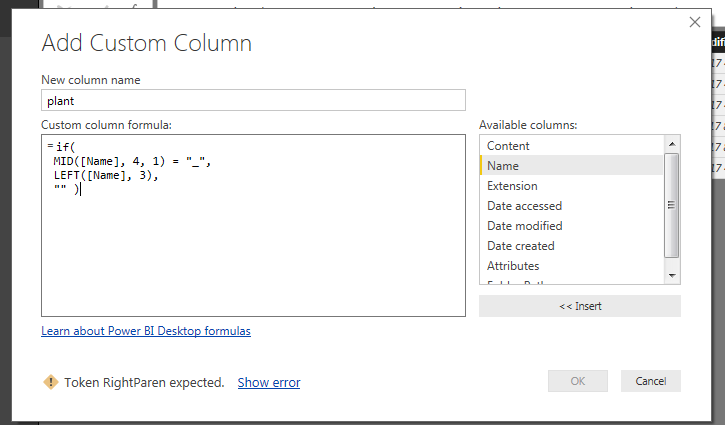
Sorry, Could you help me to split for the plant and date? I had tried, but got the error.
- Mark as New
- Bookmark
- Subscribe
- Mute
- Subscribe to RSS Feed
- Permalink
- Report Inappropriate Content
Well, if you use DAX code in the query editor, it isn't going to work.
This would be Power Query code:
let
    Content = Table.FromColumns({{"F02_Shipping_19062017","F02_Shipping_19062018","F03_Shipping_19062017"}},type table[Name = text]),
    #"Split Column by Delimiter" = Table.SplitColumn(Content, "Name", Splitter.SplitTextByDelimiter("_", QuoteStyle.Csv), {"Name.1", "Name.2", "Name.3"}),
    #"Changed Type" = Table.TransformColumnTypes(#"Split Column by Delimiter",{{"Name.1", type text}, {"Name.2", type text}, {"Name.3", Int64.Type}})
in
    #"Changed Type"
And this is how the last 2 steps were created:
- Mark as New
- Bookmark
- Subscribe
- Mute
- Subscribe to RSS Feed
- Permalink
- Report Inappropriate Content
what is file name?
Because i got null value?
- Mark as New
- Bookmark
- Subscribe
- Mute
- Subscribe to RSS Feed
- Permalink
- Report Inappropriate Content
So now you are asking me where you can find the filenames?
That feels like the world upside-down.
It is your data, so you should know where the filename is located.
Otherwise please share a screenshot that shows your column with filenames.
Are you sure you selected this column before splitting by underscore (_)?
Or did you just copy and paste my code somewhere into your query?
That ain't gonna work, that's why I created a video to illustrate the step to take.
- Mark as New
- Bookmark
- Subscribe
- Mute
- Subscribe to RSS Feed
- Permalink
- Report Inappropriate Content
Ok, i got the solution..!
Sorry and thanks!

Helpful resources

Join our Fabric User Panel
Share feedback directly with Fabric product managers, participate in targeted research studies and influence the Fabric roadmap.

Power BI Monthly Update - February 2026
Check out the February 2026 Power BI update to learn about new features.

FabCon Atlanta 2026
Join us at FabCon Atlanta, March 16-20, for the ultimate Fabric, Power BI, AI and SQL community-led event. Save $200 with code FABCOMM.

| User | Count |
|---|---|
| 53 | |
| 49 | |
| 33 | |
| 16 | |
| 15 |


| User | Count |
|---|---|
| 85 | |
| 70 | |
| 38 | |
| 28 | |
| 25 |


