cancel
Showing results for 
Search instead for 
Did you mean: 

Get Fabric certified for FREE! Don't miss your chance! Learn more

Reply
NithinBN
Helper II
Helper II

Query between 2 Tables.

Hello All, 


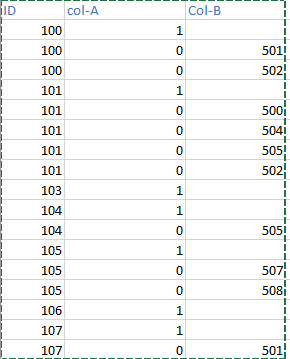
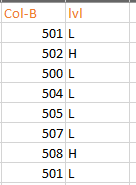
I have2 tables like this, 

NithinBN_0-1698083824344.pngNithinBN_1-1698083842205.png


I want to list the distinct count of ID, when its, Col-A = 1 and (corrosponding Col-B values in other table is not H),

Here in this example i want to count 103,104,106 and 104 and return 4 as value (rejecting 100, 101, 105 as 500 and 508 has value H )

1 ACCEPTED SOLUTION
tackytechtom
Most Valuable Professional

Hi @NithinBN ,


I'd probably start with a calculated column in the first table:
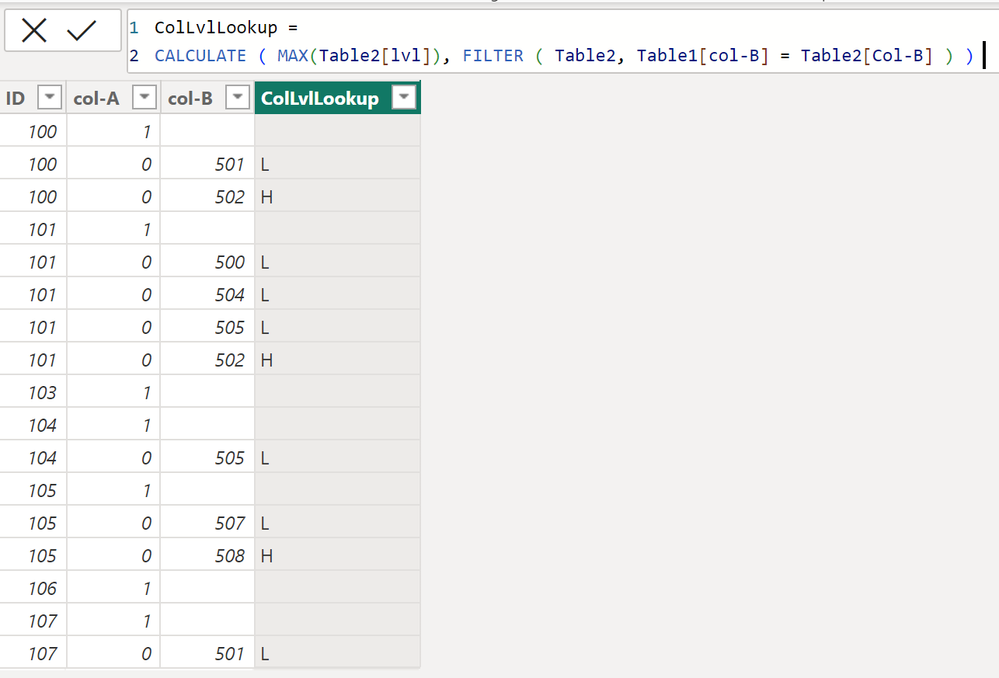
tackytechtom_0-1698094937074.png

ColLvlLookup = 
CALCULATE ( MAX(Table2[lvl]), FILTER ( Table2, Table1[col-B] = Table2[Col-B] ) ) 


And then you can add a measure:
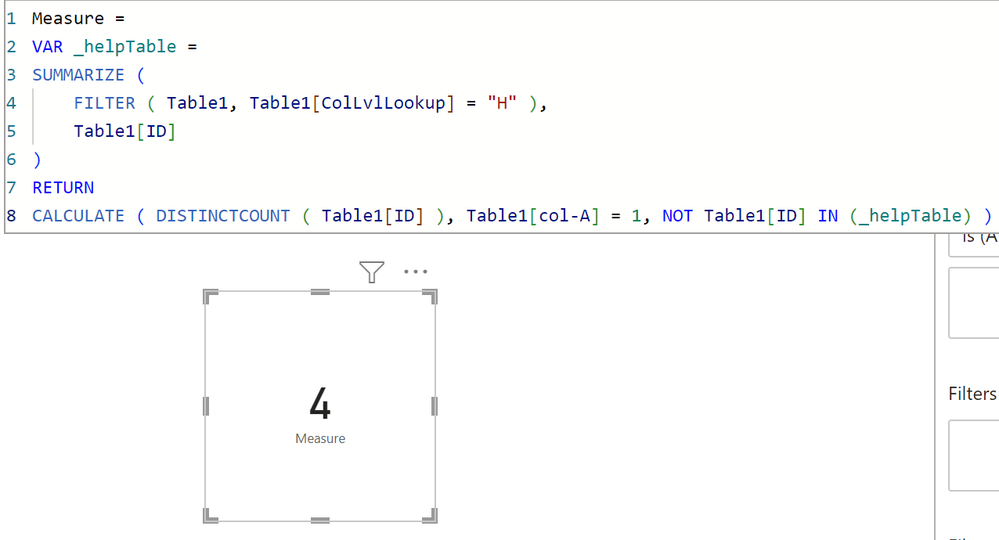
tackytechtom_1-1698095008644.png

Measure = 
VAR _helpTable =
SUMMARIZE ( 
    FILTER ( Table1, Table1[ColLvlLookup] = "H" ),
    Table1[ID]
)
RETURN
CALCULATE ( DISTINCTCOUNT ( Table1[ID] ), Table1[col-A] = 1, NOT Table1[ID] IN (_helpTable) )


You could also write the two code bits together in one measure as well:

Measure 2 = 
VAR _helpTable =
SUMMARIZE ( 
    FILTER ( Table1, CALCULATE ( MAX(Table2[lvl]), FILTER ( Table2, Table1[col-B] = Table2[Col-B] ) )  = "H" ),
    Table1[ID]
)
RETURN
CALCULATE ( DISTINCTCOUNT ( Table1[ID] ), Table1[col-A] = 1, NOT Table1[ID] IN (_helpTable) )


Hope this helps! 🙂


/Tom
https://www.tackytech.blog/
https://www.instagram.com/tackytechtom/


Did I answer your question➡️ Please, mark my post as a solution ✔️

Also happily accepting Kudos 🙂

Feel free to connect with me on LinkedIn! linkedIn

#proudtobeasuperuser 

View solution in original post

1 REPLY 1
tackytechtom
Most Valuable Professional

Hi @NithinBN ,


I'd probably start with a calculated column in the first table:

tackytechtom_0-1698094937074.png

ColLvlLookup = 
CALCULATE ( MAX(Table2[lvl]), FILTER ( Table2, Table1[col-B] = Table2[Col-B] ) ) 


And then you can add a measure:

tackytechtom_1-1698095008644.png

Measure = 
VAR _helpTable =
SUMMARIZE ( 
    FILTER ( Table1, Table1[ColLvlLookup] = "H" ),
    Table1[ID]
)
RETURN
CALCULATE ( DISTINCTCOUNT ( Table1[ID] ), Table1[col-A] = 1, NOT Table1[ID] IN (_helpTable) )


You could also write the two code bits together in one measure as well:

Measure 2 = 
VAR _helpTable =
SUMMARIZE ( 
    FILTER ( Table1, CALCULATE ( MAX(Table2[lvl]), FILTER ( Table2, Table1[col-B] = Table2[Col-B] ) )  = "H" ),
    Table1[ID]
)
RETURN
CALCULATE ( DISTINCTCOUNT ( Table1[ID] ), Table1[col-A] = 1, NOT Table1[ID] IN (_helpTable) )


Hope this helps! 🙂


/Tom
https://www.tackytech.blog/
https://www.instagram.com/tackytechtom/


Did I answer your question➡️ Please, mark my post as a solution ✔️

Also happily accepting Kudos 🙂

Feel free to connect with me on LinkedIn! linkedIn

#proudtobeasuperuser 

Helpful resources

Announcements
Sticker Challenge 2026 Carousel

Join our Community Sticker Challenge 2026

If you love stickers, then you will definitely want to check out our Community Sticker Challenge!

January Power BI Update Carousel

Power BI Monthly Update - January 2026

Check out the January 2026 Power BI update to learn about new features.

FabCon Atlanta 2026 carousel

FabCon Atlanta 2026

Join us at FabCon Atlanta, March 16-20, for the ultimate Fabric, Power BI, AI and SQL community-led event. Save $200 with code FABCOMM.